

DDesigner-Design icons
其斌 胡 Graphics & Design iPhoneiPadiPod touch
DDesigner-Design icons is a free Graphics & Design app for iPhone and iPad by 其斌 胡. Requires iOS 17.0. Updated February 4, 2024.
- Price
- Free
- on the App Store
- Size
- 1.3 GB
- Age 9+
- Updated
- Feb 4
- 2024 · v1.1
Screenshots



About DDesigner-Design icons
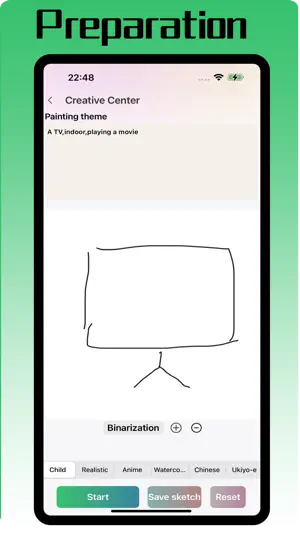
DDesigner can help you improve your drawing based on your sketches, with perfect effects that run entirely on your local Apple device without the need for networking. Supports manual drawing of a sketch, as well as selecting a sketch locally or shooting a sketch with a camera. It also supports selecting six different types of drawing styles, which can be chosen according to one's own preferences. Support AI high-definition magnification of images, which can be zoomed in to a resolution of 2048 * 2048. Running environment requirements:iOS system >= 17, device requires running memory >=6Gb, device models:iphone 12pro,iphone 13pro,iphone 14,iphone 14 plus,iphone 14pro,iphone 15,iphone 15plus,iphone 15 pro,ipad pro 4,ipad air 5,ipad pro 6,mac m1/m2/m3
What’s new
Version 1.1 · Updated February 4, 2024
1.Fix some bugs.
App privacy
The developer, 其斌 胡, reported these privacy practices to Apple.
Data Not Collected
The developer does not collect any data from this app.
Alternatives to DDesigner-Design icons
Looking for apps like DDesigner-Design icons? Here are 6 similar apps on the App Store. The highest rated is Live Preview – View Artboards (5.0/5), and 5 of the 6 are free to download.
-
 F-CAD
-
 Live Preview – View Artboards
5.0
-
 SVG Illustrator - PolySVG
-
 CAD设计 - CADesign
-
 Moe - AI Image Transformer
-
 Syntina: AI Render & Interior
5.0
| App | Rating | Price | Last updated | Compare |
|---|---|---|---|---|
| DDesigner-Design icons | – | Free | February 4, 2024 | |
| F-CAD | – | Free | Nov 3, 2026 | Compare |
| Live Preview – View Artboards | 5.0 / 5 (3) | 1.99 USD | Oct 22, 2026 | Compare |
| SVG Illustrator - PolySVG | – | Free | Oct 12, 2026 | Compare |
| CAD设计 - CADesign | – | Free | Sep 17, 2026 | Compare |
| Moe - AI Image Transformer | – | Free | Aug 22, 2025 | Compare |
| Syntina: AI Render & Interior | 5.0 / 5 (1) | Free | Nov 8, 2026 | Compare |