

Puracam: 3D Scanner
Hoa Pham Graphics & Design iPhoneiPadiPod touch
Puracam: 3D Scanner is a free Graphics & Design app for iPhone and iPad by Hoa Pham. Requires iOS 17.0. Updated October 31, 2026.
- Price
- Free
- on the App Store
- Size
- 30 MB
- Age 4+
- Updated
- Oct 31
- 2026 · v1.12.0
Screenshots


About Puracam: 3D Scanner
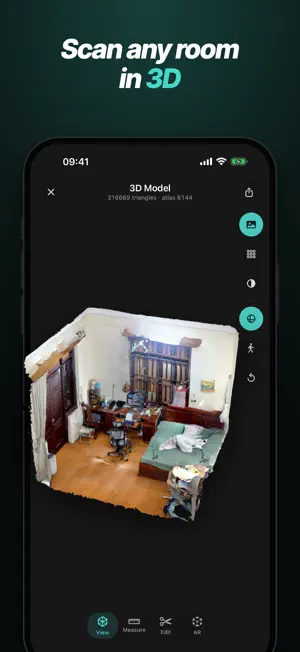
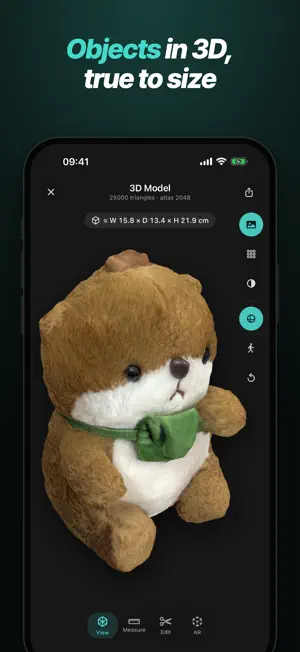
Puracam turns the LiDAR sensor in your iPhone or iPad into a 3D scanner and floor plan tool. Scan an object, a room or your whole home — the 3D reconstruction runs on your device. THREE WAYS TO SCAN • Space: walk a room and get a 3D model with photographic texture. Live coverage shows what is still missing. • Object: a guided capture takes you around the object, up higher and underneath, for a high-detail model with its real dimensions. Area mode handles reliefs and things against a wall. • Floor Plan: walk the room and Puracam detects walls, doors, windows and furniture. One shutter button, like the Camera app. A short how-to video and tips for every mode get you started. OBJECTS READY TO SELL AND PRINT • Export presets for Shopify, Amazon and the web, with realistic surface detail (normal and ambient occlusion maps). • Product photos: six clean angles on a white or transparent background. • Print in 3D: close holes, flatten the base and export 3MF or STL at real size, hollowed with drain holes to save resin. • Copy an embed code to show a model on your own website. FLOOR PLANS • A clean 2D drawing with dimensions, opening widths and room areas. • Edit everything: move walls and corners, add doors, windows, dividers and columns, lock lengths and right angles. • Furnish it with more than 100 pieces, wall-mounted ones at their real height. • Switch to 3D and keep editing: drag, rotate and resize furniture and move doors and windows right on the model. • Export a PDF to true scale with door and room schedules, or PNG, SVG, DXF for CAD, CSV and JSON. SHARE • Share a link: anyone can open the 3D model and floor plan in a web browser — no app needed. Comes with a QR code. • Let people who have Puracam save an editable copy from your link, to measure, edit and export. • Send a Puracam file by AirDrop, Messages, Mail or Files — no internet needed. • Links expire on their own and you can delete one at any time. Nothing is shared until you create a link. REVIEW AND EDIT • Orbit, pan and zoom the model and measure distances, paths and areas on it. • Clean up object models: crop box, lasso, remove the base, remove the table or stand it sat on, or Auto Clean. • Make a 360° video of any scan and save it to Photos. • Filter your library by kind and organise scans into folders. With Pro, process or export many scans at once. On iPad, a sidebar and full landscape support. FREE AND PRO • Free: scanning, viewing, measuring, every editing tool, OBJ export, share links that last 7 days, Puracam files, floor plans as PDF or PNG (with a small watermark), and 10 object scans with full quality and every export format. • Pro adds USDZ, GLB, glTF, FBX, DAE, STL, 3MF, PLY and DXF, export presets, the highest export quality, saving model edits, batch processing and export, floor plans as SVG, DXF, CSV and JSON, and floor plans and 360° videos without a watermark. For sharing: more links that last 30 days and can be renewed, link passwords, and your name, company and logo on shared pages. WHAT YOU NEED Scanning uses the LiDAR sensor: iPhone 12 Pro or later Pro models, and iPad Pro 2020 or later. Without LiDAR you can still open your library and Puracam files shared with you. Creating and opening share links needs an internet connection. PURACAM PRO Pro is an optional subscription, Monthly or Yearly, each starting with a 7-day free trial for new subscribers. No account and no sign-up — Pro follows your Apple ID, and Restore brings it back on a new device. Payment is charged to your Apple ID account at confirmation of purchase. The subscription renews automatically unless it is cancelled at least 24 hours before the end of the current period. Your account is charged for renewal within 24 hours before the end of the current period. You can manage and cancel your subscription in your App Store account settings after purchase. Terms of Use: https://puracam.com/terms/ Privacy Policy: https://puracam.com/privacy/
What’s new
Version 1.12.0 · Updated October 31, 2026
360° videos get a full studio. Set the look with studio lights, floor shadows and reflections, and brand backgrounds. Add your logo, title, price and opening and closing cards. Export several files at once: MP4 up to 4K and 60 fps, GIF sized to a target, transparent PNG cut-outs and 360° spin image sets. Save presets, or set your own camera path. Space scans look sharper: photos now line up more closely with the model, with less ghosting. Plus bug fixes.
App privacy
The developer, Hoa Pham, reported these privacy practices to Apple.
Data Not Linked to You
The following data, which may be collected but is not linked to your identity, may be used for the following purposes:
- Usage Data: Product Interaction
- Contact Info: Email Address, Name, Phone Number, Other User Contact Info
- User Content: Customer Support
- Diagnostics: Crash Data, Other Diagnostic Data
Used for: Analytics, App Functionality
Alternatives to Puracam: 3D Scanner
Looking for apps like Puracam: 3D Scanner? Here are 6 similar apps on the App Store. The highest rated is DoodLoop (5.0/5), and all 6 are free to download.
-
 CédricLab Scan 3D
-
 AI Draw - Photo Art Generator
-
 DoodLoop
5.0
DoodLoop
5.0
-
 Realform: LiDAR 3D Scanner
5.0
Realform: LiDAR 3D Scanner
5.0
-
 QuikAnimate
4.4
QuikAnimate
4.4
-
 AI Image To Prompt Generator
4.7
AI Image To Prompt Generator
4.7
| App | Rating | Price | Last updated | Compare |
|---|---|---|---|---|
| Puracam: 3D Scanner | – | Free | October 31, 2026 | |
| CédricLab Scan 3D | – | Free | Aug 5, 2026 | Compare |
| AI Draw - Photo Art Generator | – | Free | Jan 31, 2024 | Compare |
| DoodLoop | 5.0 / 5 (2) | Free | Oct 18, 2026 | Compare |
| Realform: LiDAR 3D Scanner | 5.0 / 5 (6) | Free | Oct 12, 2026 | Compare |
| QuikAnimate | 4.4 / 5 (13) | Free | Mar 31, 2026 | Compare |
| AI Image To Prompt Generator | 4.7 / 5 (33) | Free | Dec 23, 2024 | Compare |