

DoodLoop
Nubisco, LDA Graphics & Design iPhoneiPadiPod touch
DoodLoop is a free Graphics & Design app for iPhone and iPad by Nubisco, LDA. Rated 5.0/5 from 2 ratings. Requires iOS 18.0. Updated October 18, 2026.
- Rating
- 5.0
- 2 ratings
- Price
- Free
- on the App Store
- Size
- 17 MB
- Age 4+
- Updated
- Oct 18
- 2026 · v1.3.0
Screenshots


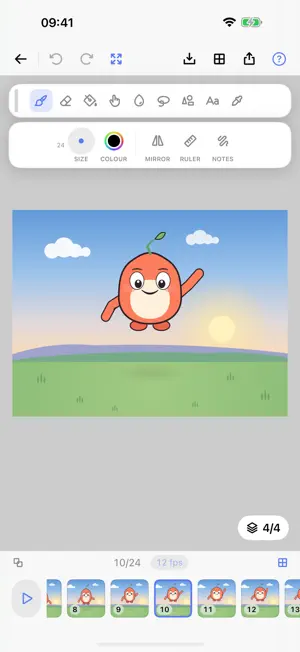
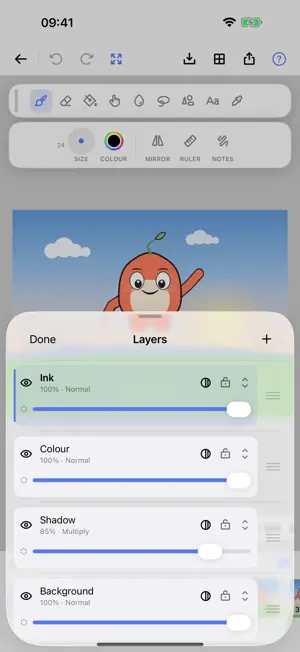
About DoodLoop
Draw it. Flip it. Loop it. DoodLoop is a frame-by-frame animation studio for iPad and iPhone, built for Apple Pencil and just as happy with a finger. Sketch a drawing, change it a little on the next frame, and watch your cartoon come to life on a loop. No ads, no watermarks, no subscription. Your cartoons, your files, yours. DRAW • Apple Pencil pressure and tilt, tuned for line work, on paper that behaves like paper. Drawing with a finger gets a stroke stabiliser, so a shaky line comes out smooth. • A full kit: brushes, eraser, fill, smudge and blur, shapes (line, rectangle, ellipse, triangle, star and more), text, and symmetry. • Layers with blend modes: sketch below, ink above, shade on top. ANIMATE • A timeline made for flipping, with duplicate, reorder, and holds. • Onion skinning ghosts the frame before and after, like tracing paper on a lightbox. • Set the frame rate, lift the pencil, and your animation plays while you keep tweaking. SOUND & SHARE • Record your voice or sound effects right in the app and line them up with your frames. • Export clean, full-resolution MP4 video, animated GIF, or a PNG image sequence. Never watermarked. OWN YOUR WORK • Every project is a real .doodloop file in the Files app: browse it, copy it, back it up anywhere. • One-tap backup and restore for your whole library. • Import your existing FlipaClip projects and keep animating. FREE TO START • Download DoodLoop free and start animating today. • One optional, one-time Pro unlock opens up higher frame rates, larger canvases, and pro export formats. No monthly fee, no rented features, ever. DoodLoop is made by Nubisco, Lda. Questions, bug reports, or ideas? A human who actually works on the app will answer.
What’s new
Version 1.3.0 · Updated October 18, 2026
Every layer at once, across time. And on a folding iPhone, the drawing lies flat under your hand while everything else stands up out of the way. TRACKS The frame reel shows one layer, the one you are drawing on. Tracks shows them all: layers down the side, frames across the top, and a filled square wherever that layer has a drawing on that frame. The shape of your animation, in one look. Tap any square to go straight there, to that frame and that layer at once, instead of switching layer and then hunting for the frame again. Audio sits on the same ruler, so you can see exactly what a sound covers. Add and remove layers from here too. The reel has not gone anywhere. There is a switch between the two, and it remembers which one you prefer. A FOLDING IPHONE BECOMES A SKETCHPAD Half fold the phone, stand it on a table, and DoodLoop rearranges itself. The canvas takes the lower half, lying flat where your hand rests and where a pencil meets the screen at the angle you actually write at. Everything else moves to the upper half, standing up where you can see it. Which means your hand stops covering the tools. On one screen they have to float over the drawing, because there is nowhere else for them to be. Here there is somewhere else. The colour picker gets half the device to itself instead of covering the very thing you are colouring. Tracks gets room to breathe. And when you type, the canvas rises to meet you and the keyboard takes the flat half, the way a laptop does. Folded shut it is the phone layout. Open flat it is the tablet layout. Nothing to set up.
App privacy
The developer, Nubisco, LDA, reported these privacy practices to Apple.
Data Not Collected
The developer does not collect any data from this app.
Alternatives to DoodLoop
Looking for apps like DoodLoop? Here are 6 similar apps on the App Store. The highest rated is Vecta Motion (4.8/5), and all 6 are free to download.
-
 Vecta Motion
4.8
Vecta Motion
4.8
-
 Flip Animation: 2D Draw Create
4.5
Flip Animation: 2D Draw Create
4.5
-
 Doodraw: Animated Drawing
4.1
Doodraw: Animated Drawing
4.1
-
 AniToon: Draw Art & Animate
4.3
AniToon: Draw Art & Animate
4.3
-
 Paint.Ms
-
 Pencil 2d - Draw & Animations
4.5
Pencil 2d - Draw & Animations
4.5
| App | Rating | Price | Last updated | Compare |
|---|---|---|---|---|
| DoodLoop | 5.0 / 5 (2 ratings) | Free | October 18, 2026 | |
| Vecta Motion | 4.8 / 5 (6) | Free | Jul 22, 2026 | Compare |
| Flip Animation: 2D Draw Create | 4.5 / 5 (30) | Free | Oct 17, 2026 | Compare |
| Doodraw: Animated Drawing | 4.1 / 5 (88) | Free | Sep 29, 2026 | Compare |
| AniToon: Draw Art & Animate | 4.3 / 5 (267) | Free | Jan 31, 2025 | Compare |
| Paint.Ms | – | Free | Oct 29, 2026 | Compare |
| Pencil 2d - Draw & Animations | 4.5 / 5 (322) | Free | Sep 26, 2026 | Compare |
Compare DoodLoop with the top alternatives: ratings, updates, ASO score and keyword gaps →