

Flip Animation: 2D Draw Create
ZENBYTE DIJITAL TEKNOLOJILER LIMITED SIRKETI Graphics & Design iPhoneiPadiPod touch
Flip Animation: 2D Draw Create is a free Graphics & Design app for iPhone and iPad by ZENBYTE DIJITAL TEKNOLOJILER LIMITED SIRKETI.
- Rating
- 4.5
- 30 ratings
- Price
- Free
- on the App Store
- Size
- 90 MB
- Age 4+
- Updated
- Oct 17
- 2026 · v2.0.5
Screenshots


About Flip Animation: 2D Draw Create
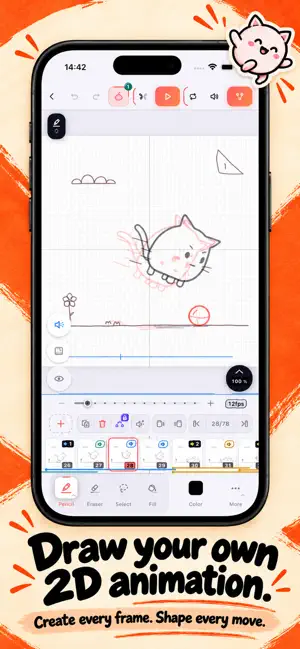
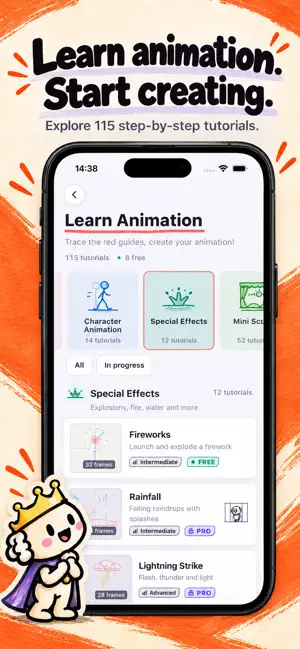
Turn your ideas, and even your own videos, into 2D animation! FlipAnimation is a complete frame by frame animation studio on your phone and tablet: draw cartoons like a flipbook, trace over video with Rotoscope, put background images behind your frames, learn from 115+ step by step lessons and export as GIF or HD video. ROTOSCOPE: DRAW OVER YOUR VIDEOS • Import any video from your gallery and trace it frame by frame • The easiest way to learn real motion: walk cycles, dance moves, sports, pets, faces • Trim the clip, place it on your canvas exactly how you want, adjust guide opacity • Everything is processed privately on your device, and you decide if the video appears in your export FRAME BACKGROUNDS • Put a background picture behind any frame, or behind all frames at once • Move, resize and rotate the image freely, then lock it in place • Draw your characters over photo scenes, storyboards and comic panels LEARN ANIMATION: 115+ GUIDED LESSONS • Step by step tutorials from bouncing ball to full mini scenes • The 12 principles of animation, walk cycles, effects, characters and more • Trace the guide strokes and watch your drawing come alive • Your lesson progress is saved so you can continue or reset anytime PROFESSIONAL DRAWING TOOLS • Pencil, ink pen, marker, crayon, fill and a precise eraser • Pressure sensitive strokes with smooth curves • Shapes, symmetry drawing, grid overlay and color eyedropper • Text tool, custom brush presets and a full color palette ANIMATE FRAME BY FRAME • Unlimited frames with per frame timing control • Onion skinning shows previous frames as ghost overlays • Auto In-Betweens generate the frames between your keyframes for you • Copy, duplicate and reorder frames; loop, ping-pong and one-shot playback LAYERS, TRANSFORM & AUDIO • Multiple layers per frame with lock and visibility controls • Free transform: scale, rotate, flip and move your selection • Import music or voice over, see the waveform on the timeline, export video with sound EXPORT & SHARE • GIF for social media, HD MP4 video with audio • Printable sheets to cut your own physical flipbook, ZIP with all frames as PNG • Share straight to Instagram, TikTok, YouTube and WhatsApp MADE FOR CREATORS OF EVERY LEVEL • Beginners: guided lessons and a friendly, clean interface • Artists and animators: pro tools, layers, rotoscoping and precise timing • Kids and families: draw, doodle and bring silly characters to life • Optimized layouts for both phone and tablet, dark theme for long sessions WHAT WILL YOU MAKE? • Animated memes, stickers and reaction GIFs for your chats • Rotoscope studies of dancers, athletes and animals from your own clips • Storyboards and animatics for films, games and school projects • Game sprites, walk cycles and pixel style motion tests • Birthday cards, logo animations, doodles on photos and mini music videos WHY ANIMATORS LOVE FLIPANIMATION • A real animation studio, not a toy: onion skin, timing, layers, audio sync • Auto In-Betweens save hours of drawing on every scene • Works fully offline: animate anywhere, no account needed • Fast and lightweight, with autosave protecting every stroke • Available in 20 languages PREMIUM (OPTIONAL) Unlock unlimited projects, every lesson, Auto In-Betweens, all brushes and watermark free HD export with a weekly plan or a single lifetime purchase. A generous free version lets you draw, animate and export from day one. Whether you are making your first flipbook doodle, teaching yourself the 12 principles, or rotoscoping reference footage like a pro animator, FlipAnimation turns every idea into motion. Sketch it. Animate it. Share it. Download FlipAnimation and make your first animation in minutes! Privacy Policy: https://flipanimation.app/privacy.html Terms of Use: https://www.apple.com/legal/internet-services/itunes/dev/stdeula/
Ratings & reviews
4.5
30 ratings
What’s new
Version 2.0.5 · Updated October 17, 2026
• Improved drawing tools for 2D animation: more flexible brushes and eraser • Smoother layers, frame editing and playback for your flipbook animations • Easier export and sharing for your animation videos and GIFs • Bug fixes and stability improvements for a more reliable animation app • Small interface refinements throughout the app Thanks for animating with us
App privacy
The developer, ZENBYTE DIJITAL TEKNOLOJILER LIMITED SIRKETI, reported these privacy practices to Apple.
Data Not Collected
The developer does not collect any data from this app.
Alternatives to Flip Animation: 2D Draw Create
Looking for apps like Flip Animation: 2D Draw Create? Here are 6 similar apps on the App Store. The highest rated is Wallpapers Neo: Live Wallpaper (5.0/5), and all 6 are free to download.
-
 Lilacpane: Device Mockups
4.4
Lilacpane: Device Mockups
4.4
-
 Edit Text In Photo - Forgeit
4.6
Edit Text In Photo - Forgeit
4.6
-
 Pixel Art Maker - Pixel Canvas
-
 Wallpapers Neo: Live Wallpaper
5.0
Wallpapers Neo: Live Wallpaper
5.0
-
 Ai Photo - Background Eraser
4.1
Ai Photo - Background Eraser
4.1
-
 AuraCanvas
5.0
AuraCanvas
5.0
| App | Rating | Price | Last updated | Compare |
|---|---|---|---|---|
| Flip Animation: 2D Draw Create | 4.5 / 5 (30 ratings) | Free | October 17, 2026 | |
| Lilacpane: Device Mockups | 4.4 / 5 (7) | Free | Sep 13, 2026 | Compare |
| Edit Text In Photo - Forgeit | 4.6 / 5 (12) | Free | Oct 13, 2026 | Compare |
| Pixel Art Maker - Pixel Canvas | – | Free | May 20, 2026 | Compare |
| Wallpapers Neo: Live Wallpaper | 5.0 / 5 (2) | Free | Sep 23, 2026 | Compare |
| Ai Photo - Background Eraser | 4.1 / 5 (11) | Free | Oct 7, 2026 | Compare |
| AuraCanvas | 5.0 / 5 (10) | Free | Sep 7, 2026 | Compare |