

Recven - Screen Recorder
桂榕 傅 Photo & Video iPhoneiPadiPod touchApple Watch
Recven - Screen Recorder is a free Photo & Video app for iPhone and iPad by 桂榕 傅. Requires iOS 15.6. Updated September 24, 2026.
- Price
- Free
- on the App Store
- Size
- 32 MB
- Age 4+
- Updated
- Sep 24
- 2026 · v1.0
Screenshots


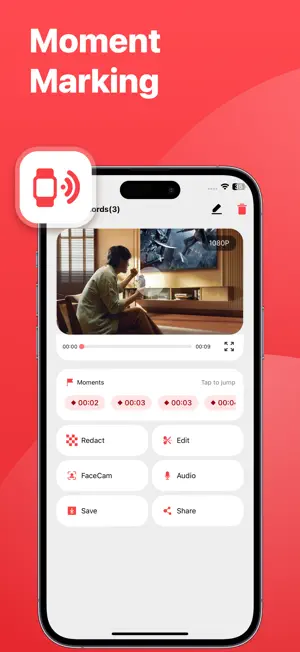
About Recven - Screen Recorder
Screen recording is easy, but pinpointing key moments and sharing with confidence is hard. More than a simple screen recorder, this tool seamlessly integrates "Apple Watch moment marking" and "privacy redaction" directly into your recording workflow, making every clip easier to review, organize, and share. Mark Key Moments via Apple Watch: When a crucial moment happens during recording, there is no need to interrupt your workflow or pick up your iPhone. Just tap your Apple Watch to bookmark the exact second. Once finished, jump directly to key highlights without scrubbing through lengthy footage. Redact Sensitive Info before Sharing: Mask account details, incoming notifications, profile pictures, or any sensitive area before sending. Customize redaction zones using blur, pixelation, or solid color overlays, and set precise timeframes for when they appear. All processing occurs locally on your device, exporting a protected file while keeping your original recording intact. FEATURES - Capture full iPhone screen operations alongside system-supported audio - Mark key moments in real time using Apple Watch - Jump instantly to highlighted timestamps during playback - Customize privacy redaction regions and their active timeframes - Apply blur, pixelation, or solid color redaction styles - Process everything locally with non-destructive original backup - Trim, manage, save, and share recorded files effortlessly - Adjust recording settings including resolution, bitrate, frame rate, and orientation Who It's For - Tutorial Creators: Record app walkthroughs, lessons, and feature demos while bookmarking key steps on the fly. - Gamers: Capture full gameplay sessions and flag highlights, missteps, or bug encounters instantly. - Product Managers & Designers: Log product demos, interaction walkthroughs, and UX issues to quickly reference specific discussion points. - Developers & QA Testers: Document bug reproduction steps and pinpoint the exact moment an anomaly occurs. - Customer Support & IT Teams: Build visual guides and troubleshooting clips while safely obscuring user and account data. - Educators & Trainers: Record long-form instructional content and locate key segments without tedious searching. - Frequent Screen Sharers: Redact sensitive information before sharing clips with colleagues, clients, or public audiences. From start to finish—record, locate key moments, and share securely—all in one fluid motion.
App privacy
The developer, 桂榕 傅, reported these privacy practices to Apple.
Data Used to Track You
The following data may be used to track you across apps and websites owned by other companies:
- Identifiers: Device ID
Data Not Linked to You
The following data, which may be collected but is not linked to your identity, may be used for the following purposes:
- Identifiers: Device ID
Used for: Analytics
Alternatives to Recven - Screen Recorder
Looking for apps like Recven - Screen Recorder? Here are 6 similar apps on the App Store. The highest rated is PocketTok - Save Videos (5.0/5), and all 6 are free to download.
-
 Reczen - Live Stream Screen
3.4
-
 Screen Recorder - RecGen
3.8
-
 Vega: Video Player & Shorts
-
 PocketTok - Save Videos
5.0
-
 iRecordScreen: Screen Recorder
4.7
-
 Screen Recorder
4.5
| App | Rating | Price | Last updated | Compare |
|---|---|---|---|---|
| Recven - Screen Recorder | – | Free | September 24, 2026 | |
| Reczen - Live Stream Screen | 3.4 / 5 (8) | Free | Aug 20, 2026 | Compare |
| Screen Recorder - RecGen | 3.8 / 5 (17) | Free | Aug 3, 2026 | Compare |
| Vega: Video Player & Shorts | – | Free | Sep 29, 2026 | Compare |
| PocketTok - Save Videos | 5.0 / 5 (25) | Free | Oct 27, 2026 | Compare |
| iRecordScreen: Screen Recorder | 4.7 / 5 (77) | Free | Aug 18, 2026 | Compare |
| Screen Recorder | 4.5 / 5 (34,509) | Free | Sep 9, 2026 | Compare |