

PDF On
Abbas Hoseiny Productivity iPhoneiPadiPod touch
PDF On is a free Productivity app for iPhone and iPad by Abbas Hoseiny. Requires iOS 17.0. Updated September 28, 2026.
- Price
- Free
- on the App Store
- Size
- 11 MB
- Age 4+
- Updated
- Sep 28
- 2026 · v1.0
Screenshots


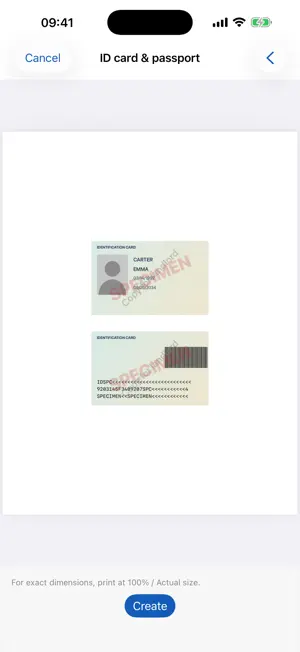

About PDF On
PDF On turns paper into clean PDFs and lets you finish them right away: fill in, sign, highlight, share. Everything happens on your iPhone. No account, no upload, no tracking. SCAN AND CREATE • Scan documents with automatic edge detection • Take a photo and crop it: the edges are found and straightened for you • Build PDFs from photos, files and other PDFs • Convert Word, Excel, PowerPoint, Pages, Numbers, Keynote, text and HTML files to PDF • Choose page size, layout (1, 2 or 4 per page) and quality • Optional date and time stamps • Make PDFs searchable with on-device text recognition • Protect PDFs with a password FILL IN AND SIGN • Tap a form field and type: the text lands inside the box, on the line • Return jumps to the next field • Checkmarks snap into checkboxes, dates follow the format of the form • Your name, address and phone number appear as suggestions above the keyboard • Sign by drawing, or photograph your signature on paper • Place a passport photo on an application form: the photo frame is found automatically • Typefaces, sizes, bold and colors for every language MARK UP • Highlighter, pen with thickness and opacity, lines, arrows, rectangles and circles • Undo and redo READING MODE • Full screen with trimmed margins, so the text is larger • Highlight with one swipe, in four colors of your choice • Name your colors, for example "Important" or "Question", and add notes • A list of all highlights with page jump; share them as text • The app remembers where you stopped reading ID CARD AND PASSPORT COPY • Front and back on one sheet in true original size • Optional enlargement, grayscale, cut lines and a watermark such as "Copy for landlord" PAGES • Reorder, rotate, crop, straighten and delete pages • Merge PDFs, insert scans, photos or other PDFs • Export the text as a Word document (.docx), copy text, search in the document PRIVATE BY DESIGN • Works fully offline • No account, no ads, no tracking, no data collection • Optional app lock with Face ID • Share extension: send photos and PDFs from other apps to PDF On LANGUAGES English, Spanish, German, French, Arabic, Persian, Urdu and more than 40 other languages, with full right-to-left layout.
App privacy
The developer, Abbas Hoseiny, reported these privacy practices to Apple.
Data Not Collected
The developer does not collect any data from this app.
Alternatives to PDF On
Looking for apps like PDF On? Here are 6 similar apps on the App Store. The highest rated is DartPDF: Edit PDF Documents (5.0/5), and all 6 are free to download.
-
 Eve - PDF Editor
-
 VARAK PDF: Editor, Sign & OCR
-
 FolikPDF
-
 Clearcan: PDF Scanner
-
 DartPDF: Edit PDF Documents
5.0
DartPDF: Edit PDF Documents
5.0
-
 Convert to PDF - PDFOn
2.0
Convert to PDF - PDFOn
2.0
| App | Rating | Price | Last updated | Compare |
|---|---|---|---|---|
| PDF On | – | Free | September 28, 2026 | |
| Eve - PDF Editor | – | Free | Sep 15, 2026 | Compare |
| VARAK PDF: Editor, Sign & OCR | – | Free | Oct 1, 2026 | Compare |
| FolikPDF | – | Free | Oct 19, 2026 | Compare |
| Clearcan: PDF Scanner | – | Free | Oct 18, 2026 | Compare |
| DartPDF: Edit PDF Documents | 5.0 / 5 (1) | Free | Oct 20, 2026 | Compare |
| Convert to PDF - PDFOn | 2.0 / 5 (1) | Free | Feb 22, 2026 | Compare |
Compare PDF On with the top alternatives: ratings, updates, ASO score and keyword gaps →