
Eve - PDF Editor
KAAN DONMEZ Productivity iPhoneiPadiPod touch
Eve - PDF Editor is a free Productivity app for iPhone and iPad by KAAN DONMEZ. Requires iOS 16.4. Updated September 15, 2026.
- Price
- Free
- on the App Store
- Size
- 48 MB
- Age 4+
- Updated
- Sep 15
- 2026 · v1.0.1
Screenshots


About Eve - PDF Editor
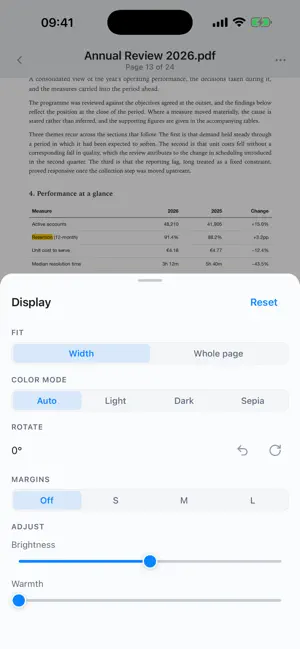
Eve is a calm, offline PDF reader and annotator for iPhone and iPad. Open your documents, mark them up, and pick up right where you left off — with no accounts, ads, or tracking. YOUR LIBRARY, LIKE A SHELF • Real first-page cover previews turn your files into a bookshelf • See reading progress at a glance • Filter by unread or favorites, and sort your way A FOCUSED READER • Smooth continuous or page-by-page reading • Search across the whole document • Outline and bookmarks to jump anywhere • Go to any page instantly, with a live thumbnail scrubber • Fit width or whole page; light, dark, and sepia modes ANNOTATE WITH EASE • Highlight, underline, strikethrough, and squiggly marks • Sticky notes, free text, and freehand ink • Saved per document and redrawn when you reopen MADE FOR READING • Reading stats and a daily streak • Reading timer, auto-scroll, and read-aloud • Brightness swipe and an immersive, distraction-free mode PRIVATE BY DESIGN Eve works fully offline. Your PDFs, annotations, bookmarks, and settings stay on your device — never uploaded, never shared. No account required. Eve is a companion to Eve for Mac. Terms of Use (EULA): https://www.apple.com/legal/internet-services/itunes/dev/stdeula/ Privacy Policy: https://www.gladve.com/privacy
What’s new
Version 1.0.1 · Updated September 15, 2026
What's New in This Version A new reading engine. Eve's reader now runs on iOS's own PDF engine instead of a web view. Everything that touches a page goes through it — search, text selection, thumbnails, read aloud, export — so pages settle faster, long documents stop stalling, and the reader no longer freezes when you reopen a document. Also new: • Resume reading — a document reopens on the page you left it on, and the library shows how far through each one you are • Pan lock — hold the page still while you read, so a stray swipe can't drag it sideways • Live annotations — highlights, ink, shapes, notes, signatures and stamps are real PDF annotations written into the file, not a rebuilt copy of it • Two-page spreads and page rotation • A cleaner phone layout — the thumbnail sidebar is gone on iPhone and optional on iPad, so the page gets the whole screen Plus a long list of fixes to scrolling, page turns, covers and text export.
App privacy
The developer, KAAN DONMEZ, reported these privacy practices to Apple.
Data Not Collected
The developer does not collect any data from this app.
Alternatives to Eve - PDF Editor
Looking for apps like Eve - PDF Editor? Here are 6 similar apps on the App Store.
-
 Lucid Note
-
 P&P PDF Reader
-
 Reader Ink: PDF Editor & Sign
-
 PDF Viewer: Reader & Markup
-
 FolikPDF
-
 Papyrus - notes, PDF
| App | Rating | Price | Last updated | Compare |
|---|---|---|---|---|
| Eve - PDF Editor | – | Free | September 15, 2026 | |
| Lucid Note | – | Free | Sep 16, 2026 | Compare |
| P&P PDF Reader | – | Free | Jun 12, 2026 | Compare |
| Reader Ink: PDF Editor & Sign | – | Free | Sep 20, 2026 | Compare |
| PDF Viewer: Reader & Markup | – | Free | Sep 15, 2026 | Compare |
| FolikPDF | – | Free | Sep 15, 2026 | Compare |
| Papyrus - notes, PDF | – | Free | Aug 20, 2026 | Compare |
Compare Eve - PDF Editor with the top alternatives: ratings, updates, ASO score and keyword gaps →