

FolikPDF
JOSEPH AARON SPEARS Productivity iPhoneiPadiPod touch
FolikPDF is a free Productivity app for iPhone and iPad by JOSEPH AARON SPEARS. Requires iOS 18.6. Updated September 15, 2026.
- Price
- Free
- on the App Store
- Size
- 9 MB
- Age 4+
- Updated
- Sep 15
- 2026 · v1.0.4
Screenshots



About FolikPDF
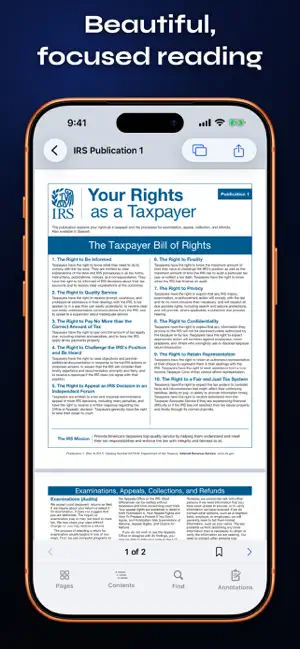
Folik is a private, capable PDF workspace for iPhone and iPad. It is completely free: no ads, no subscription, no account, and no in-app purchases. READ AND FIND • Open PDFs from Files or other apps • Search with contextual results and next/previous navigation • Use continuous, single-page, or two-page layouts • Browse thumbnails, outlines, and bookmarks SCAN ON DEVICE • Capture multi-page documents with automatic edge detection • Recognize text locally so new scans are searchable • Keep scans inside Folik unless you choose to share them FILL AND SIGN • Complete standard PDF text, checkbox, radio, and choice fields • Track required fields and jump to the next unfinished field • Create handwritten or typed signatures and initials ANNOTATE AND ORGANIZE • Highlight, underline, strike through, draw, add notes, shapes, text, and stamps • Move, resize, recolor, undo, and redo annotations • Reorder, rotate, duplicate, delete, extract, or combine pages in a new copy EXPORT YOUR WAY • Share the original • Create an editable copy • Export a flattened copy for consistent appearance PRIVATE BY DESIGN Folik processes documents, scans, text recognition, and edits on your device. It has no backend, analytics SDK, or advertising SDK. Compatibility note: Folik supports standard AcroForm fields exposed by iOS. XFA-only forms, certificate-backed digital signatures, JavaScript calculations, and vendor-specific PDF behavior may not be supported. EULA: https://www.apple.com/legal/internet-services/itunes/dev/stdeula/ Folik is open source under the MIT License. https://github.com/x3n-network/FolikPDF
What’s new
Version 1.0.4 · Updated September 15, 2026
FolikPDF 1.0.4 makes creating, filling, and sharing PDFs smoother while keeping everything private and on your device. - Build fillable copies directly on the page with separate Build and Fill modes. - Place fields repeatedly, duplicate them, edit labels and required status, and use undo or redo. - Align, resize, distribute, and reorder multiple fields with new layout tools. - Review on-device field suggestions before adding them to a PDF. - Start with the practice form or bundled Work Order, Inspection Checklist, and Meeting Notes templates. - Save your own reusable form templates with blank fields or retained defaults. - Preview editable and flattened copies page by page before sharing. - Keep form values, borders, signatures, rotations, and cropped pages more reliable when saving or exporting. - Open library search results on the exact matching page and expand results to see more matching pages. - Preview changed, added, and removed pages when comparing PDFs. - Get clearer confirmations, reversible library actions, safer draft handling, and an on-device Using Folik guide. - Enjoy faster library refreshes, reusable thumbnails, smoother annotation saves, improved Dynamic Type layouts, keyboard shortcuts, and clearer processing controls. - Improved compatibility with iOS 27 while continuing to support iOS 18.6 and later. Folik remains free and open source, with no accounts, ads, analytics, in-app purchases, or document uploads.
App privacy
The developer, JOSEPH AARON SPEARS, reported these privacy practices to Apple.
Data Not Collected
The developer does not collect any data from this app.
Alternatives to FolikPDF
Looking for apps like FolikPDF? Here are 6 similar apps on the App Store.
-
 Lucid Note
-
 Reader Ink: PDF Editor & Sign
-
 HonestPDF: Private PDF Tools
-
 PDF Studio – Reader & Tools
-
 Eve - PDF Editor
-
 P&P PDF Reader
| App | Rating | Price | Last updated | Compare |
|---|---|---|---|---|
| FolikPDF | – | Free | September 15, 2026 | |
| Lucid Note | – | Free | Sep 16, 2026 | Compare |
| Reader Ink: PDF Editor & Sign | – | Free | Sep 20, 2026 | Compare |
| HonestPDF: Private PDF Tools | – | Free | Sep 2, 2026 | Compare |
| PDF Studio – Reader & Tools | – | Free | Oct 5, 2026 | Compare |
| Eve - PDF Editor | – | Free | Sep 15, 2026 | Compare |
| P&P PDF Reader | – | Free | Jun 12, 2026 | Compare |
Compare FolikPDF with the top alternatives: ratings, updates, ASO score and keyword gaps →