

Clearcan: PDF Scanner
Ion Hortolomei Productivity iPhoneiPadiPod touch
Clearcan: PDF Scanner is a free Productivity app for iPhone and iPad by Ion Hortolomei. Requires iOS 15.1. Updated October 18, 2026.
- Price
- Free
- on the App Store
- Size
- 34 MB
- Age 4+
- Updated
- Oct 18
- 2026 · v1.7.0
Screenshots
Save to Pinterest
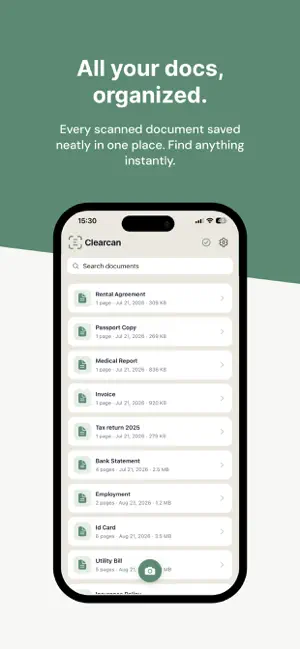

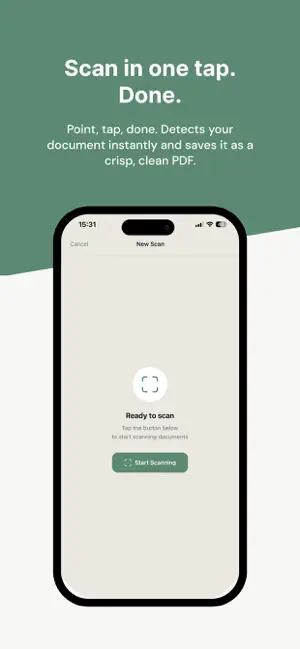
About Clearcan: PDF Scanner
Clearcan is a simple, fast document scanner built for everyone who's tired of cluttered apps full of ads and subscription walls. Just open, scan, and share. No account needed. KEY FEATURES - Multi-page document scanning powered by Apple VisionKit - Automatic edge detection and perspective correction - Unlimited OCR — text recognition on every page, no limits, no paywall - Search documents by their content, not just their names - Smart automatic naming for new scans - Copy recognized text from any page - Export recognized text as a .txt file - Convert any document to PDF instantly - Export as image — share scans as JPG, or as a ZIP for multi-page documents - Save scans straight to Photos in one tap - Share only the pages you select, in any format - Combine several documents into one - Extract chosen pages into a new document - Flag important documents and filter to find them fast - Reorder pages before exporting - Add or delete individual pages anytime - Grid view for browsing your documents - Local backup — export everything to a single file and restore it anytime - Light and dark mode, matching your system - Share via Mail, Messages, AirDrop, or save to Files - No ads. No tracking. No subscriptions - Works offline — no internet required EVERYTHING ON DEVICE Text recognition, search and naming all run on your iPhone. Your documents are never uploaded and never seen by anyone. Powerful features without your data ever leaving your device. WHO IT'S FOR Students scanning class notes and handouts. Professionals digitizing receipts and contracts. Anyone who needs a quick, reliable scanner that just works. HOW IT WORKS 1. Tap the camera button 2. Point at your document and capture 3. Add more pages, reorder, or save 4. Export as PDF, image or text and share anywhere PRIVACY FIRST We don't collect any data. We can't see your documents. Everything stays on your iPhone — exactly where it belongs. When you delete the app, all your data is gone too. No traces left behind on any server. WHY CLEARCAN Most scanner apps are bloated with features you don't need, hidden behind paywalls, or covered in ads. Clearcan does the essentials well — scan, read, organize and save — without ever charging a subscription or showing a single ad. If you just need a clean, powerful scanner that respects your privacy — this is it. SUPPORT Questions or feedback? Email us at [email protected] — we read every message. Made with care for everyone who values simplicity.
What’s new
Version 1.7.0 · Updated October 18, 2026
More ways to work with your scans. - Combine several documents into one - Extract selected pages into a new document - Share only the pages you choose - Export recognized text as a .txt file - Save scans straight to Photos - Refreshed welcome tour - Fixes and polish As always: everything stays on your device. No accounts, no ads, no tracking.
App privacy
The developer, Ion Hortolomei, reported these privacy practices to Apple.
Data Not Collected
The developer does not collect any data from this app.
Alternatives to Clearcan: PDF Scanner
Looking for apps like Clearcan: PDF Scanner? Here are 6 similar apps on the App Store. The highest rated is ScanMate: PDF Scanner (5.0/5), and all 6 are free to download.
-
 Scanling – PDF Scanner & OCR
-
 ScanMate: PDF Scanner
5.0
-
 Paperix - PDF Secure and Local
5.0
-
 FairScan: PDF Scanner
1.0
-
 PureScan: Document Scanner
-
 PDF Fill & Sign: Scanner
| App | Rating | Price | Last updated | Compare |
|---|---|---|---|---|
| Clearcan: PDF Scanner | – | Free | October 18, 2026 | |
| Scanling – PDF Scanner & OCR | – | Free | Jul 13, 2026 | Compare |
| ScanMate: PDF Scanner | 5.0 / 5 (1) | Free | Oct 20, 2026 | Compare |
| Paperix - PDF Secure and Local | 5.0 / 5 (5) | Free | Nov 6, 2026 | Compare |
| FairScan: PDF Scanner | 1.0 / 5 (1) | Free | Oct 3, 2026 | Compare |
| PureScan: Document Scanner | – | Free | May 28, 2026 | Compare |
| PDF Fill & Sign: Scanner | – | Free | Aug 17, 2026 | Compare |