

PDF Fill & Sign: Scanner
Artiom Gaureac Productivity iPhoneiPadiPod touch
PDF Fill & Sign: Scanner is a free Productivity app for iPhone and iPad by Artiom Gaureac. Requires iOS 16.0. Updated August 17, 2026.
- Price
- Free
- on the App Store
- Size
- 9 MB
- Age 4+
- Updated
- Aug 17
- 2026 · v1.0.0
Screenshots

About PDF Fill & Sign: Scanner
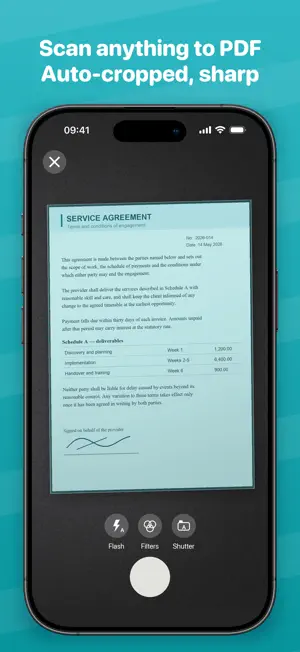
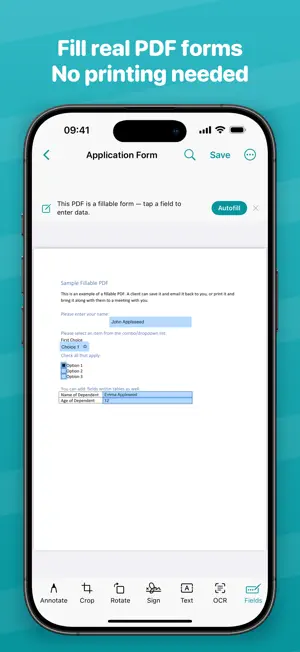
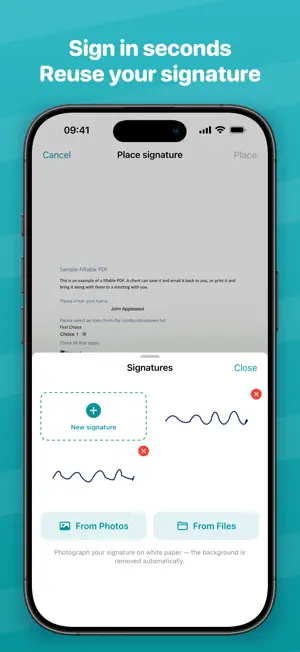
Fill and sign PDFs the easy way, then scan, OCR and organize everything in one private app. Most scanners flatten your PDF. PDF Fill & Sign fills the REAL form fields (text, checkboxes, dropdowns) and lets you sign with a saved signature. FILL & SIGN • Fillable PDF forms: tap a real field to type, check boxes, pick from dropdowns • Autofill fields from your saved profile: name, email, phone, address • Draw your signature once, reuse it on any document • Add text anywhere on the page SCAN & IMPORT • Auto edge detection and perspective correction • Clean-up filters: black & white, grayscale, enhance • Multi-page scans; reorder and merge pages • Import PDFs and photos. Imported PDFs keep their text AND form fields RECOGNIZE TEXT (OCR) • On-device text recognition in English and Russian • Search inside your documents in real time • Copy recognized text or export a searchable PDF ORGANIZE & EXPORT • Folders, favorites, and instant search across names and content • Export as PDF or JPEG; choose page range and quality • Protect PDFs with a password • Share anywhere via the system share sheet PRIVATE BY DESIGN Your documents never leave your device. No accounts, no ads, no analytics, no tracking of any kind. What you scan stays yours. SUBSCRIPTION DETAILS PDF Fill & Sign Premium unlocks unlimited documents, text recognition and watermark-free export: • Weekly: $3.99 per week • Monthly: $9.99 per month • Yearly: $29.99 per year, including a 7-day free trial for new subscribers Prices are in USD and may vary by country. Payment is charged to your Apple ID at confirmation of purchase. A subscription renews automatically unless it is cancelled at least 24 hours before the end of the current period, and your account is charged for renewal within 24 hours before the period ends. Manage or cancel your subscription in your Apple ID settings. Any unused part of a free trial is forfeited when a subscription is purchased. Terms of Use: https://gaureac.github.io/pdfsign/terms.html Privacy Policy: https://gaureac.github.io/pdfsign/privacy.html
App privacy
The developer, Artiom Gaureac, reported these privacy practices to Apple.
Data Not Linked to You
The following data, which may be collected but is not linked to your identity, may be used for the following purposes:
- Purchases: Purchase History
- Identifiers: User ID
Used for: Analytics, App Functionality
Alternatives to PDF Fill & Sign: Scanner
Looking for apps like PDF Fill & Sign: Scanner? Here are 6 similar apps on the App Store. The highest rated is Add Text to PDF - Fill Forms (5.0/5), and all 6 are free to download.
-
 ExplorePDF: Read, Fill & Sign
-
 CopySafe — Clipboard Manager
-
 Clearcan: PDF Scanner
-
 PDF Scanner: Signature maker
-
 PDF Scanner and Editor ++
-
 Add Text to PDF - Fill Forms
5.0
Add Text to PDF - Fill Forms
5.0
| App | Rating | Price | Last updated | Compare |
|---|---|---|---|---|
| PDF Fill & Sign: Scanner | – | Free | August 17, 2026 | |
| ExplorePDF: Read, Fill & Sign | – | Free | Oct 10, 2026 | Compare |
| CopySafe — Clipboard Manager | – | Free | Sep 29, 2026 | Compare |
| Clearcan: PDF Scanner | – | Free | Sep 2, 2026 | Compare |
| PDF Scanner: Signature maker | – | Free | Sep 10, 2026 | Compare |
| PDF Scanner and Editor ++ | – | Free | Aug 10, 2026 | Compare |
| Add Text to PDF - Fill Forms | 5.0 / 5 (4) | Free | Sep 6, 2026 | Compare |