

ExplorePDF: Read, Fill & Sign
AvanSaber Inc Productivity iPhoneiPadiPod touchMac
ExplorePDF: Read, Fill & Sign is a free Productivity app for iPhone and iPad by AvanSaber Inc. Requires iOS 26.0. Updated October 10, 2026.
- Price
- Free
- on the App Store
- Size
- 6 MB
- Age 4+
- Updated
- Oct 10
- 2026 · v1.3.1
Screenshots



About ExplorePDF: Read, Fill & Sign
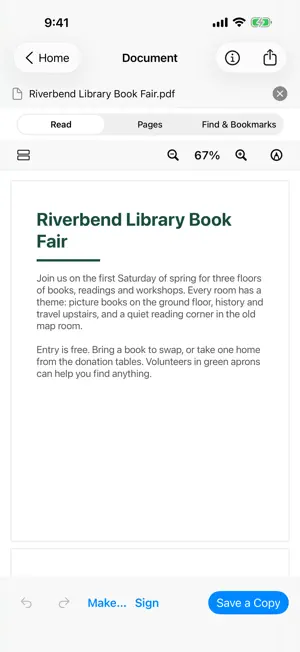
Read, edit and make PDFs on your iPhone or iPad. ExplorePDF helps you find what matters, fill and sign forms, organise pages, combine documents and save a new copy while keeping the original. Read and search Open a PDF from Files or another app. Zoom, choose a page view, search the text and return to bookmarks. Recognise text in scanned pages on your device and save a searchable copy. Fill, sign and mark up Enter values in fillable forms, add a visible signature, highlight text, draw, add notes and place stamps. Your form values and marks can go into the same new copy. A visible signature is an image on the page, not a certificate-based digital signature. Organise and combine Move, rotate, duplicate or remove pages. Save selected pages as a new PDF. Split a PDF into files or combine several PDFs in the order you choose. Make a PDF for the job Turn images into a PDF, prepare a booklet for printing, put several pages on one sheet or make pages the same paper size. Preview the result and its warnings before saving. Reduce File Size Try lossless reduction on a supported PDF. See the measured size before you save. Keep document metadata by default, or choose to remove it. ExplorePDF leaves the original alone and creates no result when the copy would not be smaller. Save a Copy Your original stays as it was. If you close a document with unsaved changes, choose whether to save a copy, discard the changes or keep working. Share or print when your copy is ready. Work on your device PDF work runs locally and does not require an account. A file kept by a cloud provider may need downloading before it is available offline. Help and feedback are available from Home.
What’s new
Version 1.3.1 · Updated October 10, 2026
This update improves PDF page-size copies and lossless compression. Document language is preserved during compression, and supported PDFs can use a verified alternate page-size writer. Form guidance explains how to save and reopen completed fields. Your original files remain unchanged.
App privacy
The developer, AvanSaber Inc, reported these privacy practices to Apple.
Data Not Collected
The developer does not collect any data from this app.
Alternatives to ExplorePDF: Read, Fill & Sign
Looking for apps like ExplorePDF: Read, Fill & Sign? Here are 6 similar apps on the App Store.
-
 Mori - Markdown Editor
-
 PDF Fill & Sign: Scanner
-
 KyPDF: PDF Editor & Converter
-
 Collate: PDF & Image Merger
-
 Make-Contact
-
 HonestPDF: Private PDF Tools
| App | Rating | Price | Last updated | Compare |
|---|---|---|---|---|
| ExplorePDF: Read, Fill & Sign | – | Free | October 10, 2026 | |
| Mori - Markdown Editor | – | Free | Sep 13, 2026 | Compare |
| PDF Fill & Sign: Scanner | – | Free | Aug 17, 2026 | Compare |
| KyPDF: PDF Editor & Converter | – | Free | Oct 5, 2026 | Compare |
| Collate: PDF & Image Merger | – | Free | Sep 30, 2026 | Compare |
| Make-Contact | – | Free | Aug 23, 2025 | Compare |
| HonestPDF: Private PDF Tools | – | Free | Sep 2, 2026 | Compare |