

Paperix - PDF Secure and Local
Abhijit Bansal Productivity iPhoneiPadiPod touch
Paperix - PDF Secure and Local is a free Productivity app for iPhone and iPad by Abhijit Bansal. Rated 5.0/5 from 4 ratings. Requires iOS 26.0.
- Rating
- 5.0
- 4 ratings
- Price
- Free
- on the App Store
- Size
- 10 MB
- Age 4+
- Updated
- Oct 10
- 2026 · v1.7.1
Screenshots

About Paperix - PDF Secure and Local
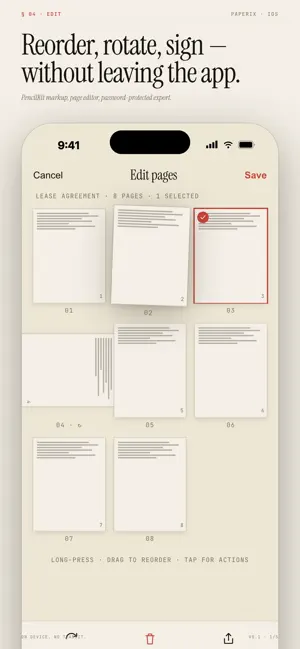
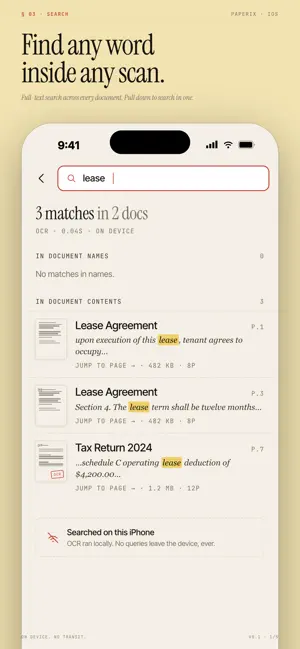
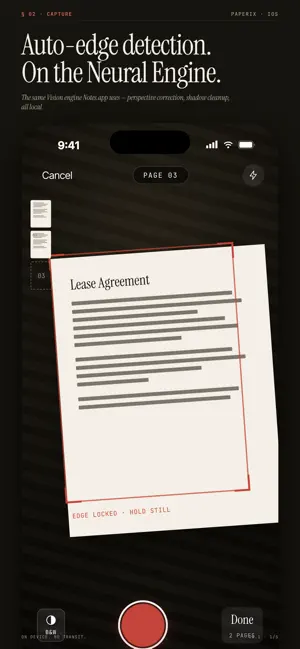
Paperix is a fully free document scanner that runs everything — scanning, OCR, and AI — on your iPhone. No subscriptions. No watermarks. No ads. No upsells. No accounts. No cloud. Stop paying a yearly fee just to turn paper into a PDF, and keep your documents on your own device. EVERY FEATURE OF THE PAID APPS — FOR FREE You shouldn't have to pay a recurring fee to turn paper into a PDF. Paperix matches the paid scanners feature-for-feature and charges $0 for any of it: - One-tap multi-page scanning with auto edge-detect and perspective correction - Black & white mode for receipts, faint print, signed contracts - Maximum-punch filter for the cleanest possible output - Reprocess any saved scan — switch Color / B&W / Max Punch later without rescanning - Auto-name scans from the largest text on the first page - Import from Photos or Files (PDFs, images, iCloud Drive, Dropbox) - Save to Paperix from any app's share sheet — send one photo or a whole stack and they land as cropped, scanned documents - Folders, sort, bulk select, swipe-to-share, 30-day Recently Deleted SEARCHABLE PDFs OUT OF THE BOX — NO PREMIUM TIER Every scan runs through on-device text recognition. PDFs are searchable in Paperix, in Preview on your Mac, in Adobe Acrobat, anywhere. Pull down the list to search across every doc and tap a result to jump straight to the highlighted phrase. No "OCR credits". No paywalled search. - Extract Text — Paperix: a share-sheet action that pulls the text out of any image with Copy and Share, without even opening the app — layout preserved, columns aligned SIGN, FILL, AND MARK UP — NO WATERMARK - Pen, Eraser, Undo, Redo, Clear in one toolbar - Real ink colors: true black, red, blue, green, yellow - Type text directly on a page — drag the dashed box anywhere, resize, pick size and alignment - One-tap presets drop today's date or your saved name for forms - Pinch-to-zoom canvas for tight signatures - Draw with finger or Apple Pencil - OCR re-runs on save so signed pages stay searchable ON-DEVICE AI — ON YOUR IPHONE, NEVER ON A SERVER Every word of AI inference runs on your iPhone's Neural Engine using Apple's Foundation Models. Nothing is uploaded. Nothing is logged. Nothing is ever seen by anyone but you. - ANALYZE a document — on-device Summary, Key Points, and per-doc Q&A - ASK PAPERIX — pose a question across every doc on your phone and get a sourced answer with tappable citations back to the exact page - Semantic search by meaning, not just keywords - AI surfaces hide cleanly on iPhones without Apple Intelligence; the rest of the app works the same The cloud scanners ship your private contracts, medical records, and bank statements to someone else's GPU. Paperix runs the same AI on your own phone. Your iPhone makes that possible — and free. SMART ACTIONS FROM A SCAN Paperix looks for contact info, appointment dates, addresses, and links in every scan. One tap adds the contact to Contacts, the appointment to Calendar, the address to Maps, or opens the link in Safari. EXPORT ON YOUR TERMS - Standard PDF for everyday sharing - Password-protected PDF for anything sensitive - AirPrint to any printer on your network - Standard iOS share sheet — Mail, Messages, AirDrop, Files, anywhere PRIVATE BY ARCHITECTURE Paperix literally has no network code. Not "encrypted in transit" — no transit at all. - No accounts, no sign-up - No cloud sync, no telemetry, no analytics, no SDKs - No ads, no upsells, no "premium tier" - Verifiable with Little Snitch / Lulu. Turn airplane mode on permanently and Paperix works exactly the same. REQUIREMENTS - iPhone running iOS 16 or later - Apple Intelligence-capable iPhone for AI features (iPhone 15 Pro and later); the rest of Paperix works on every iPhone with a camera
What’s new
Version 1.7.1 · Updated October 10, 2026
Paperix now reads the fine print. - Analyze, Ask Paperix and search now read small print — fee schedules, statement terms, policy wording and dense forms. Before, this text could be skipped or misread. - Tables keep each amount on its own row, even in small type or when the amounts sit far to the right of their labels. - Search and the AI now read text in more languages and scripts, such as Chinese. - Your existing documents are re-read once after you update, so answers about them improve too. The app stays responsive while that runs. - Fixed: "Rebuild AI cache" now waits until the rebuild is really done, and creates fresh summaries. - Fixed: the confidence marks in Extracted Text now show how sure text recognition was about each line.
App privacy
The developer, Abhijit Bansal, reported these privacy practices to Apple.
Data Not Collected
The developer does not collect any data from this app.
Alternatives to Paperix - PDF Secure and Local
Looking for apps like Paperix - PDF Secure and Local? Here are 6 similar apps on the App Store. The highest rated is iScanKit: Offline Scanner (5.0/5), and all 6 are free to download.
-
 iScanKit: Offline Scanner
5.0
iScanKit: Offline Scanner
5.0
-
 Paperlane: Scan to PDF
5.0
Paperlane: Scan to PDF
5.0
-
 Scanling – PDF Scanner & OCR
-
 PureScan: Document Scanner
-
 ScanMate: Scan, Convert, Edit
-
 DocPolish
| App | Rating | Price | Last updated | Compare |
|---|---|---|---|---|
| Paperix - PDF Secure and Local | 5.0 / 5 (4 ratings) | Free | October 10, 2026 | |
| iScanKit: Offline Scanner | 5.0 / 5 (1) | Free | Mar 24, 2026 | Compare |
| Paperlane: Scan to PDF | 5.0 / 5 (2) | Free | Oct 12, 2026 | Compare |
| Scanling – PDF Scanner & OCR | – | Free | Jul 13, 2026 | Compare |
| PureScan: Document Scanner | – | Free | May 28, 2026 | Compare |
| ScanMate: Scan, Convert, Edit | – | Free | Apr 24, 2025 | Compare |
| DocPolish | – | Free | Jun 2, 2026 | Compare |