

ScanMate: PDF Scanner
iComet Productivity iPhoneiPadiPod touch
ScanMate: PDF Scanner is a free Productivity app for iPhone and iPad by iComet. Rated 5.0/5 from 1 ratings. Requires iOS 18.0. Updated October 20, 2026.
- Rating
- 5.0
- 1 ratings
- Price
- Free
- on the App Store
- Size
- 6 MB
- Age 4+
- Updated
- Oct 20
- 2026 · v1.4
Screenshots

About ScanMate: PDF Scanner
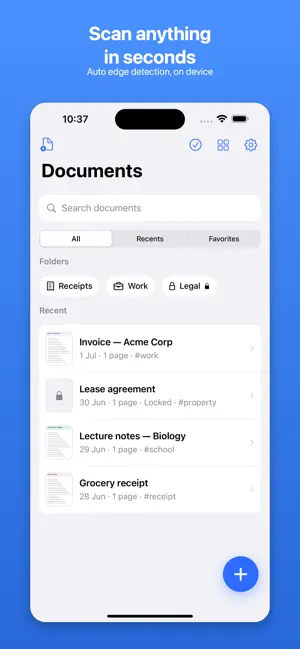
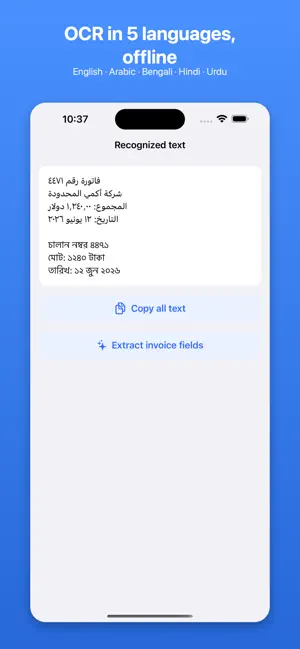
ScanMate turns your iPhone into a fast, private document scanner — without the ads, watermarks, and subscription traps you're tired of. FREE, AND STAYING FREE • Unlimited scans — no daily limits • No watermark on any export • No ads, anywhere • Automatic edge detection, manual crop with a magnifier • Multi-page and batch scanning • Enhancement filters: Auto, Grayscale, B&W, Color • Sign pages, reuse saved signatures, drop in a date stamp • Expiry reminders for passports, IDs, insurance, and contracts • Export to PDF, JPG, or PNG; share or save to Files • Folders, tags, search, favorites, and Trash • Face ID app lock • Home Screen and Lock Screen widgets, Control Center button, Siri and Shortcuts • Find any scan straight from Spotlight SCANMATE PRO • Offline OCR in more than 15 languages • Search inside your documents • AI naming and document classification • Receipt, invoice, and business-card extraction — save cards to Contacts • Receipt ledger with monthly totals and CSV export • Smart cleanup and background removal • PDF tools: merge, split, reorder, compress • Export to Google Drive, Dropbox, and OneDrive • Unlimited private folders PRIVATE BY DESIGN Everything runs on your iPhone. Scans and text recognition never touch our servers. Documents sync through your own iCloud account — we never see them. Locked documents and private folders never appear in widgets or Spotlight. HONEST PRICING A genuinely useful free tier that stays free. One fair yearly plan, or buy Pro once with Lifetime. No fake countdowns, no surprise trial charges, no dark patterns. Cancel anytime in Settings. Built for students, small businesses, freelancers, accountants, lawyers, real estate agents, teachers, and parents. Scan a receipt, a contract, a whiteboard, or a stack of notes — and get a clean, professional PDF in seconds. — Questions? [email protected] — a real person answers. Terms of Use (EULA): https://www.apple.com/legal/internet-services/itunes/dev/stdeula/ Privacy Policy: https://jigsawlab.com/scanmate/privacy.html
What’s new
Version 1.4 · Updated October 20, 2026
This release is about one thing: getting the whole page, every time. • The camera now keeps the full sheet — no more scans missing half the page or one side • Edge detection looks for the page itself, not a block of text sitting on it • Adjust edges opens on the whole photo: pull the corners back out, or in to keep just one part • Fixed a crash when saving a scan with a lot of pages Free features stay free. No countdowns, no tricks.
App privacy
The developer, iComet, reported these privacy practices to Apple.
Data Not Collected
The developer does not collect any data from this app.
Alternatives to ScanMate: PDF Scanner
Looking for apps like ScanMate: PDF Scanner? Here are 6 similar apps on the App Store. The highest rated is Paperlane: Scan to PDF (5.0/5), and all 6 are free to download.
-
 Scanling – PDF Scanner & OCR
-
 Paperlane: Scan to PDF
5.0
Paperlane: Scan to PDF
5.0
-
 ScanMate: Scan, Convert, Edit
-
 Scanr Lens — Document Scanner
1.0
Scanr Lens — Document Scanner
1.0
-
 Crisp Scan
-
 Privascan: PDF Scanner & OCR
| App | Rating | Price | Last updated | Compare |
|---|---|---|---|---|
| ScanMate: PDF Scanner | 5.0 / 5 (1 rating) | Free | October 20, 2026 | |
| Scanling – PDF Scanner & OCR | – | Free | Jul 13, 2026 | Compare |
| Paperlane: Scan to PDF | 5.0 / 5 (2) | Free | Oct 12, 2026 | Compare |
| ScanMate: Scan, Convert, Edit | – | Free | Apr 24, 2025 | Compare |
| Scanr Lens — Document Scanner | 1.0 / 5 (1) | Free | Aug 28, 2026 | Compare |
| Crisp Scan | – | Free | Sep 29, 2026 | Compare |
| Privascan: PDF Scanner & OCR | – | Free | Sep 3, 2026 | Compare |