

Scanr Lens — Document Scanner
Beskar Technologies LLP Productivity iPhoneiPadiPod touch
Scanr Lens — Document Scanner is a free Productivity app for iPhone and iPad by Beskar Technologies LLP. Rated 1.0/5 from 1 ratings. Requires iOS 16.0.
- Rating
- 1.0
- 1 ratings
- Price
- Free
- on the App Store
- Size
- 3 MB
- Age 4+
- Updated
- Aug 28
- 2026 · v1.41
Screenshots
About Scanr Lens — Document Scanner
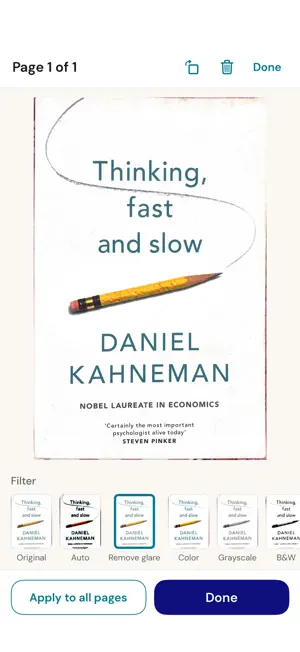
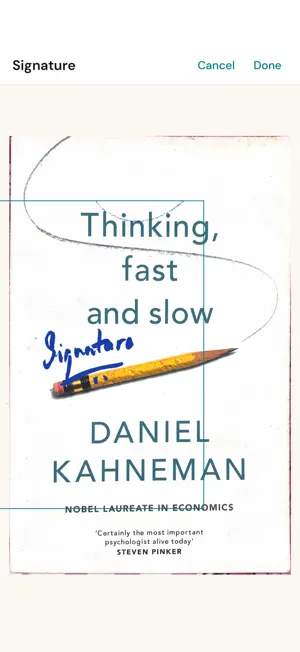
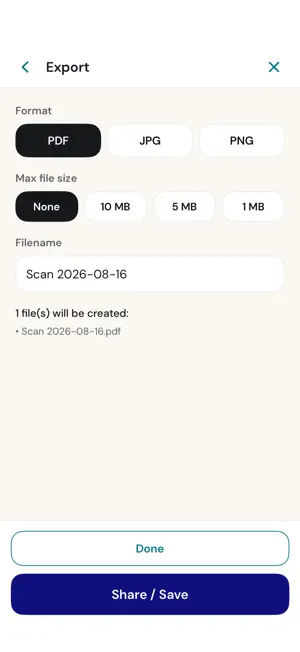
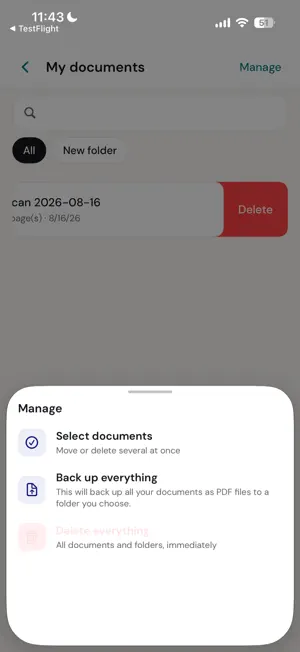
Scanr is a fast, private document scanner that does everything on your device. No account. No sign-up. No ads. No tracking. Point your camera at a document and Scanr captures it with automatic edge detection and perspective correction, powered by Apple's on-device scanner. Scan a single page or a whole stack, tidy it up, sign it, and export — all in a few taps. SCAN • Automatic edge detection and perspective correction • Multi-page scanning — build a document one page at a time • Add more pages to an existing document any time • Split ID mode: capture the front and back of an ID card onto one page IMPORT • Bring in photos and PDFs you already have • Share images or PDFs into Scanr from any other app • Imported pages get the same cropping and filters as a fresh scan MY DOCUMENTS • Every scan is saved from its first page — nothing to remember to keep • Organize into folders, rename, and search your documents by name • Back up everything as PDF files to a folder you choose • Delete any document immediately — no hidden copies left behind ORGANIZE • Reorder, delete, split, and move pages between documents • Combine pages into one • Rotate pages ENHANCE • One-tap filters: Original, Auto, Color, Grayscale, Black & White, High Contrast, and Soft • Remove glare from photos of glossy or laminated pages • Apply a filter to one page or to every page at once SIGN • Draw a signature, or scan one from paper • Set its thickness and colour, then place and resize it on any page • Save signatures to reuse later EXPORT & SHARE • Export as PDF (one multi-page file), or as JPG / PNG (one image per page) • Hold exports under a file-size limit when you need to email or upload them • Share or save through the iOS share sheet PRIVATE BY DESIGN • Everything happens on your device — scanning, filtering, signing, export • No accounts, no cloud, no analytics, no ads • The app makes no network requests • Documents live in the app's private storage SMALL AND SIMPLE • Point, scan, export, done • Tiny install size • Clean, uncluttered interface • Available in 12 languages • Universal — one app for iPhone and iPad Made by Beskar — fast, private tools. https://beskar.tech
What’s new
Version 1.41 · Updated August 28, 2026
ID scanning, improved: • Exactly one photo for the front and one for the back — no more extra captures that went nowhere • After each shot, drag the corners to adjust the crop • The camera now captures the full frame, so portrait IDs and documents fit Still no cloud, no account, no ads. Everything stays on your phone.
App privacy
The developer, Beskar Technologies LLP, reported these privacy practices to Apple.
Data Not Collected
The developer does not collect any data from this app.
Alternatives to Scanr Lens — Document Scanner
Looking for apps like Scanr Lens — Document Scanner? Here are 6 similar apps on the App Store.
-
 ScannerCam Light
-
 ScanMate: PDF Scanner
-
 PocketScan - Snap to PDF
-
 Scanner4K
-
 Scanry: PDF Scanner & OCR
-
 MemoTree - Notes Organizer
| App | Rating | Price | Last updated | Compare |
|---|---|---|---|---|
| Scanr Lens — Document Scanner | 1.0 / 5 (1 rating) | Free | August 28, 2026 | |
| ScannerCam Light | – | Free | Sep 16, 2026 | Compare |
| ScanMate: PDF Scanner | – | Free | Sep 21, 2026 | Compare |
| PocketScan - Snap to PDF | – | Free | Jul 7, 2026 | Compare |
| Scanner4K | – | Free | Apr 2, 2026 | Compare |
| Scanry: PDF Scanner & OCR | – | Free | Sep 18, 2026 | Compare |
| MemoTree - Notes Organizer | – | Free | Sep 22, 2026 | Compare |