

Phone Controller
Jake Jin Utilities iPhoneiPadiPod touch
Phone Controller is a free Utilities app for iPhone and iPad by Jake Jin. Rated 5.0/5 from 1 ratings. Requires iOS 17.0. Updated September 15, 2026.
- Rating
- 5.0
- 1 ratings
- Price
- Free
- on the App Store
- Size
- 1 MB
- Age 4+
- Updated
- Sep 15
- 2026 · v1.0
Screenshots

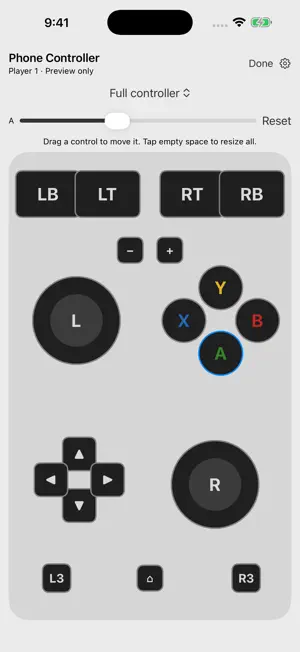


About Phone Controller
Turn your iPhone into a wireless gamepad for a Windows PC on the same Wi-Fi network. Phone Controller requires the Phone Controller Windows companion and the ViGEmBus virtual controller driver on your PC. Install them before playing. This app does not connect directly to a game console and does not include games. CUSTOMIZE YOUR CONTROLS Use a full two-stick controller or left- or right-hand single-stick layouts. Move and resize buttons, with separate saved layouts for portrait, landscape and upright or sideways holding. Use independent touches for sticks and buttons. ADD MOTION AND TOUCH FEEDBACK Enable optional gyroscope and accelerometer controls for compatible PC software through the companion's DSU motion bridge. Adjust sensitivity and calibrate while still. Optional iPhone haptics provide feedback for button presses and stick movement. Motion support depends on the game or emulator and its configuration. CONNECT ON YOUR LOCAL NETWORK Scan the QR code in the Windows companion using the in-app scanner, or paste the pairing URL. Keep the companion open while playing. Up to four phones can connect as independent controllers. One phone supplies one motion source. No app account, ads or analytics. Use a trusted private network: local controller traffic is unencrypted. See the privacy policy for the data sent to your computer. Compatibility: iPhone with iOS 17 or later; Windows PC with the companion and ViGEmBus installed; both devices on the same local network. Games must support compatible controller input. Motion requires a compatible DSU client. Standalone left/right layouts require manual game or emulator bindings. Haptic feedback depends on device hardware. Phone Controller is an independent app and is not affiliated with Nintendo or Microsoft. Joy-Con and Xbox names describe control compatibility. The app does not provide IR, NFC, Nintendo HD rumble or absolute positional tracking.
App privacy
The developer, Jake Jin, reported these privacy practices to Apple.
Data Not Collected
The developer does not collect any data from this app.
Alternatives to Phone Controller
Looking for apps like Phone Controller? Here are 6 similar apps on the App Store. The highest rated is XBX Controller - Remote Play (4.1/5), and all 6 are free to download.
-
 PadLink Remote
-
 Lose Control: PC Controller
-
 V-Pad: Virtual Gamepad
-
 Gamepad Pro – Remote for PC
-
 BLE Joystick
2.8
-
 XBX Controller - Remote Play
4.1
| App | Rating | Price | Last updated | Compare |
|---|---|---|---|---|
| Phone Controller | 5.0 / 5 (1 rating) | Free | September 15, 2026 | |
| PadLink Remote | – | Free | Sep 22, 2026 | Compare |
| Lose Control: PC Controller | – | Free | Oct 22, 2026 | Compare |
| V-Pad: Virtual Gamepad | – | Free | Oct 9, 2026 | Compare |
| Gamepad Pro – Remote for PC | – | Free | Aug 20, 2026 | Compare |
| BLE Joystick | 2.8 / 5 (13) | Free | Sep 11, 2026 | Compare |
| XBX Controller - Remote Play | 4.1 / 5 (645) | Free | Dec 6, 2024 | Compare |
Compare Phone Controller with the top alternatives: ratings, updates, ASO score and keyword gaps →