

V-Pad: Virtual Gamepad
SAMET VOLKAN CAVUSOGLU Utilities iPhoneiPadiPod touch
V-Pad: Virtual Gamepad is a free Utilities app for iPhone and iPad by SAMET VOLKAN CAVUSOGLU. Requires iOS 15.0. Updated October 9, 2026.
- Price
- Free
- on the App Store
- Size
- 41 MB
- Age 9+
- Updated
- Oct 9
- 2026 · v2.0.7
Screenshots


About V-Pad: Virtual Gamepad
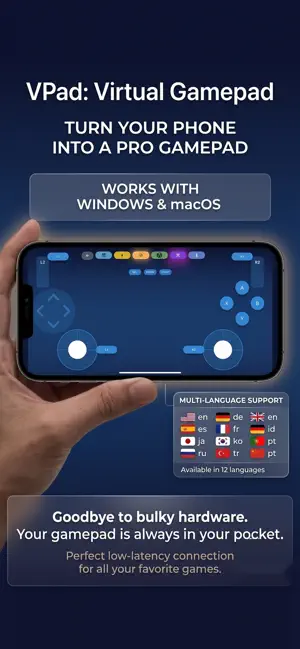
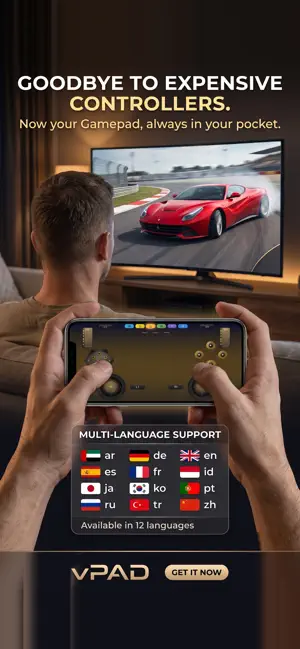
V-Pad turns your iPhone into a game controller for the computer in front of you. Twin analog sticks, a D-pad, four face buttons, shoulders and analog triggers — on a layout you can rearrange, resize and recolour until it fits your thumbs. BEFORE YOU START V-Pad needs a small free program running on your computer: V-Pad Helper, for Windows and macOS, from vpadcontroller.com. Your phone reaches it over your own Wi-Fi — both devices on the same network, nothing in the cloud, no account, no sign-in. Why not Bluetooth? iOS does not let a third-party app present itself as a Bluetooth gamepad. That is a platform rule, not a missing feature, and it is why every iPhone app in this category ships a desktop companion. ON WINDOWS The helper creates a real virtual Xbox 360 controller. Games and Steam see an ordinary XInput pad — no key mapping, sticks and triggers stay analog. ON macOS Apple grants no third-party app a virtual gamepad, so the pad is mapped to keyboard and mouse instead: left stick to WASD, D-pad to the arrows, right stick to the mouse, triggers to clicks. Games that insist on a real controller will not find one on a Mac. 22 LAYOUTS, READY TO PLAY Classic, Pro, Edge and Compact for the shape of your hands. Football, Tactical and Sci-Fi for the kind of game. Crimson Dragon and Gold Dragon for their own illustrated worlds. Plus a metal and neon set: Chrome, Gold, Rose Gold, Gunmetal, Obsidian, Sapphire, Emerald, Copper, Volt, Neon, Plasma, Circuit, Prism. MAKE IT YOURS Drag any control where you want it. Pinch to resize. Change its colour and shape. Pick a backdrop for the app and a separate surface for the pad. Save your own layouts and open them straight from the home grid. SHORTCUTS Bind a sequence of presses to a single control, with the timing recorded as you tap — up to five seconds per shortcut. One thumb, several inputs. TILT TO STEER Racing Gyro turns the phone itself into a wheel: hold it in landscape and tilt. It drives the left stick, so any game that steers with a stick steers with your hands. VOLUME KEYS AS BUTTONS Assign the physical volume keys to gamepad buttons. They only act as buttons on the gamepad screen and behave normally everywhere else. TUNE THE FEEL Stick deadzone and response curve. Haptics set per group — face buttons, shoulders, triggers, system buttons, D-pad, sticks — each with its own strength. Triggers as analog drags or single presses. Press glow on or off. TWELVE LANGUAGES English, Turkish, German, Spanish, French, Indonesian, Japanese, Korean, Portuguese, Russian, Chinese and Arabic. FREE, WITH ONE OPTIONAL PURCHASE Every layout and every setting is free, with ads. V-Pad Premium is a single one-time purchase — not a subscription, nothing recurring: it removes every ad and unlocks saving your own custom layouts. Privacy: no accounts, no servers of ours, and nothing you do in the app is reported back to us. Full policy at vpadcontroller.com/privacy.
What’s new
Version 2.0.7 · Updated October 9, 2026
Pairing now sticks. Your iPhone remembers the computer by name instead of by its network address, so when you restart the computer — or your router hands it a new address — the phone finds it again on its own. No more scanning the code every day. Connecting by QR is also more reliable on computers that run VirtualBox, VMware, WSL, Hyper-V, Docker or a VPN. The code could carry an address your phone had no way of reaching, and the connection would just time out. Both fixes need the current V-Pad Helper on the computer — get it from vpadcontroller.com.
App privacy
The developer, SAMET VOLKAN CAVUSOGLU, reported these privacy practices to Apple.
Data Linked to You
The following data, which may be collected and linked to your identity, may be used for the following purposes:
- Location: Coarse Location
Used for: Third-Party Advertising, Developer’s Advertising or Marketing, Analytics
Data Not Linked to You
The following data, which may be collected but is not linked to your identity, may be used for the following purposes:
- Identifiers: Device ID
- Usage Data: Product Interaction, Advertising Data
- Diagnostics: Performance Data, Other Diagnostic Data, Crash Data
Used for: Third-Party Advertising, Developer’s Advertising or Marketing, Analytics
Alternatives to V-Pad: Virtual Gamepad
Looking for apps like V-Pad: Virtual Gamepad? Here are 6 similar apps on the App Store. The highest rated is Phone Controller (5.0/5), and all 6 are free to download.
-
 Gamepad Pro – Remote for PC
-
 TouchNow Remote
-
 Phone Controller
5.0
Phone Controller
5.0
-
 Virtual Steering Controller
4.5
Virtual Steering Controller
4.5
-
 BLE Joystick
2.8
BLE Joystick
2.8
-
 iKontroller
4.2
iKontroller
4.2
| App | Rating | Price | Last updated | Compare |
|---|---|---|---|---|
| V-Pad: Virtual Gamepad | – | Free | October 9, 2026 | |
| Gamepad Pro – Remote for PC | – | Free | Aug 20, 2026 | Compare |
| TouchNow Remote | – | Free | Sep 29, 2026 | Compare |
| Phone Controller | 5.0 / 5 (1) | Free | Sep 15, 2026 | Compare |
| Virtual Steering Controller | 4.5 / 5 (4) | Free | Sep 15, 2026 | Compare |
| BLE Joystick | 2.8 / 5 (13) | Free | Sep 11, 2026 | Compare |
| iKontroller | 4.2 / 5 (5) | Free | Mar 20, 2026 | Compare |