

PDFDock
Nagarjuna Reddy Bhimavarapu Productivity iPhoneiPadiPod touch
PDFDock is a free Productivity app for iPhone and iPad by Nagarjuna Reddy Bhimavarapu. Requires iOS 26.5. Updated September 21, 2026.
- Price
- Free
- on the App Store
- Size
- 20 MB
- Age 17+
- Updated
- Sep 21
- 2026 · v1.0
Screenshots


About PDFDock
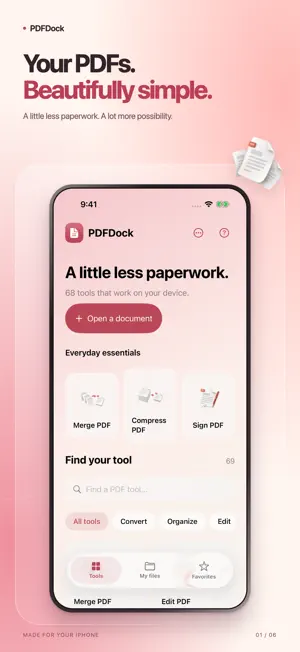
Bring your documents together in a simple PDF workspace. Merge and organize pages, scan paper documents, turn photos into PDFs, annotate, add saved handwritten signatures and preview your finished work before sharing. Keep exported files locally and find them again in My files or the Files app. Edit supported PDF text directly on the page. Import compatible static TrueType fonts, use undo and redo, and save an edited copy while keeping your original document. Most tools process documents on your device. URL to PDF connects to the website you choose. No conversion account is required. Conversion support varies by format. Office and ebook conversions focus on readable text and may omit original layout and images. PDF spreadsheet exports contain text rows rather than reconstructed tables. Text editing supports compatible individual text runs, not automatic paragraph reflow. Handwritten signatures are visual marks rather than certificate verified digital signatures.
App privacy
The developer, Nagarjuna Reddy Bhimavarapu, reported these privacy practices to Apple.
Data Not Collected
The developer does not collect any data from this app.
Alternatives to PDFDock
Looking for apps like PDFDock? Here are 6 similar apps on the App Store. The highest rated is Anycap: Capture & Bookmarks (5.0/5), and all 6 are free to download.
-
 Anycap: Capture & Bookmarks
5.0
-
 Inkstone Notes
-
 Okojo
-
 Markdown Viewer: Copy for AI
-
 Kasten - Zettelkasten Cards
5.0
-
 Nook: Read, Write, Own
| App | Rating | Price | Last updated | Compare |
|---|---|---|---|---|
| PDFDock | – | Free | September 21, 2026 | |
| Anycap: Capture & Bookmarks | 5.0 / 5 (2) | Free | Oct 22, 2026 | Compare |
| Inkstone Notes | – | Free | Sep 8, 2026 | Compare |
| Okojo | – | Free | Sep 10, 2026 | Compare |
| Markdown Viewer: Copy for AI | – | Free | Aug 20, 2026 | Compare |
| Kasten - Zettelkasten Cards | 5.0 / 5 (1) | Free | May 28, 2026 | Compare |
| Nook: Read, Write, Own | – | Free | Aug 27, 2026 | Compare |
Compare PDFDock with the top alternatives: ratings, updates, ASO score and keyword gaps →