

Inkstone Notes
Orris Productivity iPhoneiPadiPod touch
Inkstone Notes is a free Productivity app for iPhone and iPad by Orris. Requires iOS 26.0. Updated September 8, 2026.
- Price
- Free
- on the App Store
- Size
- 15 MB
- Age 4+
- Updated
- Sep 8
- 2026 · v0.1.1
Screenshots



About Inkstone Notes
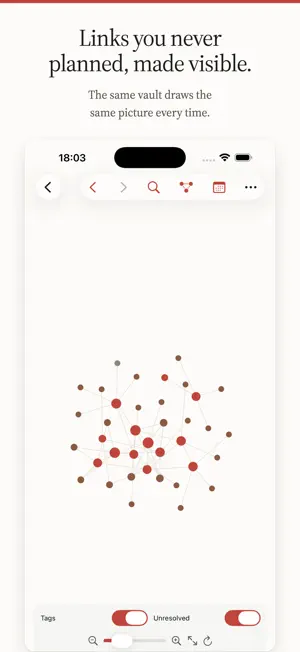
Inkstone keeps your notes as what they already are: plain Markdown files, in a folder you choose, on your own device. There is no database, no import step and no proprietary format. A vault another Markdown app created opens here, and a vault created here opens there. If Inkstone disappeared tomorrow, you would still have a folder of Markdown. WRITING Headings, bold, quotes, callouts, checkboxes, tables and code all render in place as you type, with the syntax revealed only on the line the cursor is on. Reading mode is a separate, read-only view for when you want the page without the scaffolding. Body font, code font and their sizes are set independently. LINKING [[Note]], [[Note#Heading]], [[Note^block]], ![[Embeds]] and aliases declared in frontmatter all resolve into one index. Every note shows what points at it, what it points at, and which of its links have no target yet. Rename a note and every link that pointed at it is rewritten across the whole vault, in the same action. SEEING THE SHAPE The graph view draws your notes as nodes joined by their links, and the simulation is deterministic — the same vault draws the same picture every time, so you can learn its layout instead of re-reading it on every open. SPATIAL NOTES The canvas puts cards, files and connections on an infinite sheet, saved as JSON Canvas 1.0 — the same open format other implementations read and write. FINDING THINGS A fuzzy switcher opens over every note with one gesture. Full-text search understands tag: and path:, and tags work inline or in frontmatter, nested, in any script. TYPOGRAPHY THAT HANDLES CJK Chinese sets solid — no word spaces — so a Latin word dropped into a Han sentence collides with it. Inkstone sets the gap between scripts properly, and lets you choose fonts and sizes that suit both. TWO DEVICES Sync a vault through iCloud, or push it to a GitHub repository with conflicts settled once rather than left as two copies. Per-file-type filters decide whether attachments and media travel with it. PRIVATE BY CONSTRUCTION No account. No telemetry. No network call you did not ask for. Your files are on your device and go only where you send them. Interface in English, Simplified Chinese and Traditional Chinese.
App privacy
The developer, Orris, reported these privacy practices to Apple.
Data Not Collected
The developer does not collect any data from this app.
Alternatives to Inkstone Notes
Looking for apps like Inkstone Notes? Here are 6 similar apps on the App Store. The highest rated is Kasten - Zettelkasten Cards (5.0/5), and all 6 are free to download.
-
 Okojo
Okojo
-
 Markdown Viewer: Copy for AI
-
 Nook: Read, Write, Own
-
 Kasten - Zettelkasten Cards
5.0
Kasten - Zettelkasten Cards
5.0
-
 Anycap: Capture & Bookmarks
5.0
Anycap: Capture & Bookmarks
5.0
-
 PureKanban
| App | Rating | Price | Last updated | Compare |
|---|---|---|---|---|
| Inkstone Notes | – | Free | September 8, 2026 | |
| Okojo | – | Free | Sep 10, 2026 | Compare |
| Markdown Viewer: Copy for AI | – | Free | Aug 20, 2026 | Compare |
| Nook: Read, Write, Own | – | Free | Aug 27, 2026 | Compare |
| Kasten - Zettelkasten Cards | 5.0 / 5 (1) | Free | May 28, 2026 | Compare |
| Anycap: Capture & Bookmarks | 5.0 / 5 (2) | Free | Oct 14, 2026 | Compare |
| PureKanban | – | Free | Aug 26, 2026 | Compare |
Compare Inkstone Notes with the top alternatives: ratings, updates, ASO score and keyword gaps →