

Markdown Viewer: Copy for AI
Yusuke Yamamoto Productivity iPhoneiPadiPod touch
Markdown Viewer: Copy for AI is a free Productivity app for iPhone and iPad by Yusuke Yamamoto. Requires iOS 17.0. Updated August 20, 2026.
- Price
- Free
- on the App Store
- Size
- 1 MB
- Age 4+
- Updated
- Aug 20
- 2026 · v1.0.2
Screenshots



About Markdown Viewer: Copy for AI
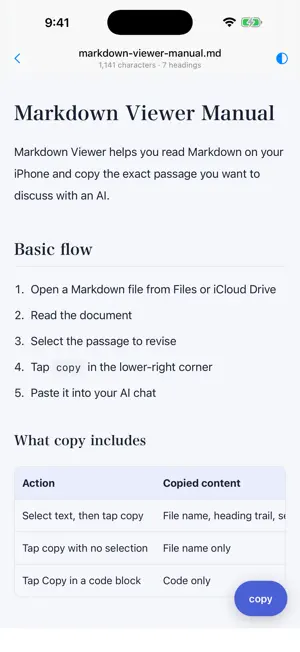
You spot a line worth fixing, but explaining which file and which section to an AI takes longer than the fix itself. Markdown Viewer removes that step. Select the text and tap copy. Then paste it into your AI chat. Three steps 1. Open a Markdown file from Files or iCloud Drive 2. Long-press to select the text you want to change 3. Tap copy in the lower right, then paste into an AI chat It copies more than the text Your selection arrives with its file name and heading trail attached. Here is what actually lands on your clipboard. File name: docs/current/plan.md Headings: Chapter 3 > Setup steps Selected text: """ An administrator handles the initial setup, and members join from an invite link. """ The AI sees which file, which section, and which sentence in a single paste. No more writing out where the text came from. Set the path yourself Tap the file name to enter any relative path. Something like docs/current/plan.md helps an AI pin down the target. Features • Markdown rendering with headings, tables, code blocks, and checklists • Text selection with context-rich copy • Open from Files, iCloud Drive, pasted text, or a sample document • Copy a code block on its own • Custom relative paths • Light and dark themes • Japanese and English, following your device language • VoiceOver and Dynamic Type support Good for • Reading back specs and notes written with an AI while you are out • Sending a fix to your AI the moment you notice it • Lining up edits before you get back to your desk • Reading Markdown from iCloud Drive in a clean layout Not included • Editing, saving, or exporting Markdown • Writing back to the original file • Automatic sending to an AI (it copies to your clipboard) • Accounts, sync, or direct cloud service connections Focused on reading and handing text to an AI. Light and simple. Not saved Your document, selections, copied text, and recent files are never stored. Everything runs on your device. No ads, no analytics. Requirements iPhone running iOS 17 or later. Supports .md and .markdown files in UTF-8, up to 1 MB.
What’s new
Version 1.0.2 · Updated August 20, 2026
External images are now supported When a document links to external images, you choose whether to load them. • Images are not loaded by default. Each one shows the host it comes from • They are fetched only when you tap "Show external images" at the top • You can also turn on "Always show external images" in the menu. It is off by default • Fetched images stay on your device and are not stored Layout fixes • Front matter at the top of a file now folds into a "Document info" section • Fixed link syntax that could leave stray brackets in the text • Fixed embedded content that appeared as a long block of markup • A line that is entirely a URL is now tappable • Fixed characters such as \_ showing as written Also • The sample document now explains what the app does not do • Japanese and English are now listed as supported languages
App privacy
The developer, Yusuke Yamamoto, reported these privacy practices to Apple.
Data Not Collected
The developer does not collect any data from this app.
Alternatives to Markdown Viewer: Copy for AI
Looking for apps like Markdown Viewer: Copy for AI? Here are 6 similar apps on the App Store. The highest rated is Kasten - Zettelkasten Cards (5.0/5), and all 6 are free to download.
-
 Okojo
Okojo
-
 Inkstone Notes
-
 Kasten - Zettelkasten Cards
5.0
Kasten - Zettelkasten Cards
5.0
-
 Nook: Read, Write, Own
-
 PDFDock
-
 Anycap: Capture & Bookmarks
5.0
Anycap: Capture & Bookmarks
5.0
| App | Rating | Price | Last updated | Compare |
|---|---|---|---|---|
| Markdown Viewer: Copy for AI | – | Free | August 20, 2026 | |
| Okojo | – | Free | Sep 10, 2026 | Compare |
| Inkstone Notes | – | Free | Sep 8, 2026 | Compare |
| Kasten - Zettelkasten Cards | 5.0 / 5 (1) | Free | May 28, 2026 | Compare |
| Nook: Read, Write, Own | – | Free | Aug 27, 2026 | Compare |
| PDFDock | – | Free | Sep 21, 2026 | Compare |
| Anycap: Capture & Bookmarks | 5.0 / 5 (2) | Free | Oct 14, 2026 | Compare |