

Nook: Read, Write, Own
KANG SEUNGHYUN Productivity iPhoneiPadiPod touch
Nook: Read, Write, Own is a free Productivity app for iPhone and iPad by KANG SEUNGHYUN. Requires iOS 18.0. Updated August 27, 2026.
- Price
- Free
- on the App Store
- Size
- 16 MB
- Age 17+
- Updated
- Aug 27
- 2026 · v0.1.2
Screenshots

About Nook: Read, Write, Own
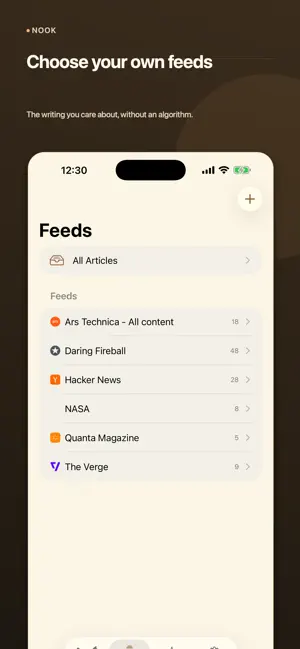
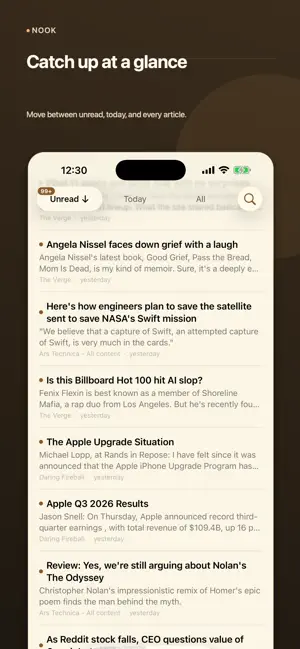
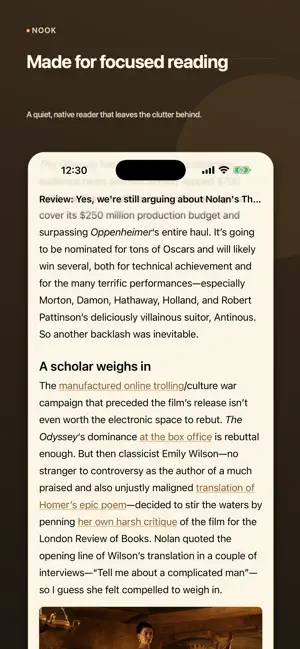
Nook is an RSS reader for people who would rather choose what they read. Add a feed, or paste a website and let Nook find the feed for you. Your subscriptions, what you have read, and what you have starred live on your device. There is no account to create, and nothing about your reading is sent anywhere. A READER THAT GETS OUT OF THE WAY Articles render natively, with real typography rather than a web page squeezed into a phone. Headings, quotes, code, tables, nested lists, images, and video all keep their structure. Set the font, size, line height, letter spacing, and colours, and switch any single feed to a full-page reader or the original site when its own layout is worth keeping. WORKS WITHOUT A NETWORK Nook is offline-first, not offline-capable. It launches, lists, and reads with no connection. Choose the articles to keep for later and decide when they expire. SYNC WITHOUT AN ACCOUNT Point Nook at a folder in iCloud Drive, Dropbox, or anywhere else that syncs files, and your feeds, read state, stars, categories, and folders follow you between devices. The folder service moves the files; Nook merges them, per device, so two devices changed at once do not overwrite each other. No server of ours is involved, because there isn't one. TRANSLATION, ON YOUR TERMS Translate a full article or just the titles in a list. Apple Intelligence runs on the device and costs nothing. Gemini is opt-in and uses an API key you provide, kept in this device's Keychain and never placed in the sync folder. ORGANISE IT HOWEVER YOU THINK Folders for feeds, colour-coded categories for articles, keyword rules, and text filters that collect what you would rather not see instead of deleting it. Optionally let Apple Intelligence or Gemini sort new articles by subject. QUIET BY DEFAULT No advertising, no tracking, no analytics, and no engagement mechanics. Badges and new-article notifications start off, and Nook asks for permission only after you turn one on — never at launch. PUBLISHING (BETA, INVITATION ONLY) Nook can also publish what you write. Articles are stored as records in an AT Protocol repository that belongs to you, and served as a web page with a real feed others can subscribe to. You can export every record and delete it at any time, including while publishing is suspended. This part of Nook is in beta and needs an invitation; everything above works without one.
What’s new
Version 0.1.2 · Updated August 27, 2026
- Importing an OPML keeps your folders, shows its progress, and no longer freezes the app while it loads. - Exporting an OPML now includes your folders, so exporting and re-importing keeps the same structure. - Delete several folders at once. - The feed list is faster and smoother — including selecting all your feeds.
App privacy
The developer, KANG SEUNGHYUN, reported these privacy practices to Apple.
Data Not Collected
The developer does not collect any data from this app.
Alternatives to Nook: Read, Write, Own
Looking for apps like Nook: Read, Write, Own? Here are 6 similar apps on the App Store. The highest rated is Anycap: Capture & Bookmarks (5.0/5), and all 6 are free to download.
-
 Inkstone Notes
-
 Okojo
Okojo
-
 Anycap: Capture & Bookmarks
5.0
Anycap: Capture & Bookmarks
5.0
-
 Kasten - Zettelkasten Cards
5.0
Kasten - Zettelkasten Cards
5.0
-
 Folio: Notes, PDFs & Canvas
-
 Markdown Viewer: Copy for AI
| App | Rating | Price | Last updated | Compare |
|---|---|---|---|---|
| Nook: Read, Write, Own | – | Free | August 27, 2026 | |
| Inkstone Notes | – | Free | Sep 8, 2026 | Compare |
| Okojo | – | Free | Sep 10, 2026 | Compare |
| Anycap: Capture & Bookmarks | 5.0 / 5 (2) | Free | Oct 14, 2026 | Compare |
| Kasten - Zettelkasten Cards | 5.0 / 5 (1) | Free | May 28, 2026 | Compare |
| Folio: Notes, PDFs & Canvas | – | Free | Sep 10, 2026 | Compare |
| Markdown Viewer: Copy for AI | – | Free | Aug 20, 2026 | Compare |