

JumpCut - Auto Silence Cut
LUNALINK Photo & Video iPhoneiPadiPod touch
JumpCut - Auto Silence Cut is a free Photo & Video app for iPhone and iPad by LUNALINK. Requires iOS 15.5. Updated November 5, 2026.
- Price
- Free
- on the App Store
- Size
- 74 MB
- Age 4+
- Updated
- Nov 5
- 2026 · v2.5.3
Screenshots
Save to Pinterest


About JumpCut - Auto Silence Cut
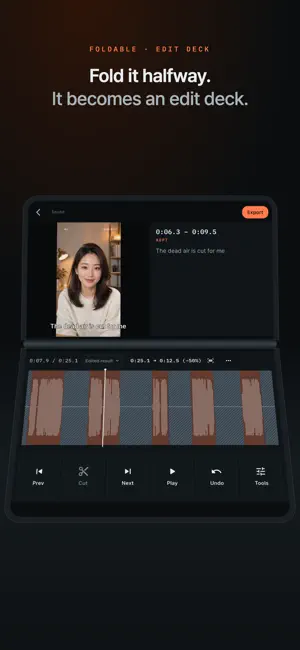
Drop in a video, and the dead air is gone. Auto captions · Auto dubbing · Subtitle files for YouTube • Recognizes speech and writes a caption for each segment. Edit any line by hand. • Translates those captions and reads them in that language as a new audio track, keeping the background sound underneath. • Exports .srt/.vtt so you can upload a subtitle track straight to YouTube — no need to burn text into the video. JumpCut finds the silent and static stretches, and cuts them out automatically. A 30-minute recording is analyzed in seconds; one slider controls how much gets cut, then you export. Key features • Zoomable timeline, draggable cut boundaries, split/merge for precise edits • Pick videos from Photos or the Files app (iCloud Drive, Google Drive) • Automatic silence detection — blazing fast • Sensitivity slider + presets (Talking · Tight · Relaxed) + fine-tuning • Tap segments on the timeline to cut or restore; the preview skips the cuts • Captions per segment, burned in; 9:16 vertical and 1:1 crops • Hardware-accelerated HEVC/H.264 encoding, save to Photos and share • Shrink video file size — make videos smaller without editing; batch and target size (25/100/300 MB) with Pro 100% on-device Analysis and encoding happen entirely on your phone. Nothing is uploaded, so it is fast, uses no data, and keeps your footage private. No watermark, no ads. Try everything free on your first 2 videos. If you like it, pick monthly, yearly, or lifetime. JumpCut Pro — monthly, yearly, or lifetime (one-time) • Your first 2 videos use every feature for free, no payment needed. • Lifetime is a single purchase — no subscription. ■ Subscription details • Monthly (1 month) / Yearly (1 year) auto-renewing subscriptions; Lifetime is a one-time payment • Renews automatically unless cancelled at least 24 hours before the period ends; billed to your store account • Manage or cancel any time in your account settings Terms of Use (EULA): https://www.apple.com/legal/internet-services/itunes/dev/stdeula/ Privacy Policy: https://jumpcut.filex.dev/privacy Support: https://jumpcut.filex.dev/contact
What’s new
Version 2.5.3 · Updated November 5, 2026
Share a video from Photos or Files, or use Open In, and JumpCut opens it straight in the editor.
App privacy
The developer, LUNALINK, reported these privacy practices to Apple.
Data Linked to You
The following data, which may be collected and linked to your identity, may be used for the following purposes:
- Contact Info: Email Address
- User Content: Other User Content
- Identifiers: User ID, Device ID
Used for: App Functionality
Data Not Linked to You
The following data, which may be collected but is not linked to your identity, may be used for the following purposes:
- Usage Data: Product Interaction
Used for: Analytics
Alternatives to JumpCut - Auto Silence Cut
Looking for apps like JumpCut - Auto Silence Cut? Here are 6 similar apps on the App Store. The highest rated is NoRetakes AI: Silence Remover (5.0/5), and all 6 are free to download.
-
 Dry Voice – Less Reverb
-
 NoRetakes AI: Silence Remover
5.0
-
 CatInCup: Silence Cut Editor
-
 tengi: Auto Video Editor
5.0
-
 ReCut - AI Video Editor
5.0
-
 RoughCut: Captions & Subtitles
5.0
| App | Rating | Price | Last updated | Compare |
|---|---|---|---|---|
| JumpCut - Auto Silence Cut | – | Free | November 5, 2026 | |
| Dry Voice – Less Reverb | – | Free | Nov 14, 2026 | Compare |
| NoRetakes AI: Silence Remover | 5.0 / 5 (1) | Free | Nov 28, 2026 | Compare |
| CatInCup: Silence Cut Editor | – | Free | Sep 25, 2026 | Compare |
| tengi: Auto Video Editor | 5.0 / 5 (1) | Free | Nov 26, 2026 | Compare |
| ReCut - AI Video Editor | 5.0 / 5 (2) | Free | Nov 23, 2026 | Compare |
| RoughCut: Captions & Subtitles | 5.0 / 5 (1) | Free | Nov 11, 2026 | Compare |