

NoRetakes AI: Silence Remover
Krishana Kant Chourasia Photo & Video iPhoneiPadiPod touch
NoRetakes AI: Silence Remover is a free Photo & Video app for iPhone and iPad by Krishana Kant Chourasia. Rated 5.0/5 from 1 ratings. Requires iOS 17.0.
- Rating
- 5.0
- 1 ratings
- Price
- Free
- on the App Store
- Size
- 19 MB
- Age 4+
- Updated
- Nov 28
- 2026 · v0.6.0
Screenshots
Save to Pinterest


About NoRetakes AI: Silence Remover
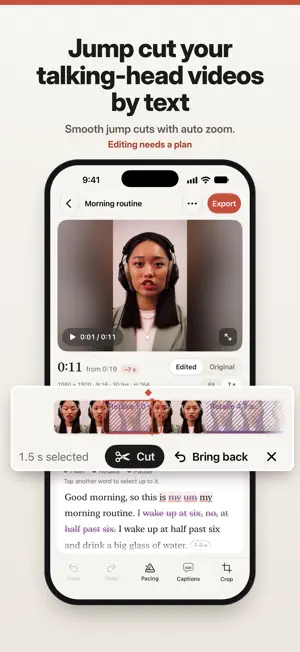
Post your best take, every time. Talk to the camera the way you naturally do: repeat a line until it lands, pause to think, say "um". NoRetakes AI finds the retakes, false starts, filler words and long pauses and cuts them, so only your best take is left. EVERY CUT VISIBLE. TAP TO BRING IT BACK. Every cut shows in the transcript and on the timeline, marked by reason: filler, retake, pause or your own cut. Tap a cut to see why, then tap Bring back to restore it. Undo anything. HOW IT WORKS • Record with the teleprompter, or pick a video from your library. • NoRetakes AI transcribes it and marks what to cut. Review it in the transcript or on the timeline. • Save to Photos in up to 4K, or optimize it for Instagram Reels, TikTok, YouTube or WhatsApp. FEATURES • Make my version: start from a video you like, and NoRetakes AI writes your own script from what's said, ready for the teleprompter. Paste a link, play it in another app, or pick a video or audio file. Source videos up to 10 minutes, on every plan. • Folders: sort your videos into folders. • Teleprompter: read your script while you record. Stumble? Say the whole line again, and NoRetakes AI keeps the last take. • Smooth jump cuts with auto zoom: subtle punch-ins at cuts, plus Zoom here to zoom in anywhere. • Pacing: one slider from Natural to Tight, keep a breath between sentences, and pick which filler words to cut. • Animated captions: five styles that follow your edit. Burn them in, or share an .srt file. • Studio sound (Pro, Ultimate): a cleaner voice and even volume, made on your device. • AI post text (Pro, Ultimate): titles, a caption and hashtags from your edit, plus YouTube chapters for longer edits. • Overlap audio (Pro, Ultimate): smoother sound at cuts. • Batch edits (Pro, Ultimate): up to 20 videos at once, with a notification as each is ready. YOUR VIDEO NEVER UPLOADS, SO IT'S FAST Your video never leaves your iPhone or iPad. To make the edit, NoRetakes AI sends the sound, which is deleted from our server as soon as the edit is ready. For Hindi and some other languages, a speech-recognition service does this step for us. It keeps no audio and doesn't use it to train its models. An AI service reads the transcript text to find the cuts and write your scripts. With the teleprompter, your script and line timings are sent too, and cleared when the edit finishes or fails (from backups within 14 days). The title, taken from the script's first line, stays with the project. For Make my version, only the chosen video's sound is sent, deleted once transcribed. No link data leaves your device. Scripts stay on our server up to 30 days, or until you delete them. No ads, no tracking. LANGUAGES More than 30 languages, including English, Spanish, French, German, Italian, Portuguese, Dutch, Hindi and Hinglish, Indonesian and Turkish. Pick yours in Settings › Video language. PLANS Your first AI cut is free (videos up to 5 minutes) and exports as it is, with a small watermark. Editing it or bringing cuts back needs a plan. New subscribers get a 3-day free trial (up to 10 AI edits and 3 scripts). The plans screen shows the date you'll be charged before you start, and edits or scripts that fail never count. No watermark on any plan. • Starter: 50 AI edits a month, 10 scripts a month, videos up to 15 minutes. • Pro: 150 AI edits a month, 50 scripts a month, videos up to 30 minutes, every Pro feature above. • Ultimate: unlimited AI edits (fair use: up to 600 edits or 300 hours a month), unlimited scripts (fair use), videos up to 60 minutes, everything in Pro. Monthly or yearly; prices in the app. Payment is charged to your Apple Account when you confirm the purchase, or when the free trial ends. Subscriptions renew automatically unless cancelled at least 24 hours before the end of the current period. Manage or cancel them in Settings › your name › Subscriptions. Terms of Use: https://noretakesai.com/terms/ Privacy Policy: https://noretakesai.com/privacy/
What’s new
Version 0.6.0 · Updated November 28, 2026
• Make my version: start from a video you like, and NoRetakes AI writes your own script from what's said, ready for the teleprompter. Paste a link, play it in another app, or pick a video or audio file. Source videos up to 10 minutes, on every plan. • Scripts: Starter includes 10 scripts a month, Pro 50 scripts a month, and Ultimate unlimited scripts (fair use). The free trial includes 3. • Folders: sort your videos into folders. • Fixed: the app could close while making a before/after clip.
App privacy
The developer, Krishana Kant Chourasia, reported these privacy practices to Apple.
Data Linked to You
The following data, which may be collected and linked to your identity, may be used for the following purposes:
- Contact Info: Email Address
- Usage Data: Product Interaction
- Purchases: Purchase History
- User Content: Audio Data, Other User Content
- Identifiers: User ID, Device ID
Used for: Developer’s Advertising or Marketing, Analytics, App Functionality
Data Not Linked to You
The following data, which may be collected but is not linked to your identity, may be used for the following purposes:
- Diagnostics: Crash Data, Performance Data
Used for: App Functionality
Alternatives to NoRetakes AI: Silence Remover
Looking for apps like NoRetakes AI: Silence Remover? Here are 6 similar apps on the App Store. The highest rated is ReCut - AI Video Editor (5.0/5), and all 6 are free to download.
-
 JumpCut - Auto Silence Cut
-
 CatInCup: Silence Cut Editor
-
 ReCut - AI Video Editor
5.0
-
 Begin Teleprompter: 4K Camera
5.0
-
 HushCut: Silence & Filler
5.0
-
 PopScript: AI Video Editor
5.0
| App | Rating | Price | Last updated | Compare |
|---|---|---|---|---|
| NoRetakes AI: Silence Remover | 5.0 / 5 (1 rating) | Free | November 28, 2026 | |
| JumpCut - Auto Silence Cut | – | Free | Nov 5, 2026 | Compare |
| CatInCup: Silence Cut Editor | – | Free | Sep 25, 2026 | Compare |
| ReCut - AI Video Editor | 5.0 / 5 (2) | Free | Nov 23, 2026 | Compare |
| Begin Teleprompter: 4K Camera | 5.0 / 5 (1) | Free | Nov 20, 2026 | Compare |
| HushCut: Silence & Filler | 5.0 / 5 (1) | Free | Sep 15, 2026 | Compare |
| PopScript: AI Video Editor | 5.0 / 5 (3) | Free | Nov 25, 2026 | Compare |