

ReCut - AI Video Editor
NOVAIRE CAPITAL CORPORATION Photo & Video iPhoneiPadiPod touch
ReCut - AI Video Editor is a free Photo & Video app for iPhone and iPad by NOVAIRE CAPITAL CORPORATION. Rated 5.0/5 from 2 ratings. Requires iOS 17.0.
- Rating
- 5.0
- 2 ratings
- Price
- Free
- on the App Store
- Size
- 56 MB
- Age 12+
- Updated
- Nov 23
- 2026 · v1.0.1
Screenshots
Save to Pinterest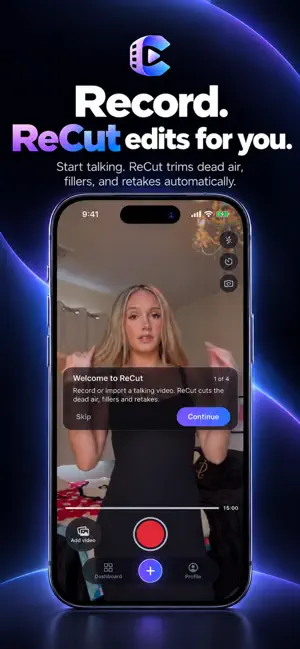


About ReCut - AI Video Editor
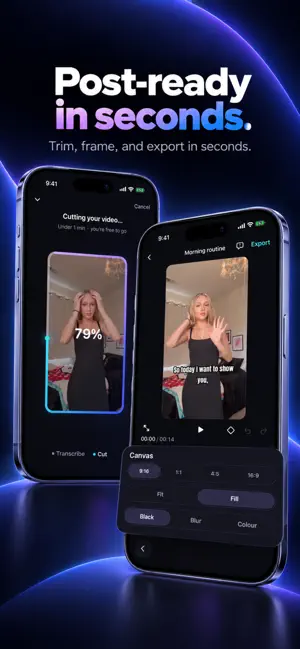
Film it messy. Post it clean. ReCut cuts the dead air, filler words, retakes and tangents out of your talking videos in one tap, then gives you a simple editor to finish them. ReCut requires a ReCut Premium subscription (Starter, Pro or Ultimate); annual plans can start with a free trial. Record in the app or import your clips. ReCut listens to the speech, cuts what you would cut yourself, and shows every cut with its reason, so you can restore anything with a tap. Made for creators, coaches, sellers and brands who talk to camera and would rather post than edit. WHAT RECUT CUTS • Silences and dead air, found on your iPhone (ReCut Premium) • Filler words like "um" and "uh" (ReCut Premium) • Retakes, false starts and repeats, keeping one complete take of each line (ReCut Premium) • Tangents and asides that wander off topic (ReCut Premium) • Tight or Natural pacing, and each kind of cut can be switched off in Settings (ReCut Premium) RECORD AND EDIT • Record with the front or back camera, one take at a time, or import from Photos and Files: up to 100 clips and 15 minutes per project (ReCut Premium) • 10 caption styles, with editable, timestamped lines and your choice of capitalization (ReCut Premium) • Text overlays with fonts, colours, backgrounds and timing (ReCut Premium) • B-roll picture-in-picture from your videos and photos (ReCut Premium) • Keyframes to move, scale and rotate overlays over time (ReCut Premium) • Canvas sizes 9:16, 1:1, 4:5 and 16:9, with fit or fill and a black, blurred or coloured background (ReCut Premium) • Undo and redo, up to 100 steps (ReCut Premium) • Music and voiceover tracks (ReCut Premium: Pro and Ultimate) • Batch: cut up to 10 videos at once, one project each (ReCut Premium: Pro and Ultimate) EXPORT • Export up to 4K (never above your source) at up to 60 fps, and save to Photos (ReCut Premium) • A notification when your cut is ready, so you can leave while it works (ReCut Premium) PRIVATE BY DESIGN Only the audio track of your video leaves your iPhone. Video frames, photos, thumbnails and your project library never do. The audio is deleted right after transcription and is never kept longer than 48 hours. Transcripts and cut plans are deleted when your iPhone receives them, or within 7 days if it never does. Projects live only on this iPhone. Deleting ReCut deletes them. PLANS Starter: 100 AI edits a month. Pro: 300 AI edits a month, plus music and voiceover tracks and batch. Ultimate: Unlimited* AI edits and everything in Pro. *Fair use: 1,000 edits and 2,000 minutes of audio a month; 150 edits and 600 minutes per rolling 24 hours. An edit is one AI processing of one project, covering all of its clips. Editing by hand and exporting never use an edit. SUBSCRIPTION TERMS Payment is charged to your Apple Account when you confirm the purchase, or when the free trial ends if you started one. The free trial is available once per Apple Account. Subscriptions renew automatically unless canceled at least 24 hours before the end of the current period, and you can manage or cancel them in your App Store account settings. Prices are shown in the app in your local currency. Terms of Service: https://www.userecut.com/terms Privacy Policy: https://www.userecut.com/privacy
What’s new
Version 1.0.1 · Updated November 23, 2026
Tracking fixes!
App privacy
The developer, NOVAIRE CAPITAL CORPORATION, reported these privacy practices to Apple.
Data Used to Track You
The following data may be used to track you across apps and websites owned by other companies:
- Purchases: Purchase History
- Identifiers: User ID, Device ID
- Usage Data: Product Interaction, Advertising Data
Data Linked to You
The following data, which may be collected and linked to your identity, may be used for the following purposes:
- Purchases: Purchase History
- Identifiers: User ID, Device ID
- Usage Data: Product Interaction, Advertising Data
- User Content: Other User Content, Audio Data
- Diagnostics: Crash Data, Performance Data, Other Diagnostic Data
- Other Data: Other Data Types
- Contact Info: Email Address, Name
Used for: Third-Party Advertising, Developer’s Advertising or Marketing, Analytics, App Functionality
Alternatives to ReCut - AI Video Editor
Looking for apps like ReCut - AI Video Editor? Here are 6 similar apps on the App Store. The highest rated is NoRetakes AI: Silence Remover (5.0/5), and all 6 are free to download.
-
 Clipo: Video Editor
-
 NoRetakes AI: Silence Remover
5.0
-
 JumpCut - Auto Silence Cut
-
 TakeCut: AI Video Editor
5.0
-
 Digicam: Y2K Digital Camera
-
 FTMV AI
5.0
| App | Rating | Price | Last updated | Compare |
|---|---|---|---|---|
| ReCut - AI Video Editor | 5.0 / 5 (2 ratings) | Free | November 23, 2026 | |
| Clipo: Video Editor | – | Free | Nov 17, 2026 | Compare |
| NoRetakes AI: Silence Remover | 5.0 / 5 (1) | Free | Nov 28, 2026 | Compare |
| JumpCut - Auto Silence Cut | – | Free | Nov 5, 2026 | Compare |
| TakeCut: AI Video Editor | 5.0 / 5 (2) | Free | Nov 24, 2026 | Compare |
| Digicam: Y2K Digital Camera | – | Free | Oct 10, 2026 | Compare |
| FTMV AI | 5.0 / 5 (1) | Free | Oct 13, 2025 | Compare |