

RoughCut: Captions & Subtitles
erdem caygor Photo & Video iPhoneiPadiPod touch
RoughCut: Captions & Subtitles is a free Photo & Video app for iPhone and iPad by erdem caygor. Requires iOS 17.0. Updated October 23, 2026.
- Price
- Free
- on the App Store
- Size
- 11 MB
- Age 4+
- Updated
- Oct 23
- 2026 · v1.5
Screenshots

About RoughCut: Captions & Subtitles
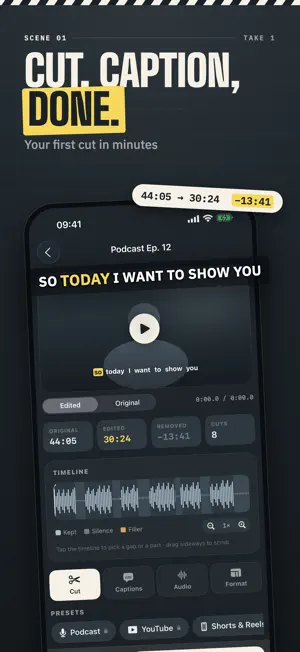
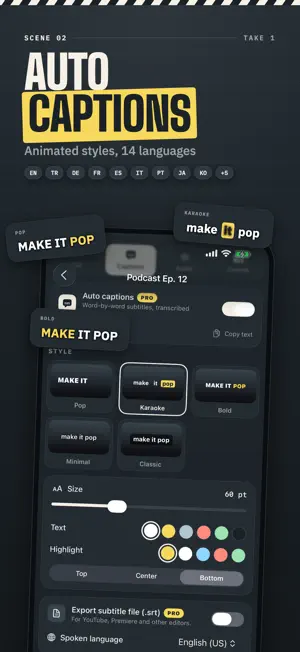
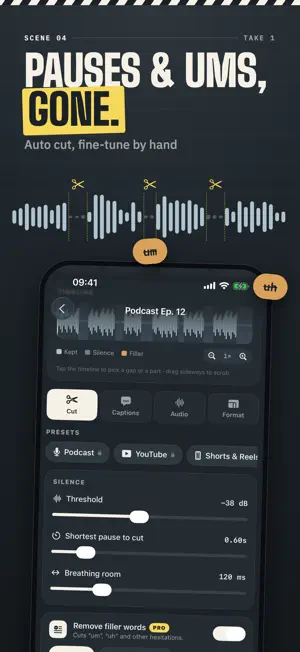
Stop scrubbing through hours of footage looking for the boring parts. RoughCut turns a rambling talking-head recording into a tight, captioned, clean-sounding video in minutes: it cuts silence and filler words, adds animated captions and cleans up your audio. Drop in a podcast, vlog, tutorial or Reel and let RoughCut do the tedious first pass. You review every cut before you export, so the edit is always yours. No account, no sign-up. AUTO CUT SILENCE AND DEAD AIR • Finds and removes silent gaps, dead air and awkward pauses automatically, like a jump-cut edit done for you • Fine-tune the silence threshold, minimum pause length and padding around each cut so the result feels natural, not choppy • Boost the volume of quiet recordings • Tap any part of the timeline to keep it or cut it by hand REMOVE FILLER WORDS (PRO) • Detects "um", "uh" and other hesitations and cuts them out • Turn it on or off per video and check every cut on the waveform AUTO CAPTIONS AND SUBTITLES (PRO) • Automatic captions in 14 languages • Animated word-by-word styles: Pop, Karaoke, Bold, Minimal and Classic • Burn captions into the video or export an SRT subtitle file STUDIO CLEAN AUDIO (PRO) • Reduces background noise and room hum behind your voice • Levels loudness so every clip sounds consistent READY FOR EVERY PLATFORM • Reframe to 9:16, 1:1 or 16:9 for Reels, TikTok, Shorts, feed posts and YouTube • Export in 1080p for free, or up to 4K with Pro • Import videos from Photos or Files, or audio-only recordings • Batch processing: queue several clips and let RoughCut cut, caption and export them in one pass (Pro) • Save your favorite settings as presets and apply a whole look in one tap • Works on iPhone and iPad PRIVATE BY DESIGN Silence detection, audio cleanup, reframing and export all run on your device, and your videos are never uploaded to our servers. Captions use Apple's speech recognition, which runs on-device for supported languages. PERFECT FOR • Podcasters cutting dead air between thoughts • YouTubers and vloggers editing talking-head footage • TikTok, Reels and Shorts creators who need fast, clean cuts • Teachers and course creators trimming tutorials and lectures • Anyone who records long and wants to post short FREE AND PRO Free: silence removal, manual edits, reframing, presets and 1080p export. RoughCut Pro: auto captions, filler-word removal, Studio Clean Audio, batch processing, 4K export and SRT subtitles. Pro is available as a weekly or annual auto-renewinfor your country is shown in the app before you buy. Payment is charged to your Apple Account when you confirm the purchase. The subscription renews automatically unless it is cancelled at least 24 hours before the end ocan manage or cancel it at any time in your Apple Account settings. Privacy Policy: https://lumiq.art/roughcut/privacy-policy Terms of Use (EULA): https://www.apple.com/legal/internet-services/itunes/dev/stdeula/ Download RoughCut and turn your next recording in minutes.
What’s new
Version 1.5 · Updated October 23, 2026
Big update: RoughCut now does captions and clean audio too. • Auto captions in 14 languages with animated styles: Pop, Karaoke, Bold, Minimal and Classic • SRT subtitle export • Studio Clean Audio: background noise reduction and loudness leveling • Filler-word removal ("um", "uh") • New timeline: see the real waveform, tap any part to keep it or cut it • Batch processing and 4K export • Import from Files, including audio-only recordings • Redesigned iPad layout with a two-column editor • The app is now available in 9 languages • Fresh new look and icon • Performance and stability improvements
App privacy
The developer, erdem caygor, reported these privacy practices to Apple.
Data Not Linked to You
The following data, which may be collected but is not linked to your identity, may be used for the following purposes:
- Identifiers: User ID, Device ID
- Usage Data: Product Interaction
Used for: Analytics
Alternatives to RoughCut: Captions & Subtitles
Looking for apps like RoughCut: Captions & Subtitles? Here are 6 similar apps on the App Store. The highest rated is HushCut: Silence & Filler (5.0/5), and all 6 are free to download.
-
 QuietCut: Silence Remover
-
 Pauseless: Auto Silence Cutter
-
 Cutter - Auto Rough Cut
-
 CatInCup: Silence Cut Editor
-
 HushCut: Silence & Filler
5.0
HushCut: Silence & Filler
5.0
-
 SilenceCut - Remove Silence
| App | Rating | Price | Last updated | Compare |
|---|---|---|---|---|
| RoughCut: Captions & Subtitles | – | Free | October 23, 2026 | |
| QuietCut: Silence Remover | – | Free | Aug 17, 2026 | Compare |
| Pauseless: Auto Silence Cutter | – | Free | Aug 6, 2026 | Compare |
| Cutter - Auto Rough Cut | – | Free | Oct 11, 2026 | Compare |
| CatInCup: Silence Cut Editor | – | Free | Sep 25, 2026 | Compare |
| HushCut: Silence & Filler | 5.0 / 5 (1) | Free | Sep 15, 2026 | Compare |
| SilenceCut - Remove Silence | – | Free | Oct 22, 2026 | Compare |