

Doc Scanner To PDF
Robert Lyon Productivity iPhoneiPadiPod touch
Doc Scanner To PDF is a free Productivity app for iPhone and iPad by Robert Lyon. Requires iOS 17.0. Updated September 26, 2026.
- Price
- Free
- on the App Store
- Size
- 2 MB
- Age 4+
- Updated
- Sep 26
- 2026 · v1.0
Screenshots



About Doc Scanner To PDF
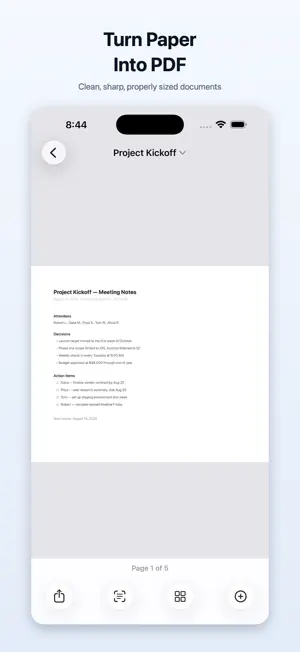
Scanner turns paper into clean, professional PDFs in seconds — and the core scanner is genuinely free. No subscription. No watermark on your exports. No account to create. No trial that expires halfway through your first scan. NO PAYWALL, NO CATCHES Most scanner apps let you scan, then ask for money at the moment you try to export. This one doesn't. Scanning, multi-page documents, PDF creation, sharing, filters, cropping, text recognition and search are all free, with no page limits. SCAN ANYTHING, INSTANTLY Point your camera at a document and Scanner finds the edges, straightens the perspective and crops it automatically. Receipts, contracts, notes, business cards, whiteboards, ID cards, forms, handwritten pages — if it's on paper, it scans. A CAMERA SCANNER, NOT A PHOTO ALBUM Your camera takes a picture of a page. Scanner turns it into a document — edges found, perspective straightened, shadows removed, paper made white. Already have photos of documents? Import them and the same thing happens: each page is detected, cleaned up and combined into one properly sized PDF. Photos to PDF, receipts to PDF, whole stacks of paper to PDF, all on device. MANY PAGES, ONE DOCUMENT Keep scanning and pages stack into a single document. Drag to reorder, rotate, crop, duplicate or delete any page, and add more later. Export the whole thing as one file. REAL PDFs, NO WATERMARK Exported PDFs are sharp, properly sized and completely unbranded. Choose Standard for smaller files that email easily, or High Quality when detail matters. Share straight to Messages, Mail, AirDrop, Files, or any app on your device — or save individual pages as JPEG or PNG. SEARCHABLE TEXT, INCLUDED Scanner reads the text on your pages using your device's built-in recognition, so you can search your scans by their contents. Look for "insurance" and find the insurance document, even if that word isn't in the title. Your exported PDFs are searchable too. Text stays selectable and findable in Files, Preview, Acrobat and Gmail — not just inside this app. Most apps charge for that. This one doesn't. CLEAN UP EVERY PAGE Enhanced mode evens out shadows and uneven lighting so text is crisp and paper looks white. Or pick Color, Grayscale, or high-contrast Black & White. Adjust the corners by hand whenever you like — your original capture is always kept, so nothing is ever destroyed. STAY ORGANIZED Sort scans into folders, star the ones you need often, rename anything, and switch between list and grid. Deleted something by accident? Recently Deleted holds it for 30 days. YOUR DOCUMENTS STAY ON YOUR DEVICE This is the part we care about most. Your scans never leave your phone. They aren't uploaded to us, sent to an AI service, or used for advertising. Text recognition runs entirely on device. There's no account because there's nothing to sync — and nothing for anyone to breach. Scanning works fully offline. WHY PEOPLE SWITCH It's a free iPhone scanner that behaves like a paid one: fast, quiet, native, and honest about what it does. No fake AI branding, no onboarding survey, no popup asking you to subscribe before you've scanned a thing. Scanner is supported by ads, kept deliberately away from your documents. You will never see an ad while the camera is open, while you're cropping or editing, while text is being recognized, while a document is on screen, or inside an exported PDF. Also works on iPad.
App privacy
The developer, Robert Lyon, reported these privacy practices to Apple.
Data Not Collected
The developer does not collect any data from this app.
Alternatives to Doc Scanner To PDF
Looking for apps like Doc Scanner To PDF? Here are 6 similar apps on the App Store.
-
 scandango: Document Scanner
-
 KaranScan: PDF Scanner
-
 ScanOwl: PDF Document Scanner
-
 ScanNgai: Scan, Sign & Send
-
 PDF Watermark & Stamp
-
 Scanner PDF: Doc Scan & OCR
| App | Rating | Price | Last updated | Compare |
|---|---|---|---|---|
| Doc Scanner To PDF | – | Free | September 26, 2026 | |
| scandango: Document Scanner | – | Free | Oct 10, 2026 | Compare |
| KaranScan: PDF Scanner | – | Free | Oct 19, 2026 | Compare |
| ScanOwl: PDF Document Scanner | – | Free | Oct 17, 2026 | Compare |
| ScanNgai: Scan, Sign & Send | – | Free | Oct 15, 2026 | Compare |
| PDF Watermark & Stamp | – | Free | Oct 12, 2026 | Compare |
| Scanner PDF: Doc Scan & OCR | – | Free | Sep 14, 2026 | Compare |
Compare Doc Scanner To PDF with the top alternatives: ratings, updates, ASO score and keyword gaps →