

scandango: Document Scanner
Neil Johnson Productivity iPhoneiPadiPod touch
scandango: Document Scanner is a free Productivity app for iPhone and iPad by Neil Johnson. Requires iOS 26.0. Updated October 10, 2026.
- Price
- Free
- on the App Store
- Size
- 38 MB
- Age 4+
- Updated
- Oct 10
- 2026 · v1.2
Screenshots
About scandango: Document Scanner
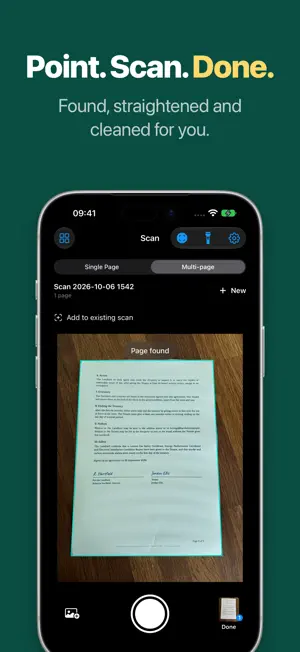
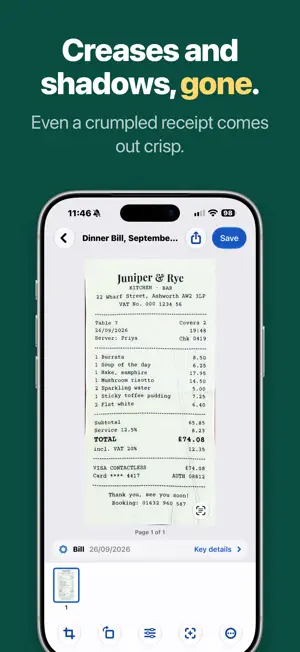
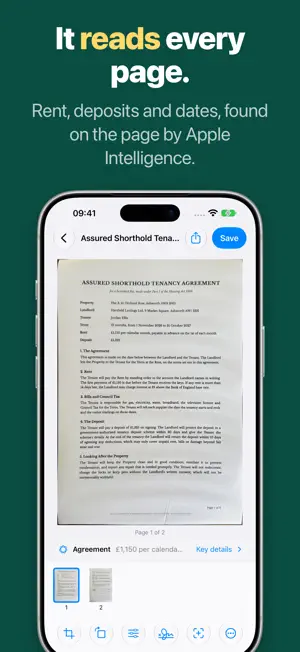
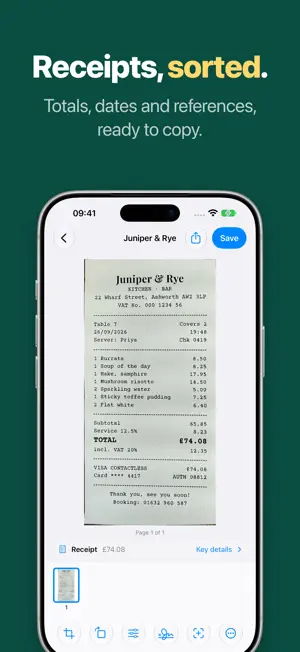
Turn paper into clean PDF and PNG files on your iPhone or iPad. Point the camera at a page and scandango finds the edges, straightens it, cleans it up and reads the text. Everything happens on your device. SMART NAMES AND KEY DETAILS Apple Intelligence reads each scan and names it for you, like "Electricity Bill, October 2026" instead of "Scan 2026-10-01 0915". It picks out the dates, amounts and reference numbers that matter, and adds a due date to Calendar in one tap. On iPhones without Apple Intelligence, scandango names scans from their first line of text. SCAN IN SECONDS Single Page saves each scan on its own. Multi-page keeps related pages together. Add pages to a scan from your library at any time, and your unfinished scans stay saved. CLEAN, STRAIGHT PAGES Auto evens out lighting and shadows and sharpens text, while checking it hasn't lost detail or changed color. Crop, rotate, reorder and undo edits. Choose Color, Grayscale, Black and White or Original. On iOS 27, Flatten Curved Page straightens pages from books. FIND ANYTHING Search your library by name, by any word in a scan, or by kind of document, such as "receipts" or "letters". Select and copy text with Live Text. SIGN, SORT AND KEEP TRACK • Sign & Mark Up: sign, write and highlight on any page with Apple Pencil or your finger. • Smart Folders: receipts, bills, letters and more, sorted into folders as you scan. • Bill Reminders: a reminder before a bill is due, from the date on the page. • Expenses: receipts, invoices and bills in one list with totals, ready to export as a spreadsheet. SAVE AND SHARE Searchable PDFs, PNG images, text files, PDF passwords, custom page sizes and margins, and batch export. Save to Files or Photos, or share with any app. Open scandango from Shortcuts, Control Center or a Lock Screen widget. BUILT FOR IPHONE DUO AND IPAD Open iPhone Duo and scan on one side while your pages build up on the other. On iPad, your library sits in a sidebar beside the scan you're working on, with tools at the top, keyboard shortcuts and drag and drop. PRIVATE BY DESIGN No account, ads or subscription, and every feature is free. Your scans, their text and Apple Intelligence all stay on your device unless you choose to share them. Requires iOS 26 or later. Smart names and summaries need a device with Apple Intelligence.
What’s new
Version 1.2 · Updated October 10, 2026
Made for iPhone Duo: open it up and scan on one side while your pages build up on the other. A new iPad design, with your library in a sidebar beside the scan, tools at the top and keyboard shortcuts. New and free for everyone: Sign & Mark Up, Smart Folders, Bill Reminders and Expenses.
App privacy
The developer, Neil Johnson, reported these privacy practices to Apple.
Data Not Collected
The developer does not collect any data from this app.
Alternatives to scandango: Document Scanner
Looking for apps like scandango: Document Scanner? Here are 6 similar apps on the App Store. The highest rated is Holdr+ (5.0/5), and all 6 are free to download.
-
 Doc Scanner To PDF
-
 Fleetly
-
 Holdr+
5.0
Holdr+
5.0
-
 Iris: AI Assistant for Watch
4.2
Iris: AI Assistant for Watch
4.2
-
 FireAngel Connected
-
 Foreplay Ad Swipe File
2.0
Foreplay Ad Swipe File
2.0
| App | Rating | Price | Last updated | Compare |
|---|---|---|---|---|
| scandango: Document Scanner | – | Free | October 10, 2026 | |
| Doc Scanner To PDF | – | Free | Sep 26, 2026 | Compare |
| Fleetly | – | Free | Mar 21, 2026 | Compare |
| Holdr+ | 5.0 / 5 (4) | Free | Apr 2, 2025 | Compare |
| Iris: AI Assistant for Watch | 4.2 / 5 (21) | Free | Oct 21, 2026 | Compare |
| FireAngel Connected | – | Free | Sep 9, 2025 | Compare |
| Foreplay Ad Swipe File | 2.0 / 5 (4) | Free | Sep 18, 2026 | Compare |