

NoLight: Black Screen Camera
Sang Cao Photo & Video iPhoneiPadiPod touch
NoLight: Black Screen Camera is a free Photo & Video app for iPhone and iPad by Sang Cao. Requires iOS 17.0. Updated September 11, 2026.
- Price
- Free
- on the App Store
- Size
- 3 MB
- Age 17+
- Updated
- Sep 11
- 2026 · v1.1
Screenshots


About NoLight: Black Screen Camera
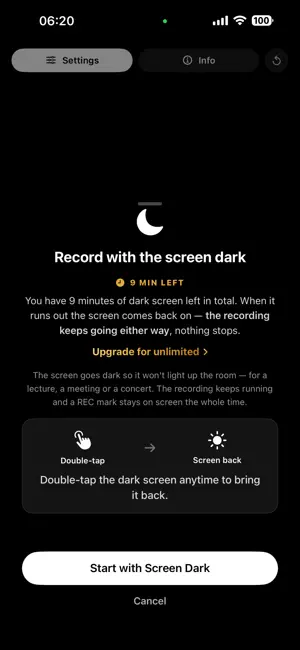
NoLight is a black screen camera and recording workspace designed for focused, distraction-free video capture. Record video while keeping your screen dark, or continue working inside NoLight with useful tools like Web, Notes, and Clock. KEY FEATURES BLACK SCREEN RECORDING Start recording and switch to a completely black display whenever you want. Restore the screen instantly without stopping your recording. ALWAYS-VISIBLE RECORDING INDICATOR While NoLight is recording, an on-screen indicator is shown at all times - including while the screen is black. It cannot be turned off, and there is no setting or gesture that hides it. RECORDING WORKSPACE Keep recording while using built-in tools: • Web browser • Notes • Clock • Vault CAMERA CONTROLS Choose the settings that fit your session: • Video or photo • Front or back camera • 1080p and 4K on supported devices • Microphone control • Recording background options QUICK BLACKOUT Start directly in blackout mode, or switch to the black screen while recording using supported controls. NOTES WHILE RECORDING Capture ideas, reminders, or research notes without ending your recording session. VAULT A separate space inside NoLight, unlocked with Face ID or a PIN you choose, for your own recordings, notes and browsing — much like the Hidden album in Photos or a Face ID–locked folder in Notes. It protects your own material from someone else picking up your unlocked phone. It does not change how recording is indicated. STORED ON YOUR DEVICE Recordings are saved on your device. NoLight has no accounts and uploads nothing; files leave your device only when you choose to export or share them. BUILT FOR REAL SESSIONS NoLight is useful for lectures, meetings, research, events, presentations, long recording sessions, and other situations where a bright camera screen can be distracting. NoLight respects iOS camera and microphone permissions and system privacy indicators.
What’s new
Version 1.1 · Updated September 11, 2026
NoLight Pro is here — one purchase, not a subscription. • Unlimited dark screen while recording • Vault: a separate space for recordings and browsing, behind Face ID or a PIN • Keep working in Workspace while a recording runs • 4K video, and export to Files • A coloured dark screen instead of plain black The free version still records video and photos with no time limit, and includes 10 minutes of dark screen so you can see how it works before deciding. Also in this update: • Choose how to bring the screen back: double tap, triple tap, or press and hold. Whichever you pick, the dark screen says so on itself. • Clearer feedback by touch when a recording starts, stops, or the screen goes dark. If you downloaded NoLight before this update, every Pro feature stays unlocked for you at no cost.
App privacy
The developer, Sang Cao, reported these privacy practices to Apple.
Data Not Collected
The developer does not collect any data from this app.
Alternatives to NoLight: Black Screen Camera
Looking for apps like NoLight: Black Screen Camera? Here are 6 similar apps on the App Store. The highest rated is Screet - Black Screen Camera (5.0/5), and all 6 are free to download.
-
 Blackout Camera
-
 BlackOut: Black Screen Camera
3.0
BlackOut: Black Screen Camera
3.0
-
 Black Screen Camera QuietCam
4.5
Black Screen Camera QuietCam
4.5
-
 Screet - Black Screen Camera
5.0
Screet - Black Screen Camera
5.0
-
 Kemra - Black Screen Camera
4.7
Kemra - Black Screen Camera
4.7
-
 Float Cam - Background camera
3.6
Float Cam - Background camera
3.6
| App | Rating | Price | Last updated | Compare |
|---|---|---|---|---|
| NoLight: Black Screen Camera | – | Free | September 11, 2026 | |
| Blackout Camera | – | Free | Oct 20, 2026 | Compare |
| BlackOut: Black Screen Camera | 3.0 / 5 (2) | Free | Oct 16, 2026 | Compare |
| Black Screen Camera QuietCam | 4.5 / 5 (51) | Free | Oct 22, 2026 | Compare |
| Screet - Black Screen Camera | 5.0 / 5 (1) | Free | Oct 26, 2026 | Compare |
| Kemra - Black Screen Camera | 4.7 / 5 (3) | Free | Sep 7, 2026 | Compare |
| Float Cam - Background camera | 3.6 / 5 (7) | Free | Oct 19, 2026 | Compare |