

Screet - Black Screen Camera
Semih Karakaya Photo & Video iPhoneiPadiPod touch
Screet - Black Screen Camera is a free Photo & Video app for iPhone and iPad by Semih Karakaya. Rated 5.0/5 from 2 ratings. Requires iOS 17.0.
- Rating
- 5.0
- 2 ratings
- Price
- Free
- on the App Store
- Size
- 44 MB
- Age 4+
- Updated
- Nov 14
- 2026 · v1.3.2
Screenshots
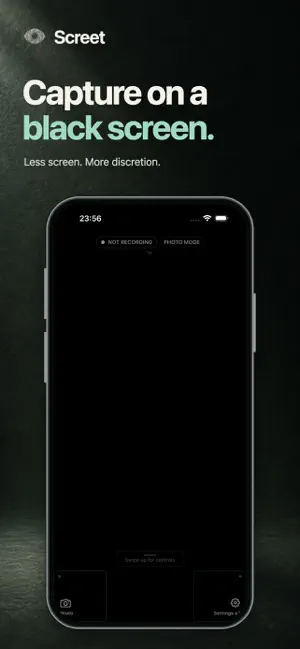
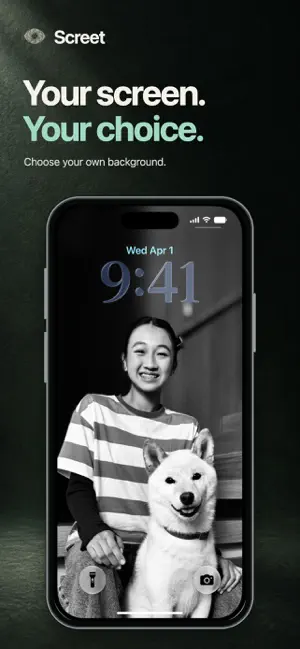


About Screet - Black Screen Camera
A black screen for less glare. Silent photos for quieter moments. Screet puts discreet photo and video controls within reach, so you can choose your camera setup and capture at your own pace. BLACK SCREEN CAMERA Keep the capture screen black or dim the display to reduce the bright camera preview. Choose the look that suits the moment while keeping control of when a photo or recording begins. Black screen changes the capture interface only; the iOS camera and microphone indicators remain visible. SILENT PHOTOS Silent Capture creates a still photo from a live video frame without the usual shutter sound. This Screet Pro mode is for photos, not silent video. Video may record microphone audio when you grant permission. Silent Capture does not use flash. YOUR CAMERA, YOUR CONTROLS • Switch between the front and rear cameras. • Choose photo or video and your save destination before capture. • Select HD or 4K, with 30 or 60 FPS on supported devices and formats. • Adjust zoom up to 5× where supported. • Use flash in compatible standard photo mode. Available resolution, frame rate, zoom and flash depend on your iPhone, selected camera and capture format. OPEN THE CAMERA, THEN CAPTURE Widgets and shortcuts open the capture screen; they never start recording automatically. You start and stop capture yourself. Screet must stay open in the foreground and does not record in the background or while your iPhone is locked. Standard photos are free. Video recording, Silent Capture and advanced controls such as 4K and 60 FPS require Screet Pro. Plan details and pricing are shown in the app. Capture with the necessary consent and follow local laws and venue rules. Terms of Use (Apple Standard EULA): https://www.apple.com/legal/internet-services/itunes/dev/stdeula/
What’s new
Version 1.3.2 · Updated November 14, 2026
Improved app stability and reliability.
App privacy
The developer, Semih Karakaya, reported these privacy practices to Apple.
Data Linked to You
The following data, which may be collected and linked to your identity, may be used for the following purposes:
- Purchases: Purchase History
- User Content: Other User Content
- Identifiers: User ID, Device ID
- Usage Data: Product Interaction, Advertising Data, Other Usage Data
Used for: Analytics, App Functionality
Alternatives to Screet - Black Screen Camera
Looking for apps like Screet - Black Screen Camera? Here are 6 similar apps on the App Store. The highest rated is Blackout Camera (5.0/5), and all 6 are free to download.
-
 BlackOut: Black Screen Camera
3.0
-
 Black Screen Camera
3.8
-
 Black Screen Camera QuietCam
4.6
-
 Black Screen Video Camera
3.7
-
 Blackout Camera
5.0
-
 Kemra - Black Screen Camera
4.8
| App | Rating | Price | Last updated | Compare |
|---|---|---|---|---|
| Screet - Black Screen Camera | 5.0 / 5 (2 ratings) | Free | November 14, 2026 | |
| BlackOut: Black Screen Camera | 3.0 / 5 (2) | Free | Nov 11, 2026 | Compare |
| Black Screen Camera | 3.8 / 5 (5) | Free | Nov 9, 2026 | Compare |
| Black Screen Camera QuietCam | 4.6 / 5 (56) | Free | Oct 22, 2026 | Compare |
| Black Screen Video Camera | 3.7 / 5 (35) | Free | Jun 22, 2025 | Compare |
| Blackout Camera | 5.0 / 5 (1) | Free | Nov 10, 2026 | Compare |
| Kemra - Black Screen Camera | 4.8 / 5 (4) | Free | Sep 7, 2026 | Compare |