

Blackout Camera
Matthew Wong Photo & Video iPhoneiPadiPod touch
Blackout Camera is a free Photo & Video app for iPhone and iPad by Matthew Wong. Requires iOS 17.0. Updated October 11, 2026.
- Price
- Free
- on the App Store
- Size
- 26 MB
- Age 4+
- Updated
- Oct 11
- 2026 · v1.5.10
Screenshots



About Blackout Camera
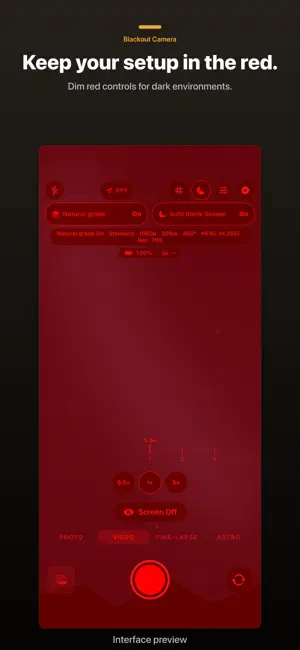
Screen off. Still recording. Record at night without screen glare. Blackout Camera gives iPhone and iPad a dim red interface and, with Blackout Pro, manual controls and a black recording screen, so your eyes stay adjusted and your surroundings stay dark. NEW IN 1.5.8 • Mark frames: save the moments that matter as full-resolution stills or one labelled contact sheet (Pro). • Blackout Glance: while recording with the screen off, a tap shows the take's time, storage left and battery in dim red. • Faster photos: take the next shot while the last is still processing. Every photo gets full-quality processing. • Smoother camera, lens and Photo/Video switching. A CAMERA WORKFLOW FOR DARK SHOOTS Keep attention on the scene with a dim red interface. After initial setup and permissions, use the Home Screen widget or supported system controls to open the app and start recording with your chosen setup. Press and hold anywhere for about a second to wake the black screen. Apple's camera and microphone indicators remain visible. Keep the app open: locking the phone or leaving the app can interrupt capture. SHAPE YOUR LOOK WITH BLACKOUT PRO Adjust ISO, shutter, focus and white balance. Check exposure and focus with monitoring tools. Natural grade gives Rec.709 video restrained color, a softer tone curve and a touch of warmth, with the graded image in the preview and saved recording. Pro also includes Astro frame stacking, time-lapse and advanced camera formats. 4K, higher frame rates, ProRes, HDR, Apple Log, ProRAW and high-resolution photos depend on your device, lens and settings. FRAME IT. KEEP IT. See the whole photo composition that will be saved. Choose the full image or 4:3, 1:1 and 16:9 crops at the original image resolution, without upscaling. ProRAW keeps the full sensor image. Open a video from the in-app Library or Files, select a moment and export a full-resolution SDR PNG to Files. The still uses the video's frame resolution; HDR video is tone-mapped to SDR. Photo framing and single-frame export are free; marking frames and contact sheets are part of Pro. Take photos and record video up to 1080p at 30 fps for free, with advertising. Capturing with the screen off and the advanced tools described above require Blackout Pro, subject to existing Basic access below. Save to Apple Photos, the in-app Library, the Pro Private Folder, or a combination. The Private Folder uses device biometrics or a passcode; existing files remain accessible when your subscription ends. No app account is required. Media is processed on your device; you control export and sharing. Apple Photos and device backups follow your Apple settings. Existing Basic subscribers keep black-screen capture and an ad-free experience. A device passcode is required to protect the Private Folder. SUBSCRIPTIONS Pro offers optional monthly or yearly auto-renewable subscriptions. Your localized price, billing period and any eligible introductory offer are shown before purchase. Apple charges your account at confirmation or after an applicable free trial. The subscription renews unless cancelled at least 24 hours before the period ends. Manage or cancel in your Apple Account settings. Restore Purchases is available in the app. Terms of Use: https://www.apple.com/legal/internet-services/itunes/dev/stdeula/ Privacy Policy: https://mwsupplylimited.github.io/blackoutcamera/privacy.html
What’s new
Version 1.5.10 · Updated October 11, 2026
Improved the timing of review requests after viewing saved videos.
App privacy
The developer, Matthew Wong, reported these privacy practices to Apple.
Data Not Linked to You
The following data, which may be collected but is not linked to your identity, may be used for the following purposes:
- Location: Coarse Location
- Identifiers: Device ID
- Usage Data: Product Interaction, Advertising Data
- Purchases: Purchase History
- Diagnostics: Performance Data, Other Diagnostic Data, Crash Data
Used for: Third-Party Advertising, Analytics, App Functionality
Alternatives to Blackout Camera
Looking for apps like Blackout Camera? Here are 6 similar apps on the App Store. The highest rated is Kiso Camera (5.0/5), and all 6 are free to download.
-
 BlackOut: Black Screen Camera
1.0
BlackOut: Black Screen Camera
1.0
-
 NoLight: Black Screen Camera
-
 Screet - Black Screen Camera
-
 Kemra - Black Screen Camera
4.0
Kemra - Black Screen Camera
4.0
-
 Black Screen Camera QuietCam
4.6
Black Screen Camera QuietCam
4.6
-
 Kiso Camera
5.0
Kiso Camera
5.0
| App | Rating | Price | Last updated | Compare |
|---|---|---|---|---|
| Blackout Camera | – | Free | October 11, 2026 | |
| BlackOut: Black Screen Camera | 1.0 / 5 (1) | Free | Oct 13, 2026 | Compare |
| NoLight: Black Screen Camera | – | Free | Sep 11, 2026 | Compare |
| Screet - Black Screen Camera | – | Free | Oct 13, 2026 | Compare |
| Kemra - Black Screen Camera | 4.0 / 5 (1) | Free | Sep 7, 2026 | Compare |
| Black Screen Camera QuietCam | 4.6 / 5 (45) | Free | Jun 19, 2026 | Compare |
| Kiso Camera | 5.0 / 5 (3) | Free | Aug 8, 2026 | Compare |
Compare Blackout Camera with the top alternatives: ratings, updates, ASO score and keyword gaps →