

Float Cam - Background camera
Try the Colors s. r. o. Photo & Video iPhoneiPadiPod touch
Float Cam - Background camera is a free Photo & Video app for iPhone and iPad by Try the Colors s. r. o. Rated 3.6/5 from 7 ratings. Requires iOS 15.0.
- Rating
- 3.6
- 7 ratings
- Price
- Free
- on the App Store
- Size
- 88 MB
- Age 17+
- Updated
- Oct 19
- 2026 · v1.0.41
Screenshots



About Float Cam - Background camera
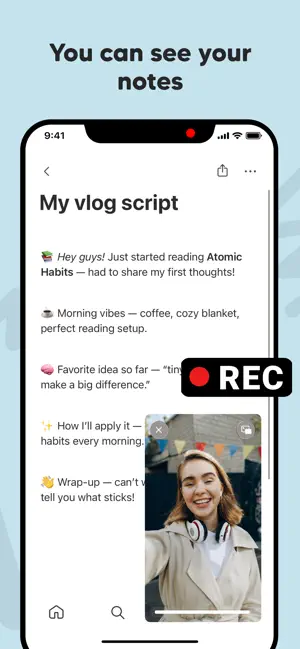
Float Cam - Background camera is a smart floating camera app that lets you record videos and take pictures while using your phone. Unlike the standard system camera, Float Cam allows multitasking — you can keep a floating camera window on screen while reading notes, browsing the web, or checking your script within the app. MAIN FEATURES: • Floating camera window: Move, resize, and position the floating camera anywhere on your screen. • Background camera recording: Record videos while keeping other content visible. • See your notes while recording: Ideal for creators, vloggers, students, or anyone reading a script. • Built-in web browser: Open any website while recording yourself. • Open images, PDFs, or documents: Display reference materials, lyrics, or presentations during video recording. • Switch front or back camera: Use either the selfie camera or rear camera easily. • Capture photos anytime: Take photos directly from the floating camera bubble. • Simple, intuitive, and powerful UI. - PERFECT FOR: • Content creators, vloggers, and YouTubers who want to record themselves while reading notes or a teleprompter. • Musicians and singers who want to see lyrics or chords while recording video performances. • Students and teachers who record study videos, tutorials, or online lessons while referencing their materials. • Coaches, trainers, and speakers who want to see their key points while recording motivational or training videos. • Business users who record video messages, product demos, or presentations with reference documents visible. - WHY FLOAT CAM? Traditional cameras block your screen while recording. Float Cam - Background camera gives you freedom. The floating camera view stays on top, so you can record video and use your phone at the same time. With the in-app browser, document viewer, and notes editor, you can open: • Websites, YouTube, or Google Docs • Images, PDFs, or DOCX files • Personal notes or scripts Float Cam is not just a camera — it's a complete multitasking video recording tool. Whether you're filming a tutorial, singing your favorite song, presenting your project, or rehearsing a speech, Float Cam helps you stay focused and efficient. - More reasons to love Float Cam Float Cam combines everything you need in one floating camera app — a picture-in-picture camera, background video recorder, and teleprompter-style note viewer. Whether you want to record video while using other apps, take photos while multitasking, or overlay a floating selfie camera while browsing, Float Cam does it all. It's perfect as a floating camera for YouTube, musicians, teachers, and vloggers who want a camera with notes, lyrics, or PDF viewer always visible on screen. - Download Float Cam - Background camera now and experience the freedom of recording videos while multitasking. Stay creative, productive, and focused — all in one floating camera app. By using this app, you agree to Apple's standard End User License Agreement (EULA), available here: https://www.apple.com/legal/internet-services/itunes/dev/stdeula/
Ratings & reviews
3.6
7 ratings
What’s new
Version 1.0.41 · Updated October 19, 2026
Improve stability of the app
App privacy
The developer, Try the Colors s. r. o., reported these privacy practices to Apple.
Data Used to Track You
The following data may be used to track you across apps and websites owned by other companies:
- Identifiers: Device ID
- Usage Data: Product Interaction, Advertising Data
- Diagnostics: Crash Data, Performance Data
Data Linked to You
The following data, which may be collected and linked to your identity, may be used for the following purposes:
- Identifiers: Device ID
- Usage Data: Product Interaction, Advertising Data
- Diagnostics: Performance Data
Used for: Third-Party Advertising, Analytics
Data Not Linked to You
The following data, which may be collected but is not linked to your identity, may be used for the following purposes:
- Diagnostics: Crash Data
Used for: Third-Party Advertising, App Functionality
Alternatives to Float Cam - Background camera
Looking for apps like Float Cam - Background camera? Here are 6 similar apps on the App Store. The highest rated is Facecam Screen Recorder: PIP (5.0/5), and all 6 are free to download.
-
 HD Face Cam Screen Recorder
4.4
-
 Picture in picture camera
3.6
-
 Black Screen Camera
3.8
-
 Facecam Screen Recorder: PIP
5.0
-
 Black Screen Camera QuietCam
4.5
-
 eZy Teleprompter
| App | Rating | Price | Last updated | Compare |
|---|---|---|---|---|
| Float Cam - Background camera | 3.6 / 5 (7 ratings) | Free | October 19, 2026 | |
| HD Face Cam Screen Recorder | 4.4 / 5 (93) | Free | Oct 4, 2026 | Compare |
| Picture in picture camera | 3.6 / 5 (5) | Free | May 28, 2026 | Compare |
| Black Screen Camera | 3.8 / 5 (4) | Free | May 17, 2026 | Compare |
| Facecam Screen Recorder: PIP | 5.0 / 5 (1) | Free | Sep 16, 2026 | Compare |
| Black Screen Camera QuietCam | 4.5 / 5 (51) | Free | Oct 22, 2026 | Compare |
| eZy Teleprompter | – | Free | Apr 17, 2026 | Compare |