

Facecam Screen Recorder: PIP
LEAN ASIA CO., LTD Photo & Video iPhoneiPadiPod touch
Facecam Screen Recorder: PIP is a free Photo & Video app for iPhone and iPad by LEAN ASIA CO., LTD. Rated 5.0/5 from 1 ratings. Requires iOS 16.0.
- Rating
- 5.0
- 1 ratings
- Price
- Free
- on the App Store
- Size
- 12 MB
- Age 4+
- Updated
- Sep 16
- 2026 · v1.1
Screenshots


About Facecam Screen Recorder: PIP
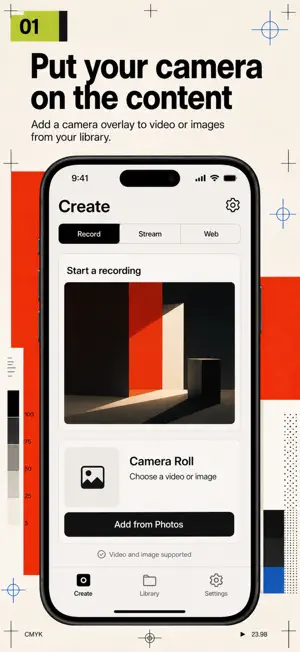
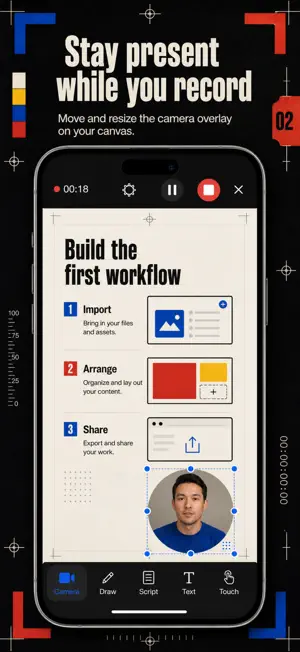
Record with your face on screen. Face Cam is a screen and camera recorder for people who make tutorial, reaction and commentary videos on their phone: pick a video or photo from your camera roll or open a web page inside the app, hit record, and your face camera, voice and on-screen notes are captured together in one clean clip — no desktop setup, no timeline editing afterwards. Everything happens in one pass. While you record, you can scroll a teleprompter script at your own pace, draw arrows and highlights directly on the content, drop a pointer where you want eyes to go, and drag your face bubble anywhere — resize it, reshape it, restyle its border — without stopping the take. WHAT YOU GET • Your gameplay clip playing full screen with your live reaction in a movable face bubble — recorded together in one take • A web page you scroll and narrate on camera, captured as a ready-to-share walkthrough video • A teleprompter scrolling over the recording view, so you look at the lens while reading your script • Arrows, highlights and a pointer drawn mid-recording, exactly when you say "look here" • Text overlays for titles and callouts baked straight into the video • A built-in library where every take is saved on your device, ready to preview and share PERFECT FOR • Creators recording reaction and commentary videos over clips from their camera roll • Teachers and coaches walking through a website or article on camera • App and product people narrating walkthrough videos for clients and social • Anyone who freezes on camera and wants the script scrolling right where the lens is WHY NOT JUST USE THE BUILT-IN SCREEN RECORDER? The system recorder captures pixels, not presence. It has no face camera, no teleprompter, no drawing tools — so you end up juggling a second app to film yourself and a desktop editor to merge the two. Face Cam records face, voice, content and annotations in a single pass, so the clip that lands in your library is the clip you post. PRIVATE BY DEFAULT Recording and processing happen on your device. Camera, microphone and photo access are requested only when a feature needs them, and your videos stay in the app's local library until you choose to share them. FULL ACCESS Face Cam Pro unlocks unlimited recording length, teleprompter scripts of any length, and watermark-free HD export. Choose a weekly or yearly subscription, or a one-time lifetime purchase — prices are shown in the app before you buy, and subscriptions can be cancelled anytime in your App Store settings. Load the clip you have been meaning to react to, and record your first take today. Terms of Use: https://leanstudio.asia/terms-of-use Privacy Policy: https://leanstudio.asia/privacy-policy Support: [email protected]
What’s new
Version 1.1 · Updated September 16, 2026
Bug fixes and performance improvements. Thanks for using the app — your feedback keeps it getting better.
App privacy
The developer, LEAN ASIA CO., LTD, reported these privacy practices to Apple.
Data Not Collected
The developer does not collect any data from this app.
Alternatives to Facecam Screen Recorder: PIP
Looking for apps like Facecam Screen Recorder: PIP? Here are 6 similar apps on the App Store. The highest rated is Screen Lab: Recorder & Editor (5.0/5), and all 6 are free to download.
-
 Screenmi: Screen Rec Facecam
3.7
Screenmi: Screen Rec Facecam
3.7
-
 HD Face Cam Screen Recorder
4.4
HD Face Cam Screen Recorder
4.4
-
 Screen Lab: Recorder & Editor
5.0
Screen Lab: Recorder & Editor
5.0
-
 Face Cam: Camera Recorder
3.5
Face Cam: Camera Recorder
3.5
-
 Screen Recorder: Save & Share
3.0
Screen Recorder: Save & Share
3.0
-
 Video Editor, Face Cam & GIF
1.0
Video Editor, Face Cam & GIF
1.0
| App | Rating | Price | Last updated | Compare |
|---|---|---|---|---|
| Facecam Screen Recorder: PIP | 5.0 / 5 (1 rating) | Free | September 16, 2026 | |
| Screenmi: Screen Rec Facecam | 3.7 / 5 (3) | Free | Jul 15, 2026 | Compare |
| HD Face Cam Screen Recorder | 4.4 / 5 (92) | Free | Oct 4, 2026 | Compare |
| Screen Lab: Recorder & Editor | 5.0 / 5 (2) | Free | Apr 27, 2026 | Compare |
| Face Cam: Camera Recorder | 3.5 / 5 (4) | Free | May 7, 2026 | Compare |
| Screen Recorder: Save & Share | 3.0 / 5 (2) | Free | Nov 24, 2025 | Compare |
| Video Editor, Face Cam & GIF | 1.0 / 5 (3) | Free | Oct 10, 2026 | Compare |