

Screen Recorder: Save & Share
Bobby Harris Photo & Video iPhoneiPadiPod touch
Screen Recorder: Save & Share is a free Photo & Video app for iPhone and iPad by Bobby Harris. Rated 3.0/5 from 2 ratings. Requires iOS 15.
- Rating
- 3.0
- 2 ratings
- Price
- Free
- on the App Store
- Size
- 37 MB
- Age 4+
- Updated
- Nov 24
- 2025 · v1.4
Screenshots

About Screen Recorder: Save & Share
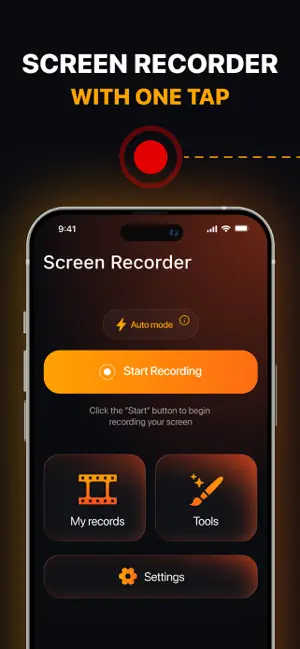
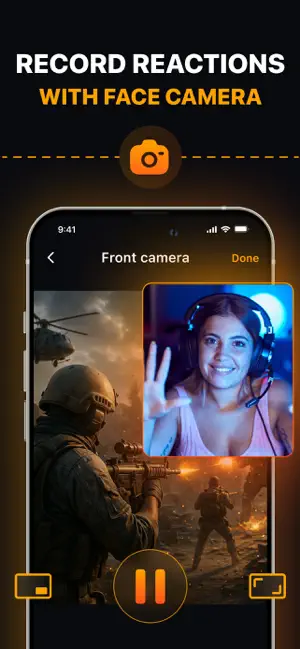
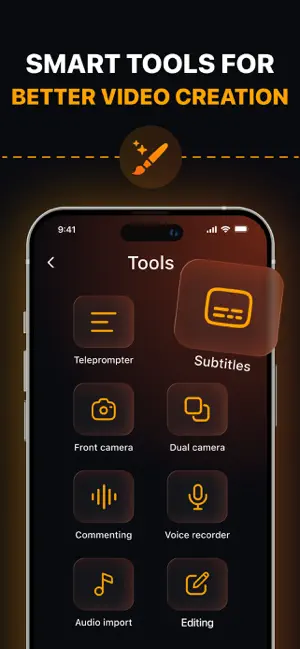
Enjoy a simple and fun way to record your screen with this all-in-one app. Whether you’re showing a new game, creating tutorials, reacting to videos, or explaining something important, this screen recorder makes it easy for anyone to capture and share their moments. Just tap to start, and the app will do the rest — clear video, smooth performance, and great sound every time. You can record in Full HD or 4K quality, add your voice, or include your face reactions using the Face Cam. After recording, the built-in video editor lets you trim clips, add effects, subtitles, or background music, so your videos always look professional. No complicated setup or editing skills needed — everything is ready in one place. This screen recorder is perfect for gamers, students, teachers, vloggers, and anyone who wants to save or share what happens on their screen. With fast sharing options and no time limits, you can focus on creativity while the app handles the rest. Discover extra perks: -Unlimited screen recording time — capture as long as you need. -Full HD and 4K support with customizable resolution and frame rate. -Face Cam overlay for reactions with flexible size and position. -Record both microphone and internal audio together. -Built-in video editor: cut, merge, crop, reverse, or change playback speed. -Add subtitles, filters, transitions, stickers, and music. -Noise reduction for clean and clear voice recording. -Floating text tool for reading scripts or guiding your video. -No watermark — keep your videos clean and professional. -Quick export and sharing through social apps, email, or cloud storage. Pro Membership: Week Access Pass. Your iTunes account will be charged after confirming your purchase. Auto-renewal occurs unless you turn it off at least 24 hours before the current period ends. Adjust your subscription and renewal preferences in Account Settings. Support and Privacy Policy: Refer to our privacy policy:https://docs.google.com/document/d/1bquElxY-otbn2jVArDJBrU8FIKD7Pazjiin-tAm3IAo/edit?usp=sharing Learn about our data protection by visiting our Terms of Use:https://docs.google.com/document/d/17MZxojlcakO9DZ0x5U4CwqTfvrxYQYI_b5e5N1xuqQM/edit?usp=sharing Contact our help desk:[email protected] From recording gameplay to creating lessons or sharing memories, this screen recorder gives you everything you need in one simple tool. Capture, edit, and share your best moments anytime — all it takes is one tap.
What’s new
Version 1.4 · Updated November 24, 2025
Bug fixes and minor improvements
App privacy
The developer, Bobby Harris, reported these privacy practices to Apple.
Data Used to Track You
The following data may be used to track you across apps and websites owned by other companies:
- Identifiers: User ID, Device ID
Data Not Linked to You
The following data, which may be collected but is not linked to your identity, may be used for the following purposes:
- Identifiers: User ID, Device ID
- Usage Data: Product Interaction
Used for: Third-Party Advertising, Developer’s Advertising or Marketing, Analytics
Alternatives to Screen Recorder: Save & Share
Looking for apps like Screen Recorder: Save & Share? Here are 6 similar apps on the App Store. The highest rated is Facecam Screen Recorder: PIP (5.0/5), and all 6 are free to download.
-
 Rec Video Recorder
4.6
Rec Video Recorder
4.6
-
 Facecam Screen Recorder: PIP
5.0
Facecam Screen Recorder: PIP
5.0
-
 Screen Recorder: Recording App
5.0
Screen Recorder: Recording App
5.0
-
 Screenmi: Screen Rec Facecam
3.7
Screenmi: Screen Rec Facecam
3.7
-
 Screen Recorder: ClipCast
-
 Wonder Rec - Screen Recorder
5.0
Wonder Rec - Screen Recorder
5.0
| App | Rating | Price | Last updated | Compare |
|---|---|---|---|---|
| Screen Recorder: Save & Share | 3.0 / 5 (2 ratings) | Free | November 24, 2025 | |
| Rec Video Recorder | 4.6 / 5 (9) | Free | May 13, 2026 | Compare |
| Facecam Screen Recorder: PIP | 5.0 / 5 (1) | Free | Sep 16, 2026 | Compare |
| Screen Recorder: Recording App | 5.0 / 5 (2) | Free | Nov 11, 2025 | Compare |
| Screenmi: Screen Rec Facecam | 3.7 / 5 (3) | Free | Jul 15, 2026 | Compare |
| Screen Recorder: ClipCast | – | Free | Aug 12, 2026 | Compare |
| Wonder Rec - Screen Recorder | 5.0 / 5 (5) | Free | Sep 29, 2026 | Compare |