

Wonder Rec - Screen Recorder
小利 薛 Photo & Video iPhoneiPadiPod touch
Wonder Rec - Screen Recorder is a free Photo & Video app for iPhone and iPad by 小利 薛. Rated 5.0/5 from 5 ratings. Requires iOS 17.0.
- Rating
- 5.0
- 5 ratings
- Price
- Free
- on the App Store
- Size
- 16 MB
- Age 4+
- Updated
- Sep 29
- 2026 · v2.0
Screenshots

About Wonder Rec - Screen Recorder
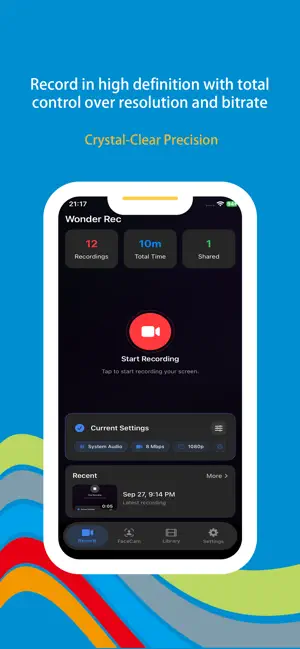
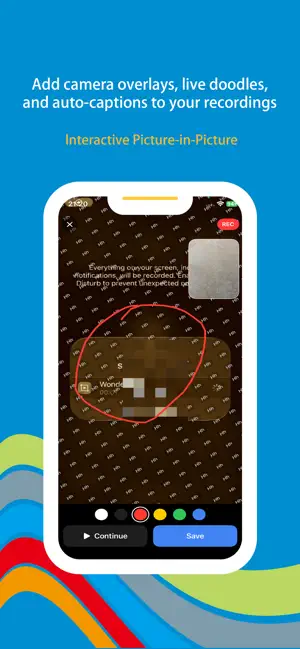
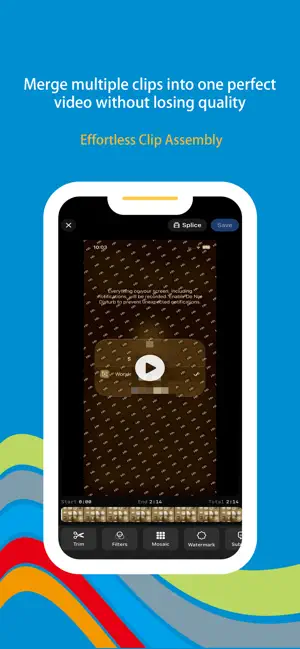
Capture, create, and share your screen like a pro. Whether you are recording gameplay, building tutorials, or delivering presentations, Wonder Rec is the all-in-one screen recording and video editing suite that gives you total control over every detail. From the first frame to the final export, everything stays fast, smooth, and precisely the way you want it. Key Features: Pro-Grade HD Recording Take full control of every frame you capture. Customize resolution, frame rate, and bitrate to ensure your recordings look exactly the way you want. Whether you need lightweight clips for quick sharing or crisp high-definition files for professional delivery, Wonder Rec adapts to your needs with a reliable, high-performance recording engine that delivers smooth, consistent results with zero lag. Stay focused on your content instead of worrying about dropped frames or stuttering playback. Dynamic Picture-in-Picture Record your camera and screen simultaneously to create engaging, personal videos with real presence. Enhance your recordings with live doodles and AI-powered auto-captions that add a professional touch without slowing you down. The entire process stays smooth and efficient, so your creativity never has to wait. Perfect for commentary, reactions, lessons, and face-to-camera explanations, picture-in-picture blends your on-screen content and your presence naturally, making every video more lively and more connected. Seamless Video Merging Combine multiple clips into one polished, complete video with ease. Enjoy smooth, natural transitions and high-quality rendering without any loss in clarity, so every detail stays exactly as it should. Wonder Rec makes it simple to assemble longer content from separate recordings, whether you are stitching together tutorial steps, compiling gameplay highlights, or building a full presentation. The final result stays clean, consistent, and seamlessly connected from start to finish. All-in-One Editing Suite Refine your footage instantly with intuitive, easy-to-use editing tools. Apply artistic filters, perform precise cropping, add custom watermarks, and insert stylish subtitles to give your video more personality and a more professional finish. Everything you need to shape your video is built right in, so you can move from raw capture to finished content without switching between multiple apps. This streamlined workflow saves time and boosts your creative efficiency at every step. Instant Sharing Export your creations directly to your camera roll or broadcast them to the world with seamless cross-platform sharing. When your video is ready, Wonder Rec helps you get it out quickly and easily, whether it is for social media, team review, or personal archives. No complicated steps, no unnecessary delays, so every creation can be seen and shared the moment it is ready. Why You Will Love Wonder Rec: High-performance recording with zero lag. Sleek, intuitive interface for a fast workflow. Perfect for content creators, gamers, educators, and professionals. Flexible controls for resolution, frame rate, bitrate, and editing. Picture-in-picture, live doodles, and AI-powered auto-captions in one place. Smooth merging, clean rendering, and easy sharing across platforms. [Subscription Service] When you subscribe to the "VIP Subscription" service, you will enjoy the following benefits: 1. Unrestricted access to all features. 2. AI content recommendations based on usage habits. Payment for subscriptions is straightforward—the user's iTunes account is credited immediately after confirmation of purchase and payment. Please note that the Apple iTunes account will be automatically debited 24 hours prior to expiration. Upon successful deduction, the subscription term will be extended by one subscription cycle. User Agreement: https://www.wonderda.com/agreement.html Privacy Agreement: https://www.wonderda.com/privacy.html Download Wonder Rec now and turn your screen into a masterpiece.
Ratings & reviews
5.0
5 ratings
What’s new
Version 2.0 · Updated September 29, 2026
Thanks for staying with us! In this version, you'll find: 1. Facecam Support: Overlay your camera feed to capture reactions and commentary instantly 2. Fix bugs
App privacy
The developer, 小利 薛, reported these privacy practices to Apple.
Data Not Collected
The developer does not collect any data from this app.
Alternatives to Wonder Rec - Screen Recorder
Looking for apps like Wonder Rec - Screen Recorder? Here are 6 similar apps on the App Store. The highest rated is Duplicate Cleaner: Smart Scan (5.0/5), and all 6 are free to download.
-
 RetroCam Mix:Photo Editor
-
 FaceBubble: Dual Camera & Live
-
 Emoryx
-
 Duplicate Cleaner: Smart Scan
5.0
Duplicate Cleaner: Smart Scan
5.0
-
 ChatVideo: AI Video Analysis
5.0
ChatVideo: AI Video Analysis
5.0
-
 Screen Recorder: Recording App
5.0
Screen Recorder: Recording App
5.0
| App | Rating | Price | Last updated | Compare |
|---|---|---|---|---|
| Wonder Rec - Screen Recorder | 5.0 / 5 (5 ratings) | Free | September 29, 2026 | |
| RetroCam Mix:Photo Editor | – | Free | Jul 16, 2025 | Compare |
| FaceBubble: Dual Camera & Live | – | Free | Oct 21, 2026 | Compare |
| Emoryx | – | Free | Oct 15, 2026 | Compare |
| Duplicate Cleaner: Smart Scan | 5.0 / 5 (7) | Free | Jan 28, 2026 | Compare |
| ChatVideo: AI Video Analysis | 5.0 / 5 (3) | Free | Aug 25, 2026 | Compare |
| Screen Recorder: Recording App | 5.0 / 5 (2) | Free | Nov 11, 2025 | Compare |