

ChatVideo: AI Video Analysis
ZSoft Labs Photo & Video iPhoneiPadiPod touch
ChatVideo: AI Video Analysis is a free Photo & Video app for iPhone and iPad by ZSoft Labs. Rated 5.0/5 from 3 ratings. Requires iOS 18.0.
- Rating
- 5.0
- 3 ratings
- Price
- Free
- on the App Store
- Size
- 38 MB
- Age 4+
- Updated
- Aug 25
- 2026 · v1.1
Screenshots



About ChatVideo: AI Video Analysis
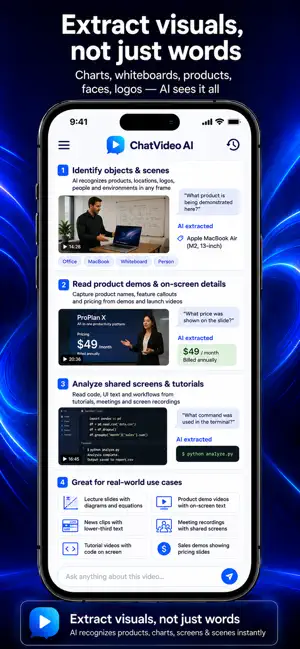
Hours of video. Seconds to understand. ChatVideo AI is the only AI analyst that sees and hears everything in the video. ChatVideo AI analyzes audio, visuals, slides, and scenes, giving you answers, summaries, and transcripts instantly, so you get answers without watching everything. Upload a video, paste a YouTube link, add a public URL, or import audio, then ask AI anything. It can identify and extract both visuals and words. Get accurate answers, timestamps, transcripts, translations, key takeaways, and more in seconds. Whether you're a professional, student, researcher, or content creator, ChatVideo AI helps you get more out of every video, faster and simpler than ever before. KEY FEATURES ◆ ASK ANYTHING ABOUT ANY VIDEO Simply add a video and start chatting. Ask any question and get accurate, instant AI-powered answers about key moments, details, topics, action items, speakers, and more directly from the video content. - What is this video about? - Summarize the key points - What did they say about X? - Give me the top 5 takeaways ◆ POWERFUL AI ANALYSIS Go beyond watching. Let AI do the heavy lifting and extract everything you need from any video instantly. - AI Summaries — get the key points without watching the full video - Key Insights — extract the most important ideas automatically - Smart Notes — generate clean, structured notes in seconds - Action Items — identify next steps and decisions instantly ◆ IMAGE ANALYSIS Identify objects, read text, analyze charts and recognize scenes instantly. For example: - Identify objects & scenes: AI recognizes products, locations, logos, people and environments in any frame - Extract any text on screen, OCR: Extract phone numbers, URLs, addresses or any text that appears on screen - Read whiteboards & screens: Capture text, diagrams and notes from whiteboards, screens and displays - Read slides & presentations: AI extracts text, charts and data from every slide in a video - Analyze charts & graphs: AI reads and interprets any chart, graph or diagram shown in the video ◆ TRANSCRIBE & TRANSLATE Get word-for-word transcripts of any video with speaker detection and timestamps. Translate instantly into 150+ languages. - Accurate auto-transcription - Timestamps & speaker detection - Translate to 150+ languages - Copy, share or export anywhere ◆ CREATE & CONVERT IN SECONDS Transform any video into powerful content with one tap. - Social posts & captions - Flashcards & quizzes - Study guides & outlines - Blog posts & newsletters - Meeting notes & action items ◆ WORKS WITH EVERYTHING ChatVideo AI works with virtually any content source. - YouTube videos & playlists - Uploaded videos - Audio files & podcasts - Recordings - Public URLs & web links ◆ PERFECT FOR - Professionals: summarize meetings, interviews & presentations - Podcasters: transcribe and repurpose episodes effortlessly - Students: turn lectures into notes and study guides instantly - Creators: turn videos into posts, threads & newsletters - Researchers: extract insights from hours of content in seconds - Language Learners: translate and study in any language And many more! ◆ PRIVACY & SECURITY Your content is private and secure. We do not sell or share your data with third parties. ◆ GET STARTED FREE NOW Download ChatVideo AI free and start asking questions about any video in seconds. Upgrade to Premium for more video minutes, advanced AI analysis, and full access to all features. Privacy Policy: https://www.zsoft.ai/privacy Terms Of Use: https://www.zsoft.ai/terms
What’s new
Version 1.1 · Updated August 25, 2026
This version of ChatVideo: AI Video Analyzer and AI Video Analysis improves and builds best user experience
App privacy
The developer, ZSoft Labs, reported these privacy practices to Apple.
Data Linked to You
The following data, which may be collected and linked to your identity, may be used for the following purposes:
- Contact Info: Email Address, Name
- Identifiers: User ID, Device ID
- Usage Data: Product Interaction, Other Usage Data
- Diagnostics: Other Diagnostic Data, Crash Data, Performance Data
- User Content: Customer Support, Other User Content, Photos or Videos, Audio Data
Used for: Developer’s Advertising or Marketing, Analytics, Product Personalization, App Functionality
Alternatives to ChatVideo: AI Video Analysis
Looking for apps like ChatVideo: AI Video Analysis? Here are 6 similar apps on the App Store. The highest rated is Reframe: Video Annotation (4.7/5), and all 6 are free to download.
-
 Viral Video Analyzer - Narrify
-
 ThingMoji: Sticker Maker
-
 Dissect: Decode Motion
-
 Reframe: Video Annotation
4.7
Reframe: Video Annotation
4.7
-
 Framewake: AI Photo Video
-
 Vizalyzer
| App | Rating | Price | Last updated | Compare |
|---|---|---|---|---|
| ChatVideo: AI Video Analysis | 5.0 / 5 (3 ratings) | Free | August 25, 2026 | |
| Viral Video Analyzer - Narrify | – | Free | Sep 8, 2026 | Compare |
| ThingMoji: Sticker Maker | – | Free | Oct 2, 2026 | Compare |
| Dissect: Decode Motion | – | Free | Jun 5, 2026 | Compare |
| Reframe: Video Annotation | 4.7 / 5 (6) | Free | Jul 9, 2026 | Compare |
| Framewake: AI Photo Video | – | Free | Aug 11, 2026 | Compare |
| Vizalyzer | – | Free | Dec 14, 2024 | Compare |