

Screenmi: Screen Rec Facecam
Yassine Arsmouk Photo & Video iPhoneiPadiPod touch
Screenmi: Screen Rec Facecam is a free Photo & Video app for iPhone and iPad by Yassine Arsmouk. Rated 3.7/5 from 3 ratings. Requires iOS 15.1.
- Rating
- 3.7
- 3 ratings
- Price
- Free
- on the App Store
- Size
- 129 MB
- Age 17+
- Updated
- Jul 15
- 2026 · v1.0.5
Screenshots
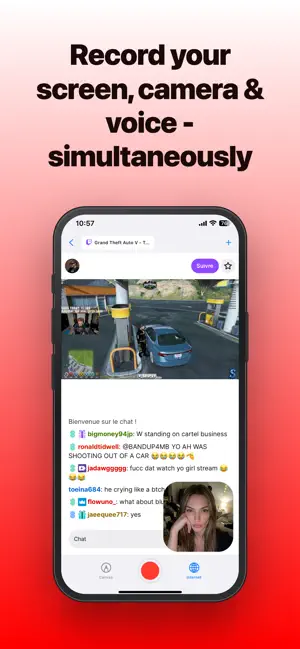



About Screenmi: Screen Rec Facecam
Record your screen and your face at the same time. Screenmi lets you create videos ready for TikTok, X, and social media in seconds — just record your screen, capture your facecam, and share instantly. HOW IT WORKS Choose what you want to record and start capturing your screen with your front camera at the same time. You can record your activity on the built-in canvas or directly browse the web inside the app. When you're done, tap the record button again and Screenmi automatically generates a video formatted for social media and saves it to your camera roll. No complicated editing. Just record and share. KEY FEATURES • Screen + Facecam Recording – Capture your screen and front camera simultaneously • Customizable Facecam – Move and resize the camera anywhere on the screen • Built-in Canvas – Add images from your library, draw, and write text before or during recording • Integrated Browser – Open and record multiple web tabs directly inside the app • Social-Ready Video Export – Videos automatically formatted for TikTok, X, and other platforms • Instant Video Generation – Stop recording and your video is generated instantly • Quick Sharing – Export to your camera roll and share directly to social media • Local Storage – All videos and canvases are saved on your device • Privacy First – No cloud uploads, no tracking PERFECT FOR • Recording tutorials • Creating TikTok or social media videos • Explaining ideas visually • Recording product demos • Sharing reactions with facecam • Creating educational content • Recording web walkthroughs CREATE VIDEOS IN SECONDS Screenmi makes it simple to record your screen with your facecam and instantly create videos ready to share. Whether you're making tutorials, reactions, or social content, everything you need is built directly into the app. Download Screenmi and start recording. ——————————————————————— If you opt to purchase a Premium subscription, the subscription fee will be charged to your iTunes account. The yearly subscription automatically renews, but you can disable auto-renewal at least 24 hours before the end of the subscription period in your iTunes account settings. After purchase, any unused portion of the free trial is forfeited. You can manage your premium subscription and turn off the auto-renewal feature in your iTunes account settings. Terms of Use: https://kuomsy.com/en/terms Privacy Policy: https://kuomsy.com/en/privacy
What’s new
Version 1.0.5 · Updated July 15, 2026
Bug fixes and performance improvements.
App privacy
The developer, Yassine Arsmouk, reported these privacy practices to Apple.
Data Not Collected
The developer does not collect any data from this app.
Alternatives to Screenmi: Screen Rec Facecam
Looking for apps like Screenmi: Screen Rec Facecam? Here are 6 similar apps on the App Store. The highest rated is Facecam Screen Recorder: PIP (5.0/5), and all 6 are free to download.
-
 Facecam Screen Recorder: PIP
5.0
Facecam Screen Recorder: PIP
5.0
-
 Face Cam: Camera Recorder
3.5
Face Cam: Camera Recorder
3.5
-
 Screen Recorder : FaceCam
4.8
Screen Recorder : FaceCam
4.8
-
 Screen Recorder: Save & Share
3.0
Screen Recorder: Save & Share
3.0
-
 HD Face Cam Screen Recorder
4.4
HD Face Cam Screen Recorder
4.4
-
 FaceCam - Camera Recorder
3.6
FaceCam - Camera Recorder
3.6
| App | Rating | Price | Last updated | Compare |
|---|---|---|---|---|
| Screenmi: Screen Rec Facecam | 3.7 / 5 (3 ratings) | Free | July 15, 2026 | |
| Facecam Screen Recorder: PIP | 5.0 / 5 (1) | Free | Sep 16, 2026 | Compare |
| Face Cam: Camera Recorder | 3.5 / 5 (4) | Free | May 7, 2026 | Compare |
| Screen Recorder : FaceCam | 4.8 / 5 (14) | Free | May 18, 2026 | Compare |
| Screen Recorder: Save & Share | 3.0 / 5 (2) | Free | Nov 24, 2025 | Compare |
| HD Face Cam Screen Recorder | 4.4 / 5 (92) | Free | Oct 4, 2026 | Compare |
| FaceCam - Camera Recorder | 3.6 / 5 (29) | Free | May 21, 2026 | Compare |