

Paper Scan: Scan to PDF
Meng-Yi Hsu Productivity iPhoneiPadiPod touch
Paper Scan: Scan to PDF is a free Productivity app for iPhone and iPad by Meng-Yi Hsu. Rated 1.0/5 from 1 ratings. Requires iOS 15.1.
- Rating
- 1.0
- 1 ratings
- Price
- Free
- on the App Store
- Size
- 45 MB
- Age 4+
- Updated
- Oct 12
- 2026 · v2.37
Screenshots

About Paper Scan: Scan to PDF
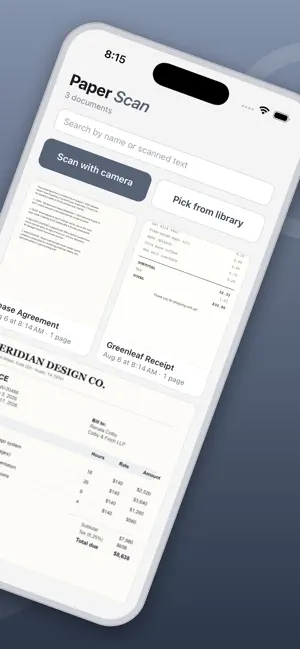
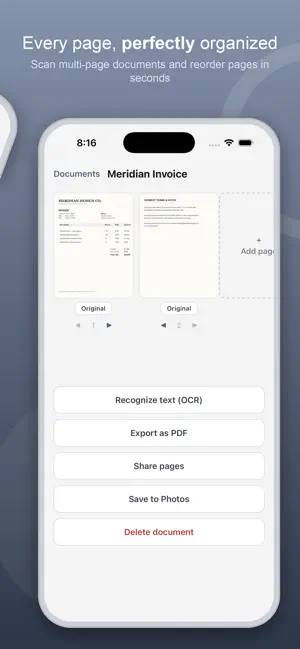
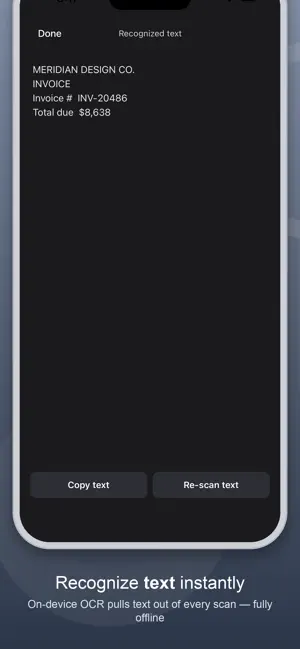
Paper Scan turns your iPhone into a fast, private document scanner. Every scan, every recognized word and every PDF you export stays on your device — none of it is ever uploaded or sold, and scanning and OCR both work with the phone in airplane mode. No account. No sign-up. No email. No ads. Open it, point it at a page, and scan. Point the camera at any document and Paper Scan automatically detects its edges and corrects the perspective — no manual cropping needed. Capture multi-page documents in one pass, then reorder, rename, or add more pages any time. Enhance any scan with a tap: choose Original, Grayscale, Black & White, or Enhance for a clean, readable page. Recognize text right on your device with on-device OCR, then copy it or search your documents by what they say. When you're ready to share, export any document straight to PDF, share individual pages, or save them to your Photos library. FEATURES • Automatic edge detection & perspective correction • Multi-page documents with reordering • On-device text recognition (OCR) • Enhance, Grayscale, and Black & White filters • Export to PDF • Share pages or save to Photos • Search documents by title or recognized text • Scanning and OCR run entirely offline — your documents never leave your iPhone • No tracking of you across other companies' apps or websites BUILT BY ONE PERSON I built Paper Scan for myself, in a year when AI finally made something like this achievable alone — then kept building whatever people asked for. No team, no investors, and no roadmap written by anyone but the people using it. And no subscription: scanning your own paperwork shouldn't cost a monthly fee. TELL ME WHAT TO BUILD See something in another scanner app that you wish this one had? Email [email protected]. I read every message and I build what people actually ask for — that is how most of this app got here.
What’s new
Version 2.37 · Updated October 12, 2026
Small update. Nothing changes in the app.
App privacy
The developer, Meng-Yi Hsu, reported these privacy practices to Apple.
Data Not Linked to You
The following data, which may be collected but is not linked to your identity, may be used for the following purposes:
- Usage Data: Product Interaction
- Identifiers: Device ID
- Diagnostics: Crash Data
Used for: Analytics, App Functionality
Alternatives to Paper Scan: Scan to PDF
Looking for apps like Paper Scan: Scan to PDF? Here are 6 similar apps on the App Store. The highest rated is PrivacyNotes: Encrypted Notes (5.0/5), and all 6 are free to download.
-
 PDFTape: PDF Scanner & Sign
-
 Origami PDF: Scan & Sign
-
 Allodia Mail & Calendar
4.0
-
 Bramble: Password Manager
4.7
-
 SoloPDF
-
 PrivacyNotes: Encrypted Notes
5.0
| App | Rating | Price | Last updated | Compare |
|---|---|---|---|---|
| Paper Scan: Scan to PDF | 1.0 / 5 (1 rating) | Free | October 12, 2026 | |
| PDFTape: PDF Scanner & Sign | – | Free | Aug 26, 2026 | Compare |
| Origami PDF: Scan & Sign | – | Free | Jun 9, 2026 | Compare |
| Allodia Mail & Calendar | 4.0 / 5 (1) | Free | Oct 20, 2026 | Compare |
| Bramble: Password Manager | 4.7 / 5 (6) | Free | Oct 13, 2026 | Compare |
| SoloPDF | – | Free | Oct 7, 2026 | Compare |
| PrivacyNotes: Encrypted Notes | 5.0 / 5 (10) | Free | Oct 16, 2026 | Compare |