

Allodia Mail & Calendar
Fits4all Productivity iPhoneiPadiPod touchMac
Allodia Mail & Calendar is a free Productivity app for iPhone and iPad by Fits4all. Rated 4.0/5 from 1 ratings. Requires iOS 18.0. Updated October 6, 2026.
- Rating
- 4.0
- 1 ratings
- Price
- Free
- on the App Store
- Size
- 52 MB
- Age 4+
- Updated
- Oct 6
- 2026 · v0.11.0
Screenshots

About Allodia Mail & Calendar
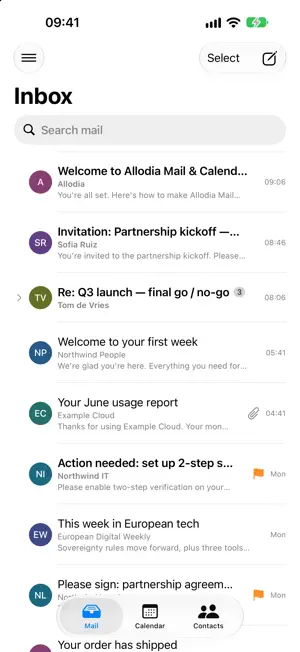
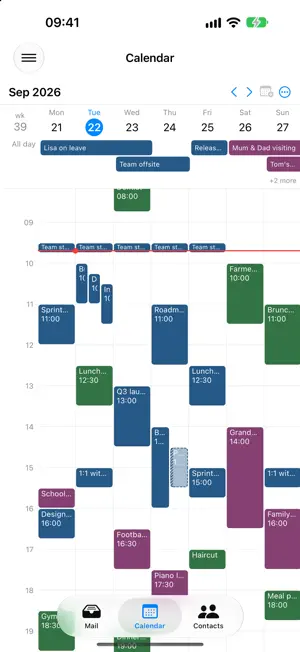
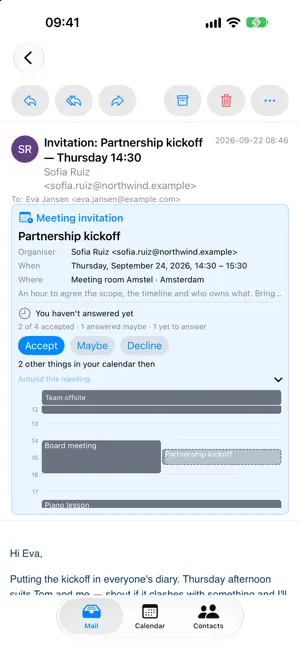
Allodia Mail & Calendar is a sovereign, secure email and calendar app for people and organisations who want to stay in control of their own data. Unlike the big cloud suites, Allodia Mail & Calendar doesn't ask you to move your mailbox onto someone else's servers. It's a client you own, connecting over open standards (JMAP, IMAP, SMTP and CalDAV) to the mail and calendar infrastructure you already run or trust: your own server, or any provider, anywhere. Your mail stays where you put it. We don't host it, and none of your mail routes through Allodia. Built in the EU, with privacy by design: • Your messages sync straight between your device and your provider: nothing passes through us. • Credentials are stored securely on your device. • Incoming HTML is sanitised before it's shown, and remote tracking images are blocked by default. • Product analytics is opt-in and off by default, and can't carry your mail, your addresses or your search terms. • A rotating, size-capped diagnostic log that never records your mail, addresses or passwords: safe to attach to a support request. Everything you expect from a modern mail and calendar app: • Multiple accounts in one unified inbox, with a per-account folder sidebar and quick switching. • Conversations grouped into threads: the whole thread, including your own replies in other folders. • Message bodies download after every sync (every size on a computer, up to a size you set on a phone), so opens are instant and the mail you have synced reads offline. • A rich HTML composer: new messages, replies, reply-all and forwards, with attachments and a From-account picker. • Write a signature once (formatting, links and your logo) and reuse it on any account, with a separate one for replies. Embedded images arrive visible, even in Outlook. • All your contacts in one list from every connected account, with address suggestions as you type a recipient. (Read-only for now.) • An optional Allodia account carries your list of mail accounts to your next device: never your mail, never a password. • Read/unread, flag, archive, delete, trash and mark-as-spam, plus reply, forward and archive-conversation from the message. • Configurable swipe actions, with an undo toast. • A full calendar: agenda, day / 3-day / work-week / week and month grids, with pinch-to-zoom, week numbers, a now line and jump-to-today. • Per-calendar visibility and colours; read-only calendars are respected: never an edit that can't be saved. • Meeting invitations arrive as a card above the message: who's asking, when and where, how everyone answered, and your calendar at that time. Accept, Maybe or Decline without leaving the email. • Fast search across all your accounts, including from: and to: filters. • Per-account sync depth, with real-time push (IMAP IDLE) or scheduled polling and clear progress. • Background mail delivery, so new mail keeps arriving when the app isn't in front. • In English, Dutch, German, French, Spanish, Italian and Portuguese, and time-zone-aware throughout. Allodia Mail & Calendar is part of the Allodia suite: European software built so you can adopt modern tools without giving up ownership of your data or your jurisdiction. Terms of Use (EULA): https://www.apple.com/legal/internet-services/itunes/dev/stdeula/
What’s new
Version 0.11.0 · Updated October 6, 2026
If the app closes while a message is being sent, it is no longer lost or sent twice: it is sent at the next start, or the Outbox asks whether it arrived. A message the server refused now stays in the Outbox, to send again, edit or discard. Add links to a message with the new Link button, or type an address and press Space. Web addresses in messages and event notes are now clickable. You can now make, rename, move and delete folders from the folder pane, even offline. Contacts from a Microsoft account appear in the app, and you can add and edit them; on a work or school account, your colleagues are suggested as you address a message. You can now move a message to any folder from its menu. An open message can now be printed, from the menu at the end of the reading toolbar. Connect a mail account by signing in with your provider, where your provider supports it, instead of storing a password. Where it doesn't, the password field is still there, and the setup screen now says which of the two your provider actually offers. When a mail provider asks the app to slow down, the status line below your messages now says so, and says when syncing continues. The message you are writing is now kept in your Drafts folder while you write it, so your other devices see it and nothing is lost if you move to another message or close the app; open a draft to carry on where you left off. Account setup now has a Back button that returns from the found settings or the manual form to the email address step. Calendars are grouped under each account's email address instead of an internal name. Your contacts now appear even when an address book holds a contact with no name or email address, such as a saved phone number. On accounts that connect over JMAP, people in Cc and Bcc now receive your message, and your replies stay in the recipients' conversation. Editing a message in the Outbox now moves it back to Drafts with its attachments, and sending again a message that may already have arrived asks first. Folders that only hold other folders, such as Gmail's [Gmail], are no longer offered as a place to move mail or to watch for new mail. Signing in with a Microsoft account no longer asks for permissions the app does not use. On IMAP accounts, Save to Sent now files the copy of a sent message that could not be saved in your Sent folder. A message that cannot be sent yet now appears in the Outbox straight away, even while the mail server is not answering. Every folder of an IMAP or Microsoft account now syncs in the background within the sync depth you chose, not only the Inbox and the standard folders; on push, the folders not watched are checked every 15 minutes.
App privacy
The developer, Fits4all, reported these privacy practices to Apple.
Data Linked to You
The following data, which may be collected and linked to your identity, may be used for the following purposes:
- Contact Info: Email Address, Name
- Identifiers: User ID
- Other Data: Other Data Types
Used for: App Functionality
Data Not Linked to You
The following data, which may be collected but is not linked to your identity, may be used for the following purposes:
- Usage Data: Product Interaction
- Diagnostics: Performance Data, Other Diagnostic Data
Used for: Analytics
Alternatives to Allodia Mail & Calendar
Looking for apps like Allodia Mail & Calendar? Here are 6 similar apps on the App Store. The highest rated is Epistles Mail (4.3/5), and all 6 are free to download.
-
 Jovra: JMAP Mail Client
-
 Boogie Mail
2.0
Boogie Mail
2.0
-
 Network & System Admin Toolkit
-
 Paper Scan: Scan to PDF
1.0
Paper Scan: Scan to PDF
1.0
-
 Rolda
Rolda
-
 Epistles Mail
4.3
Epistles Mail
4.3
| App | Rating | Price | Last updated | Compare |
|---|---|---|---|---|
| Allodia Mail & Calendar | 4.0 / 5 (1 rating) | Free | October 6, 2026 | |
| Jovra: JMAP Mail Client | – | Free | Sep 2, 2026 | Compare |
| Boogie Mail | 2.0 / 5 (1) | Free | Sep 29, 2026 | Compare |
| Network & System Admin Toolkit | – | Free | Sep 23, 2026 | Compare |
| Paper Scan: Scan to PDF | 1.0 / 5 (1) | Free | Sep 29, 2026 | Compare |
| Rolda | – | Free | Jul 9, 2026 | Compare |
| Epistles Mail | 4.3 / 5 (6) | Free | Oct 7, 2026 | Compare |