

AutoMask - Dashcam Face Blur
주식회사 엔오원 N.O.ONE Photo & Video iPhoneiPadiPod touch
AutoMask - Dashcam Face Blur is a free Photo & Video app for iPhone and iPad by 주식회사 엔오원 N.O.ONE. Requires iOS 15.1. Updated October 22, 2026.
- Price
- Free
- on the App Store
- Size
- 36 MB
- Age 4+
- Updated
- Oct 22
- 2026 · v1.4.1
Screenshots


About AutoMask - Dashcam Face Blur
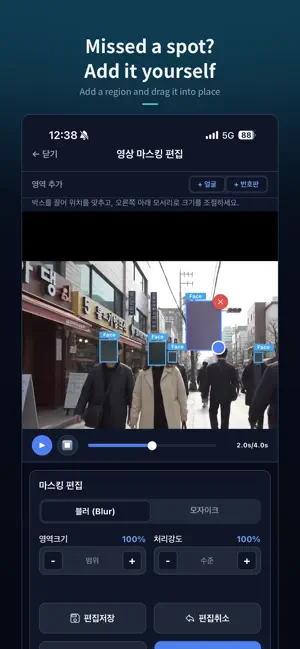
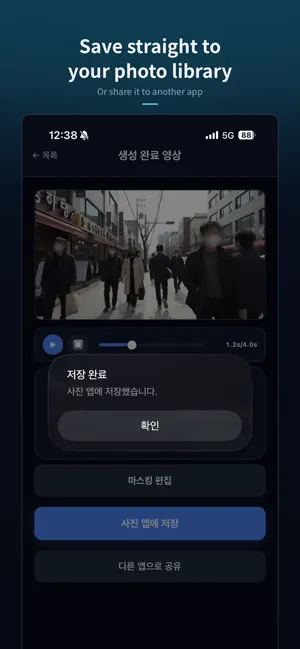
Other people's faces and license plates end up in almost every video you record — a vlog, a walk through a city, dashcam footage, a shot of the worksite. Removing them by hand, frame by frame, is slow and easy to get wrong. AutoMask does it for you. Pick a video from your library, and the AI finds every face and vehicle license plate and covers them with a mosaic or a blur. Detected regions are tracked across frames, so people and cars stay covered as they move. WHAT YOU CAN DO - Automatic detection of faces and license plates - Mosaic or blur, with adjustable strength and area - Tracking that follows each subject through the video - Add a region the detector missed, or remove one you don't need covered - Save to your device or share straight from the app - Try it immediately with the built-in sample video IT DOES NOT IDENTIFY ANYONE AutoMask detects where a face is — not who it belongs to. No face embeddings are computed, nothing is matched against a database, and no identity is ever looked up. The model runs detection only. It also never generates or alters footage of a person. WHO IT IS FOR - Creators publishing vlogs and location footage - Anyone who has to hand over dashcam or CCTV video - Teams sharing recordings from worksites, events or training - People submitting video for an insurance or accident claim PLANS Free — 3 videos and 300 MB per month, up to 100 MB and 3 minutes per video, results kept 10 days, watermark on output. Plus (monthly) — 20 videos and 10 GB per month, up to 2 GB and 15 minutes per video, results kept 30 days, no watermark. Pro (monthly) — 200 videos and 100 GB per month, up to 5 GB and 60 minutes per video, results kept 90 days, no watermark. Plus and Pro are auto-renewing monthly subscriptions. They renew unless you cancel at least 24 hours before the period ends, and you cancel in your store account settings rather than in the app. Payment is charged to the store account you purchased with. Terms of Use: https://automask.org/terms Privacy Policy: https://automask.org/privacy Support: [email protected]
What’s new
Version 1.4.1 · Updated October 22, 2026
Fixed an issue where paid plans could not upload videos larger than 100 MB. Improved reliability of large uploads.
App privacy
The developer, 주식회사 엔오원 N.O.ONE, reported these privacy practices to Apple.
Data Linked to You
The following data, which may be collected and linked to your identity, may be used for the following purposes:
- Purchases: Purchase History
- Contact Info: Email Address, Name
- User Content: Photos or Videos
- Identifiers: User ID
- Other Data: Other Data Types
Used for: App Functionality
Alternatives to AutoMask - Dashcam Face Blur
Looking for apps like AutoMask - Dashcam Face Blur? Here are 6 similar apps on the App Store. The highest rated is Garim: Blur Faces Photo Video (5.0/5), and all 6 are free to download.
-
 Plate Blur AI: Cars & Homes
-
 MoviNota
-
 PlateBlur: Plate Privacy
-
 Blur Faces in Video: Redactly
-
 Poof Auto Blur Faces in Video
-
 Garim: Blur Faces Photo Video
5.0
Garim: Blur Faces Photo Video
5.0
| App | Rating | Price | Last updated | Compare |
|---|---|---|---|---|
| AutoMask - Dashcam Face Blur | – | Free | October 22, 2026 | |
| Plate Blur AI: Cars & Homes | – | Free | Oct 20, 2026 | Compare |
| MoviNota | – | Free | Oct 21, 2026 | Compare |
| PlateBlur: Plate Privacy | – | Free | Apr 17, 2026 | Compare |
| Blur Faces in Video: Redactly | – | Free | Oct 20, 2026 | Compare |
| Poof Auto Blur Faces in Video | – | Free | Jun 16, 2026 | Compare |
| Garim: Blur Faces Photo Video | 5.0 / 5 (1) | Free | Oct 21, 2026 | Compare |