

MoviNota
AZ Software Photo & Video iPhoneiPadiPod touchMac
MoviNota is a free Photo & Video app for iPhone and iPad by AZ Software. Requires iOS 18.0. Updated October 21, 2026.
- Price
- Free
- on the App Store
- Size
- 13 MB
- Age 4+
- Updated
- Oct 21
- 2026 · v1.0.2
Screenshots

About MoviNota
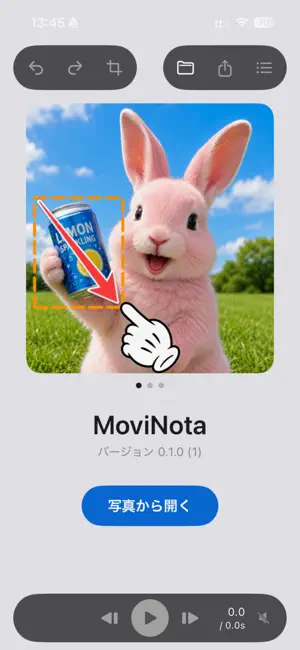
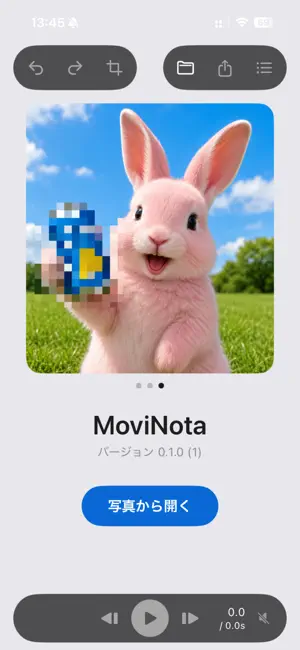
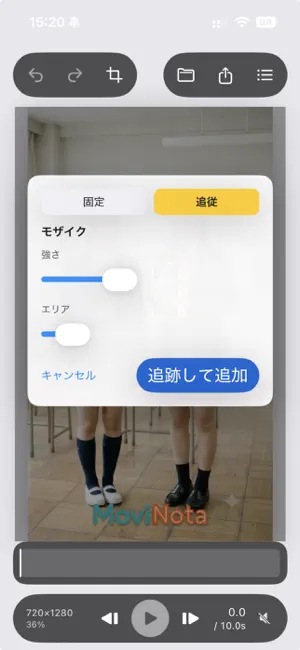
MoviNota is a video annotation app that makes it easy to add mosaic, blur, stickers, shapes, text, and more to short videos. Its standout feature is the ability to automatically track moving objects and keep annotations attached to them throughout the video. Simply drag to select a face, license plate, or anything else you want to hide, then choose mosaic or blur. MoviNota tracks the object automatically, keeping the effect in place as it moves. You can also attach arrows and stickers to moving objects, making it easy to highlight exactly what you want viewers to notice. ■ AUTOMATICALLY TRACK MOVING OBJECTS Select an object in your video and choose tracking. MoviNota automatically follows its movement. Mosaic, blur, rectangles, circles, stickers, and text can all follow moving objects. You can also place annotations at a fixed position when tracking isn't needed. ■ 6 TYPES OF ANNOTATIONS • Rectangle • Circle • Sticker • Mosaic • Gaussian Blur • Text Built-in stickers include an arrow, exclamation mark, OK, and heart. You can also import up to 12 of your own PNG images as custom stickers. ■ TRACKING MOSAIC & BLUR Need to obscure a moving face, license plate, or other object? There's no need to adjust the effect frame by frame. Just select the object and let MoviNota track it automatically. You can also adjust the mosaic intensity and blur strength. ■ EDIT UP TO 30 SECONDS AT A TIME MoviNota is designed for quickly annotating short videos. If you open a video longer than 30 seconds, simply select the 30-second section you want to edit. You can also readjust the trim range while editing. ■ HDR VIDEO SUPPORT MoviNota supports HLG and HDR video as well as SDR. You can export HDR video in HEVC while preserving HDR, or convert it to SDR and export it as H.264/MP4. The original resolution and frame rate are preserved. ■ CHANGE VOICES FOR ADDED PRIVACY When exporting, you can keep the original audio, shift voices higher or lower, or export the video without an audio track. This helps protect privacy when a person's voice could reveal their identity. ■ SAVE PROJECTS AND CONTINUE EDITING LATER Export your finished video as an MP4, or save your work as a MoviNota project (.movinota). Your source video and annotations are saved together, so you can reopen the project and continue editing later. ■ YOUR VIDEOS STAY ON YOUR DEVICE Video analysis, object tracking, annotation compositing, and exporting are all processed on your device. MoviNota does not upload your videos to an external server. Edit privacy-sensitive videos without sending them to the cloud. ■ ABOUT MOVINOTA PRO All core editing features are available for free. Videos exported with the free version include the MoviNota logo. Subscribe to MoviNota Pro to export videos without the logo. — Hide what moves. Highlight what moves. With MoviNota, just select an object and choose your annotation. A simpler way to annotate short videos. MoviNota is the video version of PictNota. Terms of Use (EULA): https://www.apple.com/legal/internet-services/itunes/dev/stdeula/
What’s new
Version 1.0.2 · Updated October 21, 2026
Optimized the layout for iPhone Duo.
App privacy
The developer, AZ Software, reported these privacy practices to Apple.
Data Not Collected
The developer does not collect any data from this app.
Alternatives to MoviNota
Looking for apps like MoviNota? Here are 6 similar apps on the App Store.
-
 MosaicMachine – Video Blur
-
 VRoom Studio
-
 AutoMask - Dashcam Face Blur
-
 Bystander Video Blur
-
 VisionCut: Pro Video Editor
-
 ぴったりトリミング
| App | Rating | Price | Last updated | Compare |
|---|---|---|---|---|
| MoviNota | – | Free | October 21, 2026 | |
| MosaicMachine – Video Blur | – | Free | Sep 26, 2026 | Compare |
| VRoom Studio | – | Free | Jul 13, 2026 | Compare |
| AutoMask - Dashcam Face Blur | – | Free | Oct 22, 2026 | Compare |
| Bystander Video Blur | – | Free | Sep 30, 2026 | Compare |
| VisionCut: Pro Video Editor | – | Free | Oct 21, 2026 | Compare |
| ぴったりトリミング | – | Free | Apr 21, 2026 | Compare |
Compare MoviNota with the top alternatives: ratings, updates, ASO score and keyword gaps →