

Bystander Video Blur
AmberMastiff Photo & Video iPhoneiPadiPod touch
Bystander Video Blur is a free Photo & Video app for iPhone and iPad by AmberMastiff. Requires iOS 26.0. Updated September 30, 2026.
- Price
- Free
- on the App Store
- Size
- 15 MB
- Age 4+
- Updated
- Sep 30
- 2026 · v1.4.5
Screenshots


About Bystander Video Blur
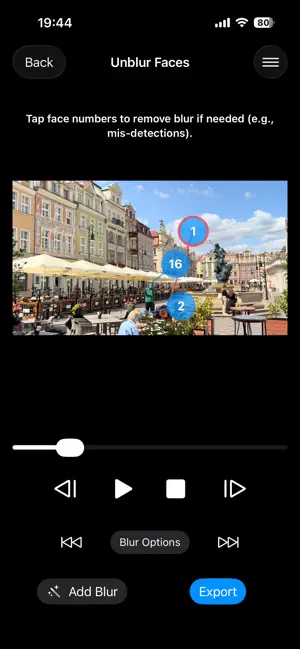
Safeguard your privacy and the privacy of others with Bystander Video Blur. Our app uses AI to automatically detect and blur faces in your videos, helping you share your moments while reducing the risk of exposing strangers or violating social media policies. Whether you are a vlogger filming in a crowd, a journalist protecting a source, or just sharing a family memory, Bystander Video Blur simplifies the process of anonymization. **Key Features:** * **Automatic Face Detection:** Instantly identifies faces in your video and applies a mask. * **Privacy First:** All video processing is performed locally on your device. Your videos are never uploaded to a server, ensuring complete privacy. * **Selective Unblur:** Detected a face you want to show? Simply tap on the face to remove the blur. Ideal for keeping the main subject visible while hiding the background crowd. * **Object Tracking:** Need to hide a license plate, a credit card, or a specific logo? Long-press and drag to select any object, and the app will automatically track and blur it across frames. * **Customizable Styles:** Choose your preferred look. Options include Pixelate (Mosaic) or Blur, in both Square and Circle shapes. You can even use a custom image to cover faces. **Why use Bystander Video Blur?** * **Avoid Liability:** Reduce the risk of legal issues by masking strangers' faces. * **Social Media Safe:** Helps comply with privacy policies of major platforms to prevent reports. * **Crowd Friendly:** Film more confidently in public spaces knowing you can easily anonymize the people around you. Protect your footage. Protect your privacy. Download Bystander Video Blur today.
What’s new
Version 1.4.5 · Updated September 30, 2026
* Fixed an issue with saving videos and images.
App privacy
The developer, AmberMastiff, reported these privacy practices to Apple.
Data Used to Track You
The following data may be used to track you across apps and websites owned by other companies:
- Location: Coarse Location
- Identifiers: Device ID
- Usage Data: Product Interaction, Advertising Data
Data Linked to You
The following data, which may be collected and linked to your identity, may be used for the following purposes:
- Identifiers: Device ID
- Usage Data: Product Interaction, Advertising Data
Used for: Third-Party Advertising
Data Not Linked to You
The following data, which may be collected but is not linked to your identity, may be used for the following purposes:
- Location: Coarse Location
- Diagnostics: Crash Data, Performance Data
Used for: Third-Party Advertising
Alternatives to Bystander Video Blur
Looking for apps like Bystander Video Blur? Here are 6 similar apps on the App Store. The highest rated is Hide Video Faces – MovieMask (5.0/5), and 5 of the 6 are free to download.
-
 MosaicMachine – Video Blur
-
 Hide Video Faces – MovieMask
5.0
-
 BlurOne: Blur Video, Face Blur
5.0
-
 Face Blur & Mosaic - Mosamosa
5.0
-
 Mozapi
-
 MoviNota
| App | Rating | Price | Last updated | Compare |
|---|---|---|---|---|
| Bystander Video Blur | – | Free | September 30, 2026 | |
| MosaicMachine – Video Blur | – | Free | Sep 26, 2026 | Compare |
| Hide Video Faces – MovieMask | 5.0 / 5 (1) | Free | Oct 1, 2026 | Compare |
| BlurOne: Blur Video, Face Blur | 5.0 / 5 (4) | Free | Oct 23, 2026 | Compare |
| Face Blur & Mosaic - Mosamosa | 5.0 / 5 (1) | Free | Oct 21, 2026 | Compare |
| Mozapi | – | 1.99 USD | Oct 11, 2026 | Compare |
| MoviNota | – | Free | Oct 21, 2026 | Compare |