

Blur Faces in Video: Redactly
PIYUSH SHIYANI Photo & Video iPhoneiPadiPod touch
Blur Faces in Video: Redactly is a free Photo & Video app for iPhone and iPad by PIYUSH SHIYANI. Requires iOS 18.0. Updated October 20, 2026.
- Price
- Free
- on the App Store
- Size
- 13 MB
- Age 4+
- Updated
- Oct 20
- 2026 · v1.5
Screenshots

About Blur Faces in Video: Redactly
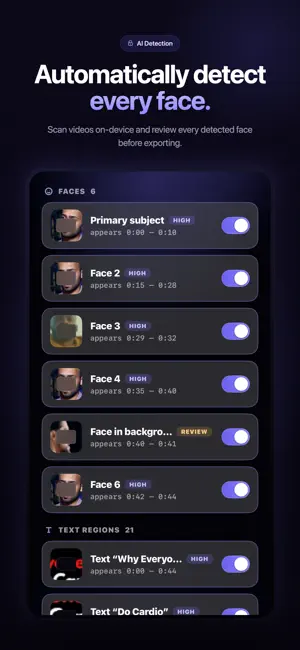
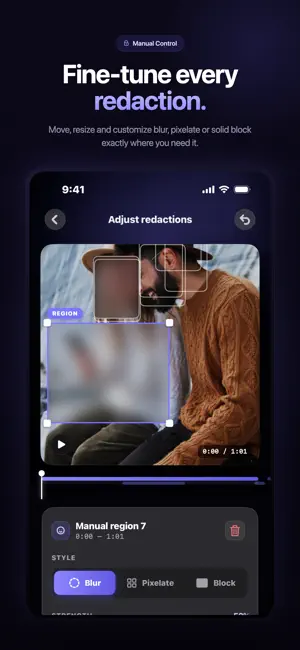
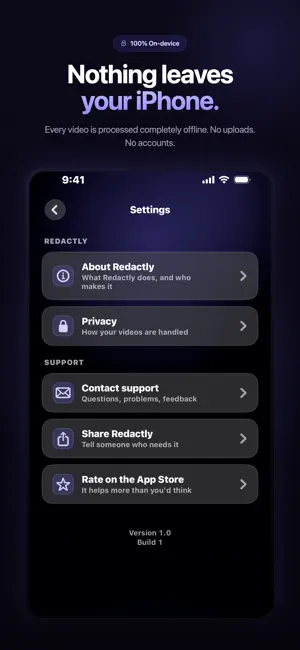
Some videos can't be shared as they are. A face in the background. A name on a badge. An address on a package. A license plate in the driveway. Redactly helps you protect privacy by automatically finding and hiding sensitive information in videos — entirely on your iPhone. Nothing is uploaded. No account is required. No cloud processing. No watermark. Your original video always stays untouched. Redactly creates a separate redacted copy, so you never lose the original. HOW IT WORKS 1. Choose a video from Photos or Files, or record a new one. 2. Redactly scans the video on-device for faces, on-screen text and license plates. 3. Review everything it finds before making changes. 4. Drag the before/after comparison to verify every redaction. 5. Save or share your redacted video. FEATURES - Automatic Face Detection - Text Detection - License Plate Detection - Manual Redaction Regions - Motion Tracking - Before & After Preview - Blur redaction style — Pixelate and Block with Pro - High quality export — full resolution up to 4K with Pro - Original Video Always Preserved - 100% On-Device Processing WHY REDACTLY Unlike cloud-based tools, Redactly processes your videos directly on your iPhone. No uploads. No sign-up. No watermark. No time limits. Everything stays private. WHO IS IT FOR? - Journalists - Parents - Content Creators - Dashcam Drivers - Real Estate Agents - Businesses - Researchers - Investigators - Anyone who wants to protect privacy before sharing videos. FREE AND PRO Redactly is free to use, with no watermark and no limit on how long your videos can be. Face, text and license plate detection, the editor, manual regions, motion tracking and the before/after preview are all included at no cost. Redactly Pro adds: - Export at full source resolution, up to 4K - Pixelate and Block redaction styles SUBSCRIPTION Redactly Pro is available as: - Weekly — $2.99 - Yearly — $14.99, with a 3-day free trial - Lifetime — $24.99, a one-time purchase Payment is charged to your Apple Account at confirmation of purchase. Subscriptions renew automatically unless auto-renew is turned off at least 24 hours before the end of the current period. Your account is charged for renewal within 24 hours prior to the end of the current period. You can manage or cancel your subscription in your Apple Account settings after purchase. Any unused portion of a free trial is forfeited when a subscription is purchased. Prices are in USD and may vary by region. Terms of Use: https://redactly-84913.web.app/terms Privacy Policy: https://redactly-84913.web.app/privacy Download Redactly today and redact faces, text and license plates in seconds — completely offline.
What’s new
Version 1.5 · Updated October 20, 2026
- Face detection is now much more reliable — it detects side profiles and faces that are farther away as well. - Blur/block now fully covers the entire clip from start to finish. - Pro: PDF redaction report — includes details about which region was redacted, when, and how. - Pro: Smart text rules — automatically selects patterns such as emails, phone numbers, and IDs. - Fix: After changing a selection and re-exporting, a new file is now created correctly.
App privacy
The developer, PIYUSH SHIYANI, reported these privacy practices to Apple.
Data Not Linked to You
The following data, which may be collected but is not linked to your identity, may be used for the following purposes:
- User Content: Photos or Videos
Used for: App Functionality
Alternatives to Blur Faces in Video: Redactly
Looking for apps like Blur Faces in Video: Redactly? Here are 6 similar apps on the App Store. The highest rated is PrivyMark (5.0/5), and all 6 are free to download.
-
 One Video Player
-
 LumiRoll – Film Cam & Editor
-
 Resize Image - Batch Resizer
-
 WirelessMic - Video & Audio
-
 PrivyMark
5.0
PrivyMark
5.0
-
 Video Editor: Trim, Cut & Crop
4.9
Video Editor: Trim, Cut & Crop
4.9
| App | Rating | Price | Last updated | Compare |
|---|---|---|---|---|
| Blur Faces in Video: Redactly | – | Free | October 20, 2026 | |
| One Video Player | – | Free | Oct 6, 2026 | Compare |
| LumiRoll – Film Cam & Editor | – | Free | Sep 12, 2026 | Compare |
| Resize Image - Batch Resizer | – | Free | Aug 10, 2026 | Compare |
| WirelessMic - Video & Audio | – | Free | Jun 16, 2026 | Compare |
| PrivyMark | 5.0 / 5 (1) | Free | Sep 17, 2026 | Compare |
| Video Editor: Trim, Cut & Crop | 4.9 / 5 (19) | Free | Oct 2, 2026 | Compare |