

Garim: Blur Faces Photo Video
HAEDUN KIM Photo & Video iPhoneiPadiPod touchMac
Garim: Blur Faces Photo Video is a free Photo & Video app for iPhone and iPad by HAEDUN KIM. Rated 5.0/5 from 1 ratings. Requires iOS 17.0.
- Rating
- 5.0
- 1 ratings
- Price
- Free
- on the App Store
- Size
- 12 MB
- Age 4+
- Updated
- Oct 21
- 2026 · v1.5.3
Screenshots

About Garim: Blur Faces Photo Video
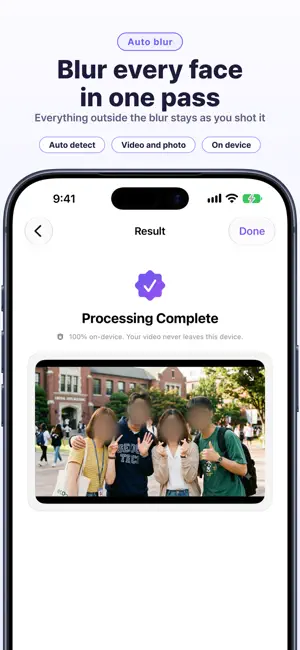
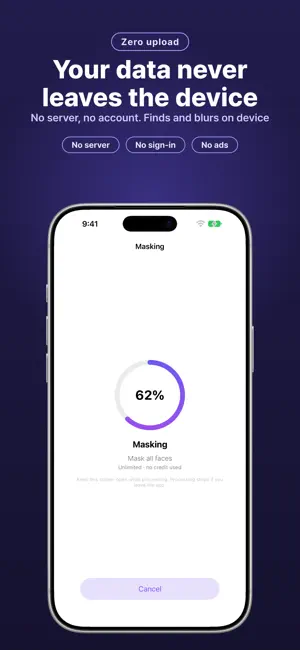
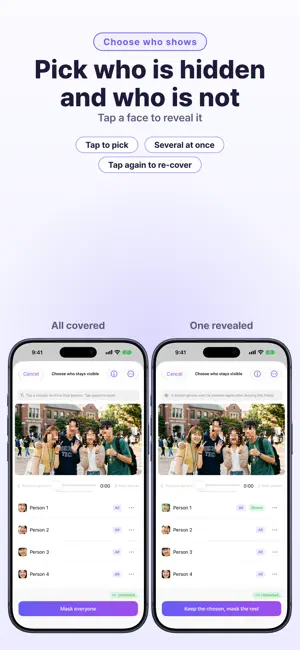
Hide faces in photos and videos — automatically, right on your device. Photos are free — save as many as you like with just a small watermark, and Pro removes even that. Garim looks through your photos and footage, finds the faces, and covers them with a clean mosaic or a soft blur. Load a clip and it spots everyone on screen in one pass, so you're not stuck scrubbing through it frame by frame. Nothing leaves your device This is the part that matters most: your photos and video are processed entirely on your iPhone, iPad, or Mac. Nothing is uploaded, nothing is sent to a server, nothing is touched by the cloud. No sign-in needed — even sensitive footage stays yours and only yours. Cover faces the way that fits · Hide everyone automatically in a single tap · Or hide everyone first, then tap just the people you want to reveal · Prefer to do it by hand? Scrub the timeline and mark exactly what to cover · Drop manual mosaic spots anywhere, with no detection at all · Choose mosaic, blur, sticker, or solid color, adjust the strength, and pick a rectangle, oval, or circle · Hide on-screen text too — license plates, name tags, signs · In photos, tap a person or object to cover just that part, precisely More ways to work · Batch mode: process a whole set of photos and videos at once · Add your own text watermark, baked across the entire video · Keep a PDF record of what you blurred and when, as proof of de-identification Made for real footage Your audio stays intact and the export keeps the original resolution and full length. HDR photos and videos shot on iPhone keep their original brightness and color, too. Check the result before you save, and turn detection sensitivity up for crowded streets or faraway faces. Who uses Garim Creators and YouTubers protecting passersby, security and field teams sharing CCTV or dashcam clips, reporters, teachers — anyone who needs to post a photo or video without giving away someone's identity. Works the same on iPhone, iPad, and Mac, in 12 languages. — Previewing is free, and saving photos is free too (with a small watermark). To save a full-length video without a watermark you spend one credit, or go unlimited with Garim Pro. New here? You start with 3 welcome credits. Garim Pro is an auto-renewing subscription, monthly or yearly, that unlocks unlimited saving. Your Apple ID is charged when you confirm the purchase. It renews automatically unless you turn it off at least 24 hours before the period ends, and you can manage or cancel it anytime in your Apple ID settings. Credits are a one-time, consumable purchase and are not refundable once used. Terms of Use (EULA): https://www.apple.com/legal/internet-services/itunes/dev/stdeula/ Privacy Policy: https://honeybeemobility.com/garim/privacy/
What’s new
Version 1.5.3 · Updated October 21, 2026
1.5.3 Update - I improved the app's stability. I look forward to your support and feedback.
App privacy
The developer, HAEDUN KIM, reported these privacy practices to Apple.
Data Not Collected
The developer does not collect any data from this app.
Alternatives to Garim: Blur Faces Photo Video
Looking for apps like Garim: Blur Faces Photo Video? Here are 6 similar apps on the App Store. The highest rated is Face Blur for Video: Anonimo (5.0/5), and all 6 are free to download.
-
 Face Blur for Video: Anonimo
5.0
Face Blur for Video: Anonimo
5.0
-
 AutoBlur - Local Video Blur
-
 Photo & Video Blur - Garim
5.0
Photo & Video Blur - Garim
5.0
-
 Blur Faces: Censor · Blurshot
-
 Blur Faces in Video & Photo
-
 Mosaic Blur: Video Editor
4.7
Mosaic Blur: Video Editor
4.7
| App | Rating | Price | Last updated | Compare |
|---|---|---|---|---|
| Garim: Blur Faces Photo Video | 5.0 / 5 (1 rating) | Free | October 21, 2026 | |
| Face Blur for Video: Anonimo | 5.0 / 5 (1) | Free | Oct 6, 2026 | Compare |
| AutoBlur - Local Video Blur | – | Free | Jul 7, 2026 | Compare |
| Photo & Video Blur - Garim | 5.0 / 5 (1) | Free | Sep 15, 2026 | Compare |
| Blur Faces: Censor · Blurshot | – | Free | Aug 30, 2026 | Compare |
| Blur Faces in Video & Photo | – | Free | Oct 12, 2026 | Compare |
| Mosaic Blur: Video Editor | 4.7 / 5 (3) | Free | Aug 19, 2026 | Compare |