

Face Blur for Video: Anonimo
Vitalii Kikot Photo & Video iPhoneiPadiPod touch
Face Blur for Video: Anonimo is a free Photo & Video app for iPhone and iPad by Vitalii Kikot. Rated 5.0/5 from 1 ratings. Requires iOS 17.0.
- Rating
- 5.0
- 1 ratings
- Price
- Free
- on the App Store
- Size
- 85 MB
- Age 4+
- Updated
- Oct 6
- 2026 · v1.9
Screenshots


About Face Blur for Video: Anonimo
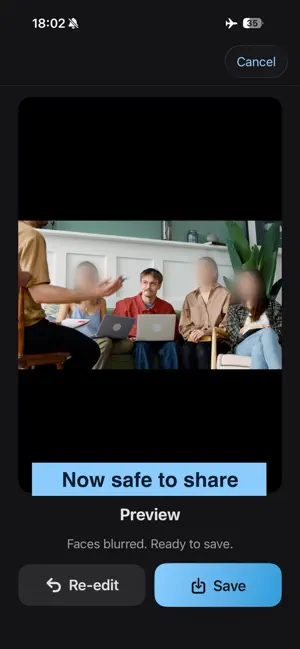
Blur everyone in your video except the people you pick. Anonimo finds every face on-device, groups them by person, and hides the rest with blur, pixelation or emoji — fully offline, nothing ever leaves your iPhone. HOW IT WORKS 1. Pick a video or photo from your library 2. Anonimo detects every face and groups them by person 3. Tap the people who stay visible — everyone else is hidden in every frame 4. Export to Photos at source resolution FEATURES • Blur everyone except the people you choose — one tap per person, across the whole video • Three ways to hide faces: pixelation, soft Gaussian blur, or emoji covers that follow each face • Works offline, even in Airplane Mode — no upload, no waiting • HEVC encoding preserves your original 4K quality • Works on photos too: JPEG, PNG, HEIC • Localized in 10 languages: English, French, German, Spanish, Portuguese, Italian, Polish, Ukrainian, Japanese, Korean PERFECT FOR • YouTube, TikTok, and Instagram creators protecting bystanders • Vloggers shooting in public — cafes, streets, events • Parents sharing kids' moments without sharing their faces • Journalists keeping sources anonymous • HR and legal professionals redacting interview recordings FREE VS PRO Free: • Unlimited face detection and grouping • Video exports up to 30 seconds at 720p • Pixelation and a smiley emoji cover • Small Anonimo watermark in the corner Pro: • Unlimited video length • Full source resolution (up to 4K) • Gaussian blur with feathered, natural edges • The full emoji set • No watermark • One-time Lifetime purchase or Yearly subscription with 7-day free trial PRIVACY BY DESIGN Anonimo was built around one rule: your content never leaves your device. • Face detection runs on-device via Apple Vision and ArcFace • No servers, no cloud storage, no uploads • No analytics or tracking SDKs — App Store label: Data Not Collected • No account required • No internet access needed SUPPORT Questions, feedback, bug reports: [email protected] Privacy policy: https://nakolini.github.io/anonimo/privacy-policy.html Terms of Use (EULA): https://www.apple.com/legal/internet-services/itunes/dev/stdeula/ SUBSCRIPTION TERMS The yearly plan bills your Apple ID after the 7-day free trial and renews automatically unless auto-renew is turned off at least 24 hours before the period ends. Manage and cancel in your Apple ID account settings.
What’s new
Version 1.9 · Updated October 6, 2026
- On photos, blur and mosaic are now a face-shaped oval with a finer mosaic, and you can shrink them to cover just the face. - On videos, mosaic is oval too, and blur and mosaic follow faces smoothly, without jumpy resizing.
App privacy
The developer, Vitalii Kikot, reported these privacy practices to Apple.
Data Not Collected
The developer does not collect any data from this app.
Alternatives to Face Blur for Video: Anonimo
Looking for apps like Face Blur for Video: Anonimo? Here are 6 similar apps on the App Store. The highest rated is Garim: Blur Faces Photo Video (5.0/5), and all 6 are free to download.
-
 Poof Auto Blur Faces in Video
-
 Garim: Blur Faces Photo Video
5.0
Garim: Blur Faces Photo Video
5.0
-
 Face Blur Video: Auto Tracking
5.0
Face Blur Video: Auto Tracking
5.0
-
 Blur Video: Face Art & Mosaic
-
 Kumo - Blur Faces
5.0
Kumo - Blur Faces
5.0
-
 Auto Blur Face in Video
5.0
Auto Blur Face in Video
5.0
| App | Rating | Price | Last updated | Compare |
|---|---|---|---|---|
| Face Blur for Video: Anonimo | 5.0 / 5 (1 rating) | Free | October 6, 2026 | |
| Poof Auto Blur Faces in Video | – | Free | Jun 16, 2026 | Compare |
| Garim: Blur Faces Photo Video | 5.0 / 5 (1) | Free | Oct 21, 2026 | Compare |
| Face Blur Video: Auto Tracking | 5.0 / 5 (2) | Free | Oct 7, 2026 | Compare |
| Blur Video: Face Art & Mosaic | – | Free | Oct 19, 2026 | Compare |
| Kumo - Blur Faces | 5.0 / 5 (1) | Free | Oct 16, 2026 | Compare |
| Auto Blur Face in Video | 5.0 / 5 (1) | Free | Oct 20, 2026 | Compare |