

Device Info: System Monitor
文武 马 Developer Tools iPhoneiPadiPod touch
Device Info: System Monitor is a free Developer Tools app for iPhone and iPad by 文武 马. Requires iOS 17. Updated September 11, 2026.
- Price
- Free
- on the App Store
- Size
- 15 MB
- Age 4+
- Updated
- Sep 11
- 2026 · v1.2
Screenshots

About Device Info: System Monitor
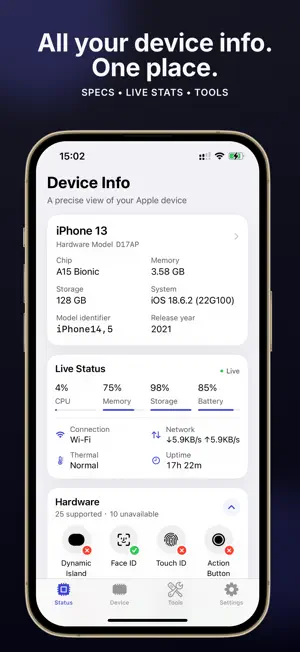
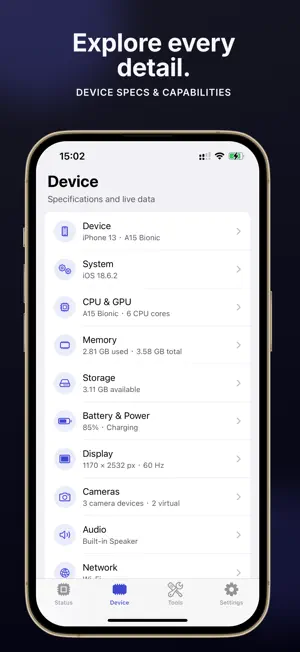
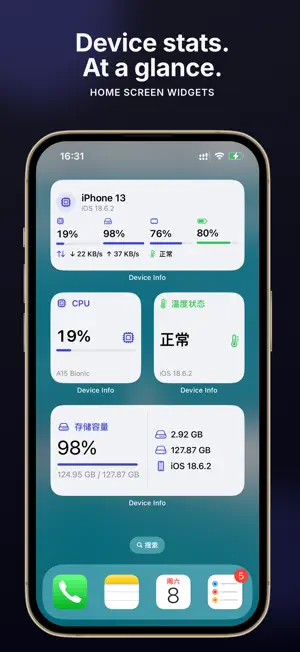
Understand your iPhone or iPad in seconds. Device Info brings live system activity, detailed hardware specifications, sensor readings, and practical diagnostics together in one clean, privacy-focused app. LIVE STATUS AT A GLANCE • CPU activity and memory usage • Storage capacity and available space • Battery level and power state • Current connection and network activity • Thermal state and device uptime DETAILED DEVICE INFORMATION Explore the details that matter, including: • Device model, model identifier, hardware model, and release year • Chip, CPU, GPU, physical memory, and operating system build • Display resolution, scale, refresh rate, brightness, and color support • Storage, battery, cameras, audio, network, location, and sensors • Hardware and feature availability for the current device PRACTICAL TOOLS Device Info includes a focused collection of tools for everyday checks and deeper troubleshooting: • Location status and GPS speedometer • Compass, two-axis level, altitude, steps, and motion data • Accelerometer, gyroscope, and magnetometer readings • Sound level, display brightness, color checks, and refresh-rate measurement • Flashlight, haptics, volume, tone generator, and audio-route checks • Storage analyzer and connection details • DNS and HTTP inspection, domain and registry lookup • LAN service discovery and Bluetooth scanning • Thermal status and related system conditions HOME SCREEN WIDGETS Keep useful information visible without opening the app. Choose from device overview, CPU, memory, storage, battery, and thermal widgets in supported sizes. PRIVATE BY DESIGN Device readings are processed on your device, and no account is required. Permissions such as Location, Microphone, Bluetooth, or Camera are requested only when a tool needs them. Whether you are troubleshooting a device, checking hardware support, comparing specifications, or simply curious about what is inside your iPhone or iPad, Device Info gives you a clear answer without unnecessary complexity. Feature and sensor availability may vary by device model, hardware, operating system version, and permission settings. Subscription automatically renews unless auto-renew is turned off at least 24 hours before the end of the current period. Terms of Use (EULA): https://www.apple.com/legal/internet-services/itunes/dev/stdeula/ Privacy Policy: https://softfinch.com/device-info/privacy
What’s new
Version 1.2 · Updated September 11, 2026
Improved the experience and stability of some detail pages.
App privacy
The developer, 文武 马, reported these privacy practices to Apple.
Data Not Collected
The developer does not collect any data from this app.
Alternatives to Device Info: System Monitor
Looking for apps like Device Info: System Monitor? Here are 6 similar apps on the App Store. The highest rated is System Info & Device Monitor (5.0/5), and all 6 are free to download.
-
 System Info & Device Monitor
5.0
System Info & Device Monitor
5.0
-
 Phone Tester: Dead Pixel Test
-
 Device Monitor & Device Tester
4.5
Device Monitor & Device Tester
4.5
-
 Remote Terminal: SSH & Tmux
-
 ReviewPilot: AI App Reply
-
 DataMint HAT
| App | Rating | Price | Last updated | Compare |
|---|---|---|---|---|
| Device Info: System Monitor | – | Free | September 11, 2026 | |
| System Info & Device Monitor | 5.0 / 5 (1) | Free | Oct 4, 2026 | Compare |
| Phone Tester: Dead Pixel Test | – | Free | Oct 26, 2026 | Compare |
| Device Monitor & Device Tester | 4.5 / 5 (26) | Free | Jul 15, 2026 | Compare |
| Remote Terminal: SSH & Tmux | – | Free | Oct 16, 2026 | Compare |
| ReviewPilot: AI App Reply | – | Free | Oct 6, 2026 | Compare |
| DataMint HAT | – | Free | Oct 29, 2026 | Compare |