

Remote Terminal: SSH & Tmux
Danjel Durmo Developer Tools iPhoneiPadiPod touch
Remote Terminal: SSH & Tmux is a free Developer Tools app for iPhone and iPad by Danjel Durmo. Requires iOS 18.0. Updated October 16, 2026.
- Price
- Free
- on the App Store
- Size
- 11 MB
- Age 4+
- Updated
- Oct 16
- 2026 · v1.1
Screenshots
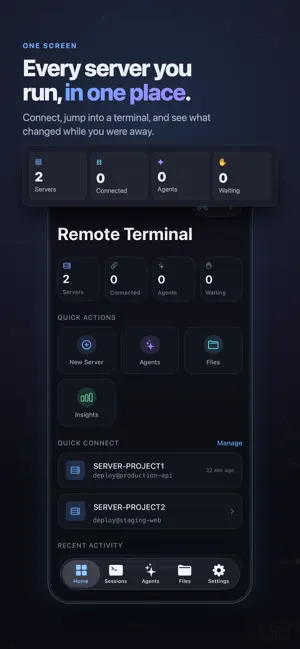


About Remote Terminal: SSH & Tmux
Your servers, and the AI agents working on them, in your pocket. Remote Terminal is a full SSH client for iPhone and iPad: a real terminal emulator, deep tmux integration, a remote file browser, and a dashboard that shows what every terminal-based AI coding agent is doing — including which one is waiting for your approval. Start Claude Code, Codex or another terminal agent inside tmux on your server, lock your phone, switch from Wi-Fi to cellular, and come back later. The agent keeps working on the server, and Remote Terminal reconnects and reattaches so you can see exactly what it did while you were away. AN AGENT COMMAND CENTRE • Every agent, on every server, on one screen • At a glance: which one is thinking, editing files, running a command — or waiting for you • Tap an agent to drop straight into its terminal • A per-agent timeline, with tools used, commands run and files touched A REAL TERMINAL • Complete emulation: 256 and true colour, alternate screen, full-screen TUIs, mouse reporting, hyperlinks • A keyboard built for a terminal: Esc, Tab, Ctrl, Alt, arrows, Home, End, Page Up/Down, function keys — hardware keyboards too • Search your scrollback, copy any region, paste with bracketed paste • Text reflows when you rotate the device instead of scrambling DEEP TMUX INTEGRATION • Create, attach, rename and kill sessions; add windows, split and close panes • Preview any pane without attaching to it • Attach automatically on connect, and reattach after a dropped connection MANY SERVERS AT ONCE • Production, staging and your GPU box connected simultaneously • Switch instantly, with favourites, search and colour tags • Per-server themes, font sizes, startup commands and tmux behaviour RESILIENT BY DESIGN • Automatic reconnection with backoff, so a flaky network does not hammer your server • Instant reconnection when the network comes back, rather than waiting out a timer • A connection state you can read, with errors that say what to do next REMOTE FILES • Browse, read and edit files on your server, with syntax highlighting for 19 language families • Upload and download over the SSH connection you already have • Confirmation before anything destructive VOICE AND IMAGES • Dictate a command or a message for an agent, review the text, then send it • Anything that looks destructive has to be confirmed, because dictation mishears • Photograph an error on another screen and hand the image to an agent BUILT ON KEYCHAIN SECURITY • Passwords, private keys and passphrases live in the iOS Keychain, on this device only, excluded from backups • Optional Face ID or Touch ID for saved credentials, and an App Lock for the app itself • Proper SSH host key verification: a changed key is never accepted silently • Ed25519 and ECDSA keys, including passphrase-protected OpenSSH keys PRIVATE BY CONSTRUCTION No account, no Remote Terminal server, no analytics SDK. Your connections go from your device straight to your machines, and your credentials, commands, output and files never go anywhere except the server you connected to. REMOTE TERMINAL PRO Connecting to your own servers is part of Remote Terminal Pro, with the agent dashboard, file transfer, voice and image input, notifications and insights. It starts with a 3-day free trial; the price and renewal terms are shown before you subscribe, and you can cancel any time in your Apple Account settings. Want to look around first? Turn on Demo Mode in Settings: sample servers that cannot be reached, every screen unlocked, and no connection ever opened. TERMS AND PRIVACY Terms of Use (EULA): https://www.apple.com/legal/internet-services/itunes/dev/stdeula/ Full terms: https://edgemarket.app/remote_terminal#terms Privacy Policy: https://edgemarket.app/remote_terminal#privacy Contacts: [email protected]
What’s new
Version 1.1 · Updated October 16, 2026
Your sessions now survive a quick trip to another app. Connections stay warm in the background and are checked the instant you return; if the link dropped, Remote Terminal reconnects and reattaches to tmux within seconds. Also new: typing `exit` now really ends the session, a faster reconnect after switching between Wi-Fi and cellular, smoother resizing, and a layout that adapts when you fold, unfold or resize your device without losing your terminal.
App privacy
The developer, Danjel Durmo, reported these privacy practices to Apple.
Data Not Collected
The developer does not collect any data from this app.
Alternatives to Remote Terminal: SSH & Tmux
Looking for apps like Remote Terminal: SSH & Tmux? Here are 6 similar apps on the App Store. The highest rated is JTerm (5.0/5), and all 6 are free to download.
-
 JTerm
5.0
JTerm
5.0
-
 Multiplex: Terminal Remote
-
 Shellme
5.0
Shellme
5.0
-
 SuperDuper Terminal
-
 NeoShell
-
 QuickTerminal - Multi-Shell
| App | Rating | Price | Last updated | Compare |
|---|---|---|---|---|
| Remote Terminal: SSH & Tmux | – | Free | October 16, 2026 | |
| JTerm | 5.0 / 5 (1) | Free | Oct 26, 2026 | Compare |
| Multiplex: Terminal Remote | – | Free | Sep 16, 2026 | Compare |
| Shellme | 5.0 / 5 (1) | Free | May 30, 2026 | Compare |
| SuperDuper Terminal | – | Free | Aug 14, 2026 | Compare |
| NeoShell | – | Free | Apr 29, 2026 | Compare |
| QuickTerminal - Multi-Shell | – | Free | Aug 25, 2026 | Compare |