

QuickTerminal - Multi-Shell
KAZUHIRO KAKIMOTO Developer Tools iPhoneiPadiPod touchMac
QuickTerminal - Multi-Shell is a free Developer Tools app for iPhone and iPad by KAZUHIRO KAKIMOTO. Requires iOS 13.0. Updated August 25, 2026.
- Price
- Free
- on the App Store
- Size
- 57 MB
- Age 4+
- Updated
- Aug 25
- 2026 · v5.1.31
Screenshots

About QuickTerminal - Multi-Shell
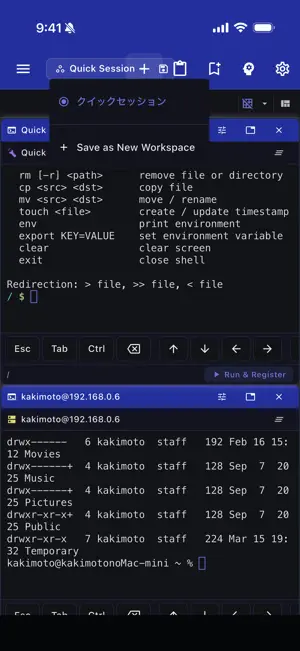
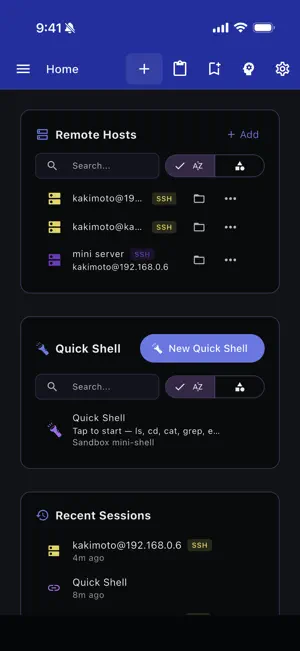
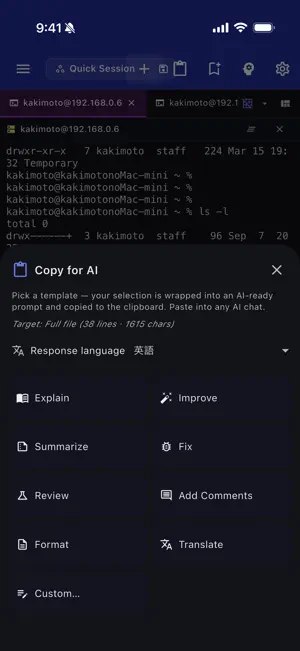
QuickTerminal is a professional terminal emulator and SSH client designed for iOS and macOS. It combines local shell access, remote SSH sessions, SFTP file browsing, and AI-powered command assistance in one workspace. TERMINAL: - Full xterm-256color terminal emulation - Local shell support (bash, zsh, fish, sh, ksh) - Multiple concurrent sessions with tabs - Horizontal and vertical terminal splitting - Customizable fonts: Fira Code, JetBrains Mono, Source Code Pro, Cascadia Code - Adjustable font size (8–32px) and cursor styles (block, underline, bar) - Scrollback buffer up to 50,000 lines SSH & SFTP: - SSH remote sessions with saved host profiles - Key-based and password authentication - SSH jump host / bastion support - SFTP file browser for remote directories - Connection pooling and session reuse - Secure credential storage AI ASSISTANT (Pro): - Claude and Gemini AI integration - Natural language command suggestions and explanations - Command safety analysis before execution - Context-aware help with working directory and git status COMMAND TOOLS: - Command snippets: save, categorize, search, and import/export as JSON - Command history with search, favorites, and directory tracking (500 entries) - Command palette for unified search across actions and snippets SECURITY POLICIES: - Command approval modes: None, Risky Only, Always - Risky command detection (rm -rf, mkfs, dd, shutdown, etc.) - Directory-based sandboxing with allowed paths - Configurable safety levels WORKSPACE: - Dockable floating panels - Integrated file browser - Resizable sidebar with icon-only mode - Grid and tabbed layout modes CUSTOMIZATION: - 20+ theme colors with dark/light mode - Customizable keyboard shortcuts - Responsive layout for mobile, tablet, and desktop ADVANCED CONNECTIVITY: - Mosh (Mobile Shell) for resilient connections over flaky networks - Port forwarding with local and remote SSH tunnels - GCP IAP tunneling for Google Cloud SSH access QuickTerminal Pro unlocks: - Unlimited AI agent execution - Ad-free experience - Advanced security policies - Priority support Terms of Use: https://kakitiro.com/quickapps/quickterminal/terms/
What’s new
Version 5.1.31 · Updated August 25, 2026
• Bug fixes and performance improvements. • UI and design improvements.
App privacy
The developer, KAZUHIRO KAKIMOTO, reported these privacy practices to Apple.
Data Linked to You
The following data, which may be collected and linked to your identity, may be used for the following purposes:
- Location: Coarse Location
- Identifiers: Device ID
- Usage Data: Product Interaction, Advertising Data
Used for: Third-Party Advertising, Developer’s Advertising or Marketing, Analytics, App Functionality
Data Not Linked to You
The following data, which may be collected but is not linked to your identity, may be used for the following purposes:
- Diagnostics: Performance Data, Other Diagnostic Data, Crash Data
Used for: Third-Party Advertising, Developer’s Advertising or Marketing, Analytics, App Functionality
Alternatives to QuickTerminal - Multi-Shell
Looking for apps like QuickTerminal - Multi-Shell? Here are 6 similar apps on the App Store.
-
 Remote Terminal: SSH & Tmux
-
 Voide: AI Code Editor
-
 ServerGuard AI
-
 HtpSniffer
-
 Agentlock: AI Agent Security
-
 OrbitSSH - Mobile Terminal
| App | Rating | Price | Last updated | Compare |
|---|---|---|---|---|
| QuickTerminal - Multi-Shell | – | Free | August 25, 2026 | |
| Remote Terminal: SSH & Tmux | – | Free | Oct 16, 2026 | Compare |
| Voide: AI Code Editor | – | Free | Oct 11, 2026 | Compare |
| ServerGuard AI | – | Free | Oct 24, 2026 | Compare |
| HtpSniffer | – | Free | Sep 11, 2026 | Compare |
| Agentlock: AI Agent Security | – | Free | Sep 5, 2026 | Compare |
| OrbitSSH - Mobile Terminal | – | Free | Sep 30, 2026 | Compare |