

ServerGuard AI
SBM Development SRL Developer Tools iPhoneiPadiPod touchMac
ServerGuard AI is a free Developer Tools app for iPhone and iPad by SBM Development SRL. Requires iOS 26.0. Updated October 24, 2026.
- Price
- Free
- on the App Store
- Size
- 14 MB
- Age 4+
- Updated
- Oct 24
- 2026 · v1.5.0
Screenshots



About ServerGuard AI
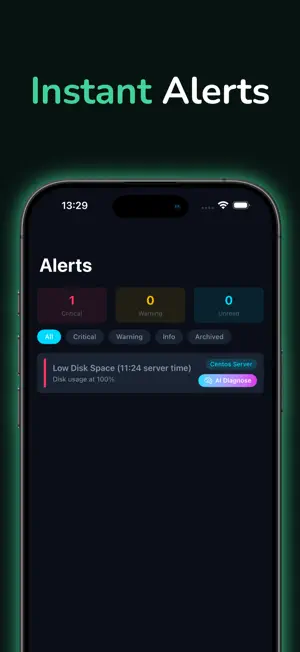
ServerGuard AI - Server Monitoring Monitor your Linux servers in real time from your iPhone, iPad, or Mac. ServerGuard AI installs a lightweight agent on your servers and delivers instant push notifications when something goes wrong — high CPU, low disk space, service crashes, or suspicious activity. Key Features Real-time dashboard with CPU, memory, disk, and load metrics Instant push notifications for critical alerts AI-powered analysis and recommendations One-tap actions: restart services, block IPs, kill processes Firewall-aware commands (ufw, firewalld, nftables, iptables) SSH-free remote management — no ports to open Supports Ubuntu, Debian, CentOS, RHEL, and Fedora How It Works Add your server and it will auto install the agent that grabs the metrics and sends them to our API Metrics start flowing in seconds Get notified the moment something needs attention Take action on services or blocking IP's directly from your device — or let AI guide you Built for sysadmins, DevOps engineers, and anyone who runs Linux servers. Terms of Use (EULA): https://www.apple.com/legal/internet-services/itunes/dev/stdeula/
What’s new
Version 1.5.0 · Updated October 24, 2026
The AI now looks at your server before it answers, and many more problems come with a fix you can run in one tap. A deeper diagnosis: on a device that has the server's SSH login, the AI can run read-only checks on your server, in a few short rounds you can watch, before it answers. It never runs anything that could change the server. New one-tap fixes, each checked on the server before it runs: clear old session files and caches, empty an oversized site log, remove old MySQL binary logs, free disk space held by deleted logs, renew a certificate, stop a runaway process, restart queue workers, and block an IP address or an aggressive crawler. Settings fixes you can undo: add swap, size PHP and web server workers to your memory, raise PHP's memory limit or MySQL's connection limit, block a file that can be downloaded from your site, block xmlrpc.php, stop a heavy cron job from taking the whole CPU, and protect the database from being killed when memory runs out. Alerts that come back at the same time every day are recognised as the usual peak, and you can quiet them. Save for later: keep an AI recommendation on a list you can open on any of your devices. Past checks show what the AI looked at. With the new agent (1.8.0), disk alerts say what is taking the space: session files, database logs or app logs. An info button in AI Insights explains what the AI sees and where it is sent.
App privacy
The developer, SBM Development SRL, reported these privacy practices to Apple.
Data Not Collected
The developer does not collect any data from this app.
Alternatives to ServerGuard AI
Looking for apps like ServerGuard AI? Here are 6 similar apps on the App Store. The highest rated is ShellRelay (5.0/5), and all 6 are free to download.


| App | Rating | Price | Last updated | Compare |
|---|---|---|---|---|
| ServerGuard AI | – | Free | October 24, 2026 | |
| ShellRelay | 5.0 / 5 (1) | Free | May 5, 2026 | Compare |
| Synapse Console Pro | – | Free | Oct 8, 2026 | Compare |
| Test Reflector | – | Free | Oct 5, 2026 | Compare |
| DashVox | 4.0 / 5 (3) | Free | Oct 16, 2026 | Compare |
| CI/CD | – | Free | Oct 10, 2026 | Compare |
| DevForge - Developer Tools | – | Free | Mar 19, 2026 | Compare |
Compare ServerGuard AI with the top alternatives: ratings, updates, ASO score and keyword gaps →