

System Info & Device Monitor
rypox Developer Tools iPhoneiPadiPod touchMac
System Info & Device Monitor is a free Developer Tools app for iPhone and iPad by rypox. Rated 5.0/5 from 1 ratings. Requires iOS 18.0.
- Rating
- 5.0
- 1 ratings
- Price
- Free
- on the App Store
- Size
- 4 MB
- Age 4+
- Updated
- Oct 4
- 2026 · v1.4.0
Screenshots


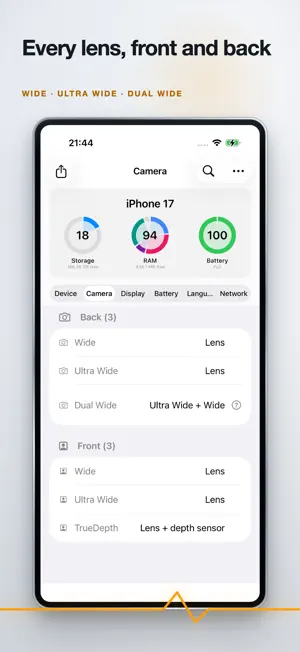
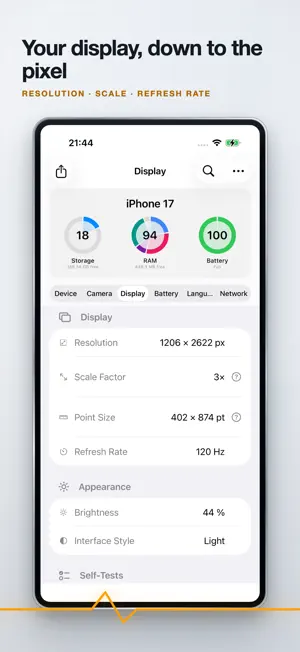
About System Info & Device Monitor
System Info shows you what your iPhone or iPad is made of, in one place, without digging through Settings. On iPhone the categories sit one swipe apart; on iPad they are all on screen at once: • Device & Hardware: model, system version, processor and graphics, memory and storage with usage bars, uptime, and which sensors and features your device actually has • Camera: every built-in lens, grouped by front and back • Display: resolution in pixels and points, scale factor, refresh rate, brightness, appearance • Battery & Power: charge level, charging status, estimated runtime, Low Power Mode, thermal state • Language & Region: language, region, time zone • Network: connection type, local addresses, gateway, DNS, and how much data has moved since the last restart Find any value Search runs across every category at once. Type what you are looking for and go straight to the row. Made to be used, not just looked at Tap any row to copy its value together with its label. Tap a section heading to copy the whole section. Values that are easy to misread carry a short explanation you can open right there. Hardware self-tests Checks for screen, touch, speakers and haptics. None of them asks for a permission. Export Share everything as plain text, as JSON, or as a PDF: compact on a single page or detailed, A4 or US Letter, with network addresses redacted by default. The PDF is drawn on your device. Made for iPad Not a stretched phone app. Every section fits on screen at once, with a sidebar to jump between pages. Works in Split View, Slide Over and with a keyboard, in any orientation. Widgets and Control Center Configurable widgets for the Home Screen and the Lock Screen, plus a Control Center tile for free storage. Shortcuts Actions for the Shortcuts app: open a page, start a self-test, or create a device report. Yours to adjust Values refresh on their own: faster, slower, or not at all. Haptic feedback can be switched off. Your data stays with you System Info reads every value locally through Apple's public APIs. No account, no sign-in, no ads, no analytics, no tracking, no data collection.
What’s new
Version 1.4.0 · Updated October 4, 2026
System Info is now available in French, Spanish and Italian. • The whole app is translated, including the widgets and Shortcuts. Requires iOS 18.
App privacy
The developer, rypox, reported these privacy practices to Apple.
Data Not Collected
The developer does not collect any data from this app.
Alternatives to System Info & Device Monitor
Looking for apps like System Info & Device Monitor? Here are 6 similar apps on the App Store. The highest rated is Usages: AI Usage Tracker (5.0/5), and all 6 are free to download.
-
 Hammer: HTTP Stream Inspector
1.0
Hammer: HTTP Stream Inspector
1.0
-
 SVN Browse
-
 Usages: AI Usage Tracker
5.0
Usages: AI Usage Tracker
5.0
-
 dev1ce
5.0
dev1ce
5.0
-
 SkillPilot: AI Tool Radar
-
 Herdie
| App | Rating | Price | Last updated | Compare |
|---|---|---|---|---|
| System Info & Device Monitor | 5.0 / 5 (1 rating) | Free | October 4, 2026 | |
| Hammer: HTTP Stream Inspector | 1.0 / 5 (1) | Free | Sep 17, 2026 | Compare |
| SVN Browse | – | Free | Sep 8, 2026 | Compare |
| Usages: AI Usage Tracker | 5.0 / 5 (3) | Free | Oct 19, 2026 | Compare |
| dev1ce | 5.0 / 5 (1) | Free | Sep 9, 2026 | Compare |
| SkillPilot: AI Tool Radar | – | Free | Sep 24, 2026 | Compare |
| Herdie | – | Free | Sep 10, 2026 | Compare |