

Calendar Widgets Suite
Joshua & Company Inc. Productivity iPhoneiPadiPod touch
Calendar Widgets Suite is a free Productivity app for iPhone and iPad by Joshua & Company Inc. Rated 3.0/5 from 1 ratings. Requires iOS 18.2.
- Rating
- 3.0
- 1 ratings
- Price
- Free
- on the App Store
- Size
- 17 MB
- Age 4+
- Updated
- Oct 23
- 2026 · v1.0.16
Screenshots



About Calendar Widgets Suite
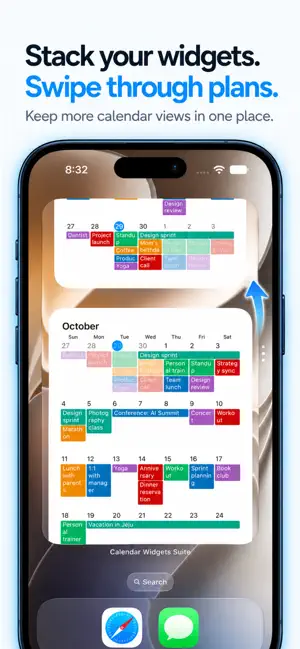
Unlock. Hunt for the app. Wait. Close it. Dozens of times a day, for a five-second glance. Month, weeks, an hour-by-hour timetable, today at a glance, or just what's next — plus your reminders, right on your Home Screen. The Month widget is free; the other eleven are one optional purchase. TWELVE WIDGETS, NINE WAYS TO SEE YOUR SCHEDULE • Month — the full month at a glance, with event titles right in the day cells • Weeks — one, two, three, or four weeks; just the horizon you actually plan against • Week Timeline — an hour-by-hour grid for one to seven days, so the gaps read as clearly as the meetings • List — what's coming up next, in order, with colored chips or simple dots • Today — today's date with the day's events right beside it • Today + Mini Month — a mini month grid with today's events alongside • Week Agenda — a seven-day strip you tap to pick a day, with that day's events below • Week Grid — the whole week at a glance, each day's events stacked in its own cell • Up Next — today and tomorrow side by side, hour by hour, so the rest of today and the start of tomorrow fit in one glance Medium, large, and extra large — wide on iPad, tall on iPhone with iOS 27. Month is free. Every other widget is part of the one-time Premium unlock. REMINDERS, ALONGSIDE YOUR EVENTS Switch Reminders on and anything with a due date joins your events in every widget — marked with a Reminders-style ring, in its list's own color. Choose which lists appear, and whether completed ones do. Reminders without a due date are skipped, and nothing is ever written back: the widgets show your reminders, they don't change them. Part of the Premium unlock. MAKE IT LOOK LIKE IT BELONGS Stock widgets clash with your Home Screen. This one doesn't have to. • Six skins, plus no skin at all • Separate colors for event titles, dates, times, and locations • Date and event font sizes, tuned independently • Word wrap: never, always, auto, or capped at two, three, or four lines • First day of week, including a rolling "Today" • Dim past events so the day ahead stands out • Highlight Saturdays, Sundays, and holidays • Choose exactly which calendars appear • Group events by calendar, or sort them by start time, end time, title, or duration • A 12- or 24-hour clock in the Week Timeline • Separate settings for the month, timeline, and list widgets YOUR CALENDAR AND REMINDERS STAY ON YOUR DEVICE Your events and reminders are read on the device and drawn into the widget. Nothing about your calendar or your reminders ever leaves it. There is no account to create, no server to sync with, and no analytics or tracking of any kind. iOS asks for Reminders access only when you switch reminders on, and the app never writes back to either. Your settings live in a private container shared only between the app and its own widgets. FREE AND PREMIUM The Month widget is free, and so are the styling controls that come with it — weekday, Saturday and Sunday colors, date and event font sizes, word wrap, sorting, calendar selection, and the rest. A single optional one-time purchase unlocks every other widget — Weeks, Week Timeline, List, Today, Today + Mini Month, Week Agenda, Week Grid, and Up Next — plus the six skins, the blurred wallpaper backgrounds, custom event text colors, and Reminders in your widgets. It is a one-off unlock, not a subscription — nothing recurs. AVAILABLE IN 27 LANGUAGES Questions or ideas? Email [email protected] — every message is read.
What’s new
Version 1.0.16 · Updated October 23, 2026
Travel time: when an event has travel time set in Apple Calendar, the Week Timeline and Up Next widgets now show it as a band just above the event. If your device is set to the Japanese or Buddhist calendar, widgets now show dates in that calendar.
App privacy
The developer, Joshua & Company Inc., reported these privacy practices to Apple.
Data Not Collected
The developer does not collect any data from this app.
Alternatives to Calendar Widgets Suite
Looking for apps like Calendar Widgets Suite? Here are 6 similar apps on the App Store. The highest rated is Lilacal: Calendar Widget (5.0/5), and all 6 are free to download.
-
 Lilacal: Calendar Widget
5.0
-
 Calendar Widget: Day & Month
3.7
-
 Month Calendar Widget
-
 minical — Minimal Calendar
5.0
-
 Tempo Calendar: Daily Planner
5.0
-
 Calendar 366 · Events & Tasks
3.5
| App | Rating | Price | Last updated | Compare |
|---|---|---|---|---|
| Calendar Widgets Suite | 3.0 / 5 (1 rating) | Free | October 23, 2026 | |
| Lilacal: Calendar Widget | 5.0 / 5 (2) | Free | Oct 11, 2026 | Compare |
| Calendar Widget: Day & Month | 3.7 / 5 (3) | Free | Oct 21, 2026 | Compare |
| Month Calendar Widget | – | Free | Sep 22, 2026 | Compare |
| minical — Minimal Calendar | 5.0 / 5 (1) | Free | Oct 15, 2026 | Compare |
| Tempo Calendar: Daily Planner | 5.0 / 5 (10) | Free | Oct 20, 2026 | Compare |
| Calendar 366 · Events & Tasks | 3.5 / 5 (48) | Free | Oct 23, 2026 | Compare |