

Lilacal: Calendar Widget
Eva Liu Productivity iPhoneiPadiPod touch
Lilacal: Calendar Widget is a free Productivity app for iPhone and iPad by Eva Liu. Requires iOS 26.5. Updated September 13, 2026.
- Price
- Free
- on the App Store
- Size
- 2 MB
- Age 4+
- Updated
- Sep 13
- 2026 · v1.5.1
Screenshots


About Lilacal: Calendar Widget
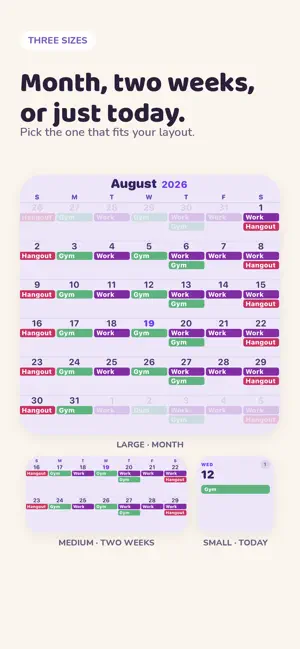
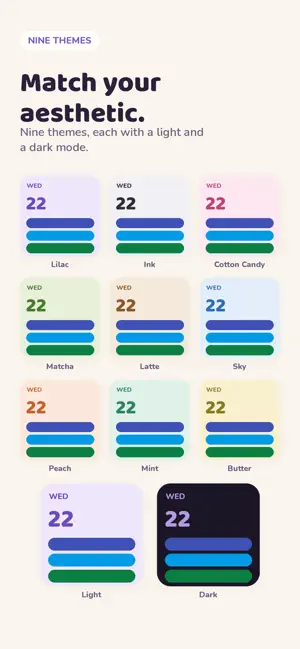
Your Google Calendar, on your Home Screen — in full color. Lilacal puts your real schedule where you look: your Home Screen. Every event keeps the exact color you gave it in Google Calendar, in a widget designed to look like it belongs on a pretty setup. FOUR WIDGETS Month — your whole month at a glance Two weeks — the next fortnight Today — just today's events Month & Agenda — two months beside everything coming up Plus a month widget you can page backward and forward on, without opening the app. 9 THEMES, LIGHT AND DARK Lilac, Ink, Cotton Candy, Matcha, Latte, Sky, Peach, Mint, and Butter. Every theme includes a light and a dark palette, and the widget follows your system appearance automatically — or pin it to light or dark, your choice. FITS YOUR HOME SCREEN Default, dark, tinted, or clear — the widgets adapt to whichever Home Screen style you've chosen. BUILT TO BE READ Full event titles, not truncated fragments. Flat, readable color pills. A clear today marker. No clutter, no chrome, no wasted space. PICK YOUR CALENDARS Choose exactly which of your Google calendars appear in the widget. Work calendar off, personal calendar on — however you like it. TAP IT YOUR WAY Tapping a widget can open Google Calendar, open Lilacal, or ask you each time. PRIVATE BY DESIGN Read-only access — Lilacal can never edit or delete anything in your calendar. There are no servers, no analytics, and no tracking. Your events stay on your device. You can revoke access at any time from your Google account. QUESTIONS OR IDEAS There's a support button in the app, and every message comes straight to me. Google Calendar is a trademark of Google LLC. Lilacal is not affiliated with or endorsed by Google. Lilacal Pro is available as a monthly subscription, a yearly subscription with a 7-day free trial, or a one-time Lifetime purchase. Prices are shown in the app. Subscriptions renew automatically unless cancelled at least 24 hours before the end of the period. Manage or cancel in your Apple Account settings. Terms of Use: https://www.apple.com/legal/internet-services/itunes/dev/stdeula/
What’s new
Version 1.5.1 · Updated September 13, 2026
Bug fixes for widget views.
App privacy
The developer, Eva Liu, reported these privacy practices to Apple.
Data Not Collected
The developer does not collect any data from this app.
Alternatives to Lilacal: Calendar Widget
Looking for apps like Lilacal: Calendar Widget? Here are 6 similar apps on the App Store. The highest rated is Calendar Widget: Day & Month (5.0/5), and all 6 are free to download.
-
 Calendar Widget: Day & Month
5.0
Calendar Widget: Day & Month
5.0
-
 Calendar Widgets Suite
-
 Layered: Calendar on Wallpaper
5.0
Layered: Calendar on Wallpaper
5.0
-
 Caly - Calendar & Widgets
4.6
Caly - Calendar & Widgets
4.6
-
 Calendar Widget - Schedule App
4.5
Calendar Widget - Schedule App
4.5
-
 WidgetCal-Calendar Widget
3.6
WidgetCal-Calendar Widget
3.6
| App | Rating | Price | Last updated | Compare |
|---|---|---|---|---|
| Lilacal: Calendar Widget | – | Free | September 13, 2026 | |
| Calendar Widget: Day & Month | 5.0 / 5 (1) | Free | Sep 18, 2026 | Compare |
| Calendar Widgets Suite | – | Free | Sep 30, 2026 | Compare |
| Layered: Calendar on Wallpaper | 5.0 / 5 (1) | Free | Jul 17, 2026 | Compare |
| Caly - Calendar & Widgets | 4.6 / 5 (82) | Free | Sep 28, 2026 | Compare |
| Calendar Widget - Schedule App | 4.5 / 5 (234) | Free | Nov 2, 2025 | Compare |
| WidgetCal-Calendar Widget | 3.6 / 5 (1,458) | Free | Sep 5, 2026 | Compare |